

_nicdean
Community Expert
Community Expert
September 18, 2024
Open for Voting

Universal Text Engine bug - Hebrew in MOGRTs

  • September 18, 2024
  • 5 replies
  • 877 views

Hebrew containing punctuation characters does not update to RTL in MOGRTs (2024+).


Attached a sample Hebrew SRT.

  • Here is Line 1 of the SRT. It should appear as the image below:
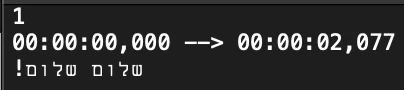
  • Here is the string typed out: שלום שלום!


Please look closely, because it is appearing incorrectly on this forum display. The punctuation glyph "!" is reversed.

It also appears this way (incorrectly) in a MOGRT.


Here is comparing an Essential Graphics Text Layer with RTL enabled to a MOGRT.

White is Text Layer, red is MOGRT text.
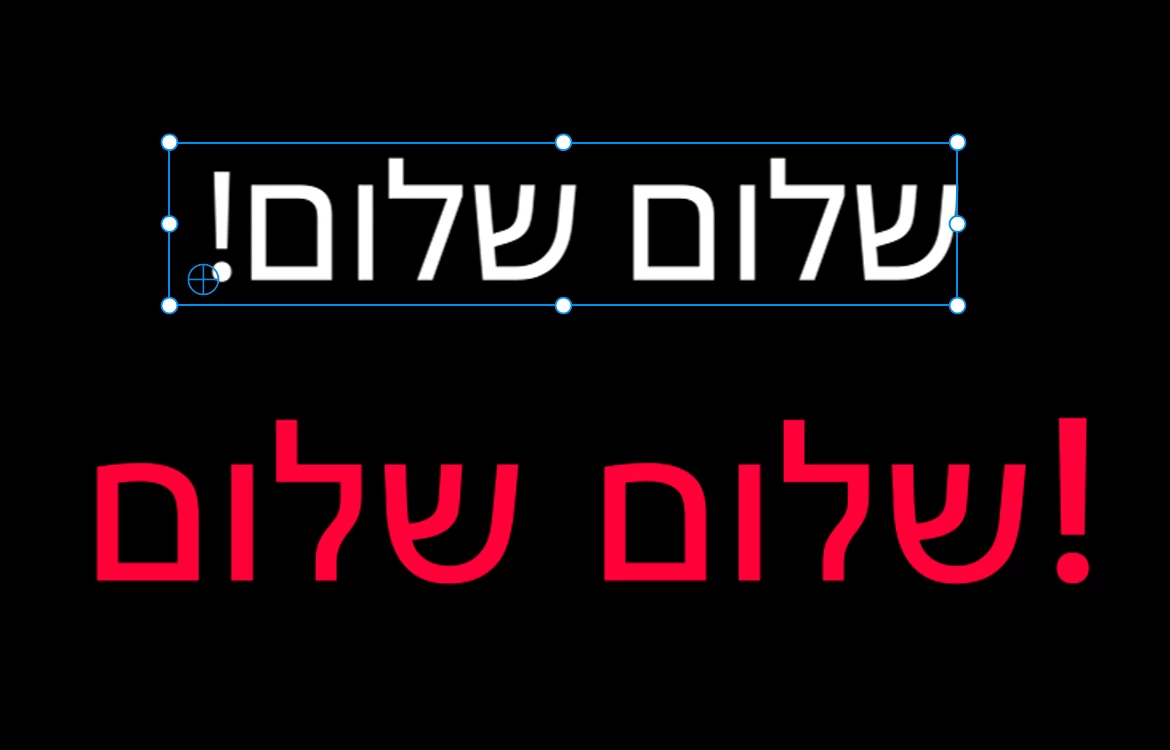


The text layer inside the MOGRT was set to LTR before exporting from AE. Users must pick either LTR or RTL before exporting. But in Premiere Pro, there is no way to change this MOGRT text from LTR to RTL. If a user picks RTL before exporting, they have the reverse problem of flipped punctuation for LTR languages.


Isn't the Universal Text Engine supposed to identify RTL languages and update if-needed?

 

If not, how can 1 template support both LTR and RTL languages?

I attached an AEP (I would attach sample .mogrts, but they are not supported by the file browser on this forum).


Feel free to ask for clarification. Thanks!

5 replies

_nicdean
Community Expert
_nicdeanCommunity ExpertAuthor
Community Expert
September 18, 2024

@Mike-Berry  ok, thanks for the clarification

Adobe Employee
September 18, 2024

The LTR/RTL paragraph settings only control indeterminate glyphs like punctuation. I.e. the text layer automatically recognizes that Hebrew glyphs should be RTL. But periods and exclamation points are not inherently LTR or RTL, which is why we need the user to tell us which to use.


Mike

_nicdean
Community Expert
_nicdeanCommunity ExpertAuthor
Community Expert
September 18, 2024

@Mike-Berry  thanks for the answer, hope you're well.


The confusing thing is standard Hebrew glyphs appear in the correct order in both LTR and RTL settings. Only punctuation is flipped. I am guessing punctuation, numbers, and special characters are defaulting to a Roman setting; even if the glyph is appearing as a valid Hebrew font. Here is an example with Adobe Hebrew via Adobe Fonts.


I would understand an inconsistency if a text layer has mixed fonts/characters of 2+ languages. But it seems like if an entire string is an RTL font, then the punctuation or special character shouldn't override that setting.

--


@Theresa Rostek  thank you for clarifying! Yes, I love the text style expressions. Favorite new feature in AE


In beta AE we could use TextStyle.setDirection() to switch between left-to-right or right-to-left. But that still requires a user to flip between 2 settings depending on their preferred language.


Is that the best solution? Any additional info that you would be able to share, or need from me?


Thanks for tracking and letting me know it is an open FR


Theresa Rostek
Community Manager
Community Manager
September 18, 2024

Hi @_nicdean!


We have support for LTR/RTL mogrts with the new Text Style expressions currently in beta with:


style.setDirection("left-to-right");
style.setDirection("right-to-left");


You can connect these to an expression control to allow the user to change the text direction. You'll also have to compensate where the anchor point is with a sourceRect expression if you want the text to remain in the same place.


The text input remains LTR.


Cheers,

Theresa


Adobe Employee
September 18, 2024

Hi Nic -


You are correct that there is no way to change the paragraph direction of a text field in an AE mogrt from Pr. This is an open feature request.


Mike