


braydon
Inspiring
February 10, 2026
Open for Voting

Virtual knobs turned by mouse control are archaic - let us type the parameter!

  • February 10, 2026
  • 1 reply
  • 23 views

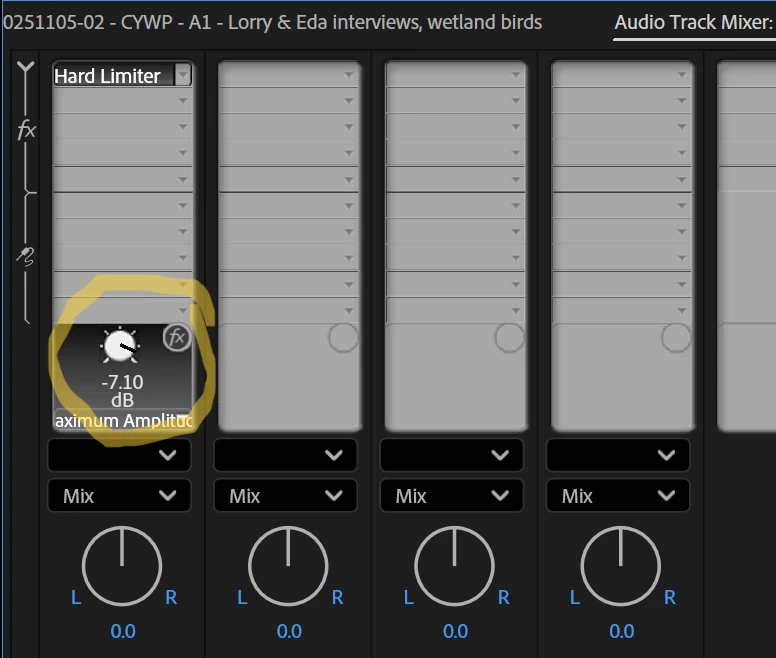
These old-school knobs might be great if you’re using a mixing deck with real knobs to turn, but when you’ve only got a mouse, they’re a bloody nightmare. No matter how you move the mouse, the value goes flying off in any direction, there’s no consistency, there’s absolutely no fine tuning, and there’s NO ABILITY TO ENTER THE NUMBER WITH THE KEYBOARD!!! Please, just let us type the value we want, as is possible with most other effects. These knobs are basically useless without a mixing deck.
 

    1 reply

    Rag and Bone
    Community Expert
    Community Expert
    February 10, 2026

    If you click on the digits the field should become highlighted by a blue rectangle, and then you can type in the desired value. Is this not the case for you?


    I don’t know of a key command to make the field active, I think you have to click on it. I hope to be corrected.

    braydon
    braydonAuthor
    Inspiring
    February 11, 2026

    I wish I didn’t have to correct you. Here’s a screen recording. You can’t see that I am clicking on each of these fields, you’ll just have to believe that I am. But it doesn’t open the text-editable boxes that you get when you click on other effect parameters. It’s not just the knobs in the Audio Track Mixer effects. I find this to be the case with almost all the knobs in Premiere.


    Rag and Bone
    Community Expert
    Community Expert
    February 11, 2026

    Hmm,,,I don’t know what to say. Works for me. I’m using version 26 on Mac OS 15.7.1 and I’m not seeing that behavior. Have you tried resetting your preferences?


    Here’s what I see: