


Ann Bens
Community Expert
Community Expert
November 28, 2024
Open for Voting

Warning Warp Stabilizer on export

  • November 28, 2024
  • 3 replies
  • 1145 views

Please give us a warning on export when New Frames need to be analyzed.
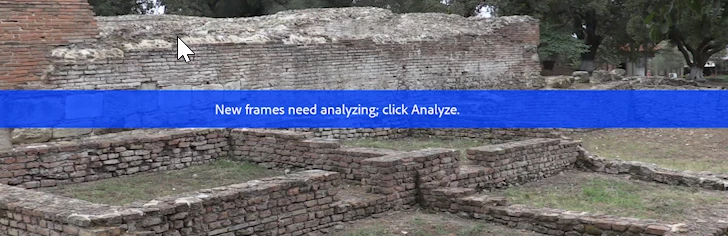
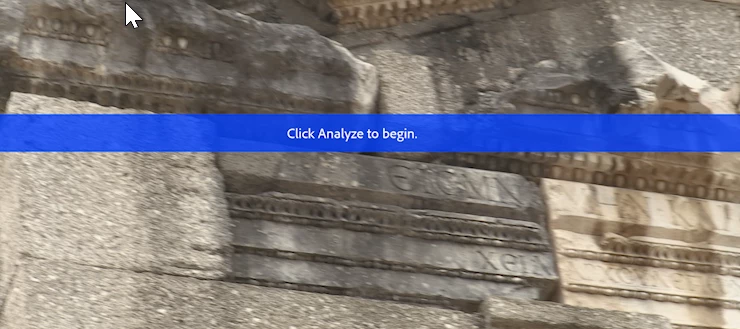
and not just when Click analyze to begin is showing.



3 replies

AndrewTheGreat
Known Participant
April 30, 2025

Just seen this banner on our local FEDERAL television channel... This is Baaaad

I just don't understand the need of this banner at all. There's an option to turn it off in the stabilizer preferences - Adobe, just make it off by default.

hellopaul4
Inspiring
April 15, 2025

Amusing that the Kiss video from 2020 mentioned by ProVideo Coalition still has that "analyze" banner on the YouTubes!

Evangelist ittsui
Community Expert
Community Expert
February 2, 2025
A warning should be issued during export if the Warp Stabilizer analysis is not complete.

The Warp Stabilizer is a great effect for suppressing shaking.

However, even after performing an analysis once, the analysis results can sometimes be wrong.

In that case, you have to perform the analysis again.

However, it is often the case that you do not realize that the analysis has been wrong as you proceed with the editing process.

A warning message should be displayed when exporting a sequence that includes clips that have not been analyzed.

ワープスタビライザーは揺れを抑えるエフェクトとしてとても素晴らしいエフェクトだ。

しかしながら、一度分析を行なったあとでも、たまに分析結果が外れることがある。
その場合、分析をやり直さなければならない。
しかし、編集作業を進める中で「分析が外れたことに気づけないこと」が多い。

分析が完了していないクリップを含むシーケンスを書き出すとき、警告メッセージを出すべきだ。
Community Expert
February 2, 2025

Totally agree, this should be something very specific that an output would render on-screen warnings like this. Been asking for this for years.