





Open for Voting
When editing text, you can adjust the "horizontal scale" and "vertical scale" separately
When editing text, you can adjust the "horizontal scale" and "vertical scale" separately (like in Photoshop).
I'd like to have items for horizontal scale and vertical scale in the properties panel when editing text.
Currently, you can change it by transforming the layer,
but I often find this specification inconvenient.
For example, if you want to make the first line of a two-line caption elongated,
you'll need to separate layers for each line because the aspect ratio will change for each layer if you transform the layer.
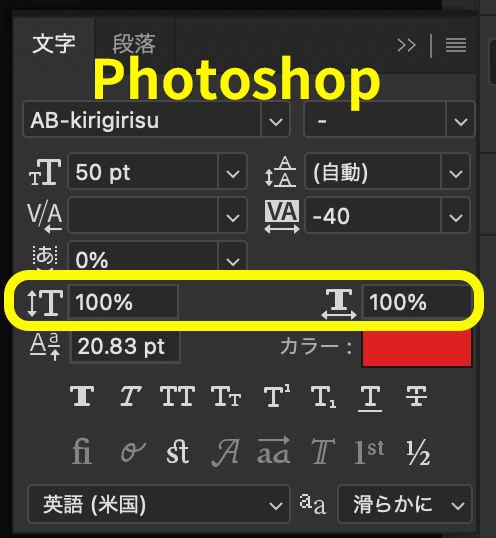
The attached image is the text panel in Photoshop, but I think it would be more convenient if the items in the yellow frame were there.
I'd like to have items for horizontal scale and vertical scale in the properties panel when editing text.
Currently, you can change it by transforming the layer,
but I often find this specification inconvenient.
For example, if you want to make the first line of a two-line caption elongated,
you'll need to separate layers for each line because the aspect ratio will change for each layer if you transform the layer.
The attached image is the text panel in Photoshop, but I think it would be more convenient if the items in the yellow frame were there.
テキストの編集でプロパティパネル内に水平比率・垂直比率の項目が欲しい
現状だとレイヤーのトランスフォームでの変更が可能ですが、この仕様だと不便だなと感じることが多いです。
例えば「2行のテロップで1行目だけ長体をかけたい」
みたいな場合にレイヤーのトランスフォームだと、レイヤーごと縦横比が変わるため、1行ずつレイヤーを分ける必要があります。
添付画像はPhotoshopの文字パネルですが、黄色枠部分の項目があった方が便利だと思います。
現状だとレイヤーのトランスフォームでの変更が可能ですが、この仕様だと不便だなと感じることが多いです。
例えば「2行のテロップで1行目だけ長体をかけたい」
みたいな場合にレイヤーのトランスフォームだと、レイヤーごと縦横比が変わるため、1行ずつレイヤーを分ける必要があります。
添付画像はPhotoshopの文字パネルですが、黄色枠部分の項目があった方が便利だと思います。
 AdChoices