



Open for Voting
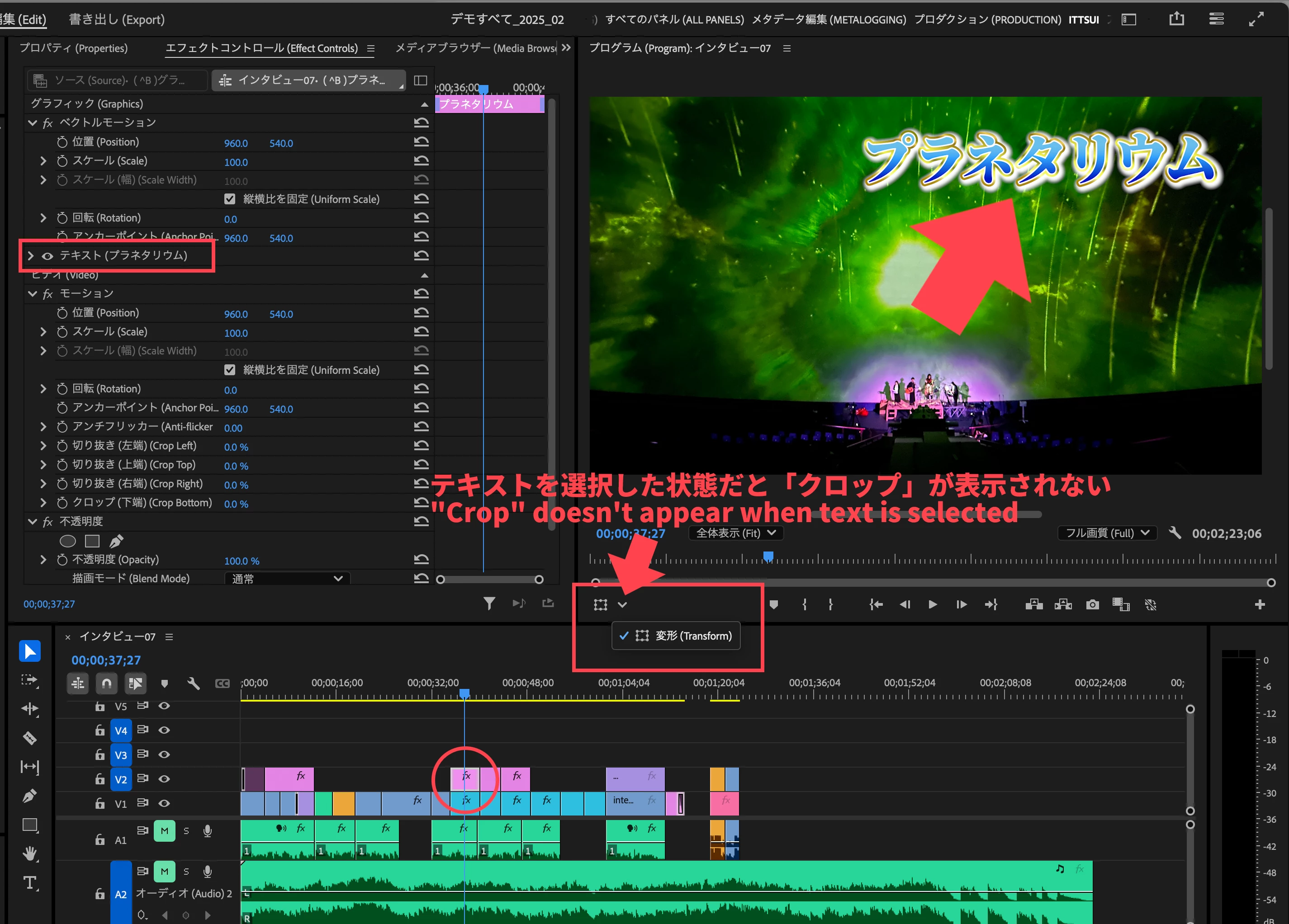
When text is selected, "Crop" does not appear in the "Switches for direct crop control."
When text is selected, "Crop" does not appear in the "Switches for direct crop control."
1. Select the "Text clip" on the timeline.
2. Check the "Switches for direct crop control" in the bottom left of the Program Monitor.
Result
The "Crop" button does not appear, even though it should.
1. Select the "Text clip" on the timeline.
2. Check the "Switches for direct crop control" in the bottom left of the Program Monitor.
Result
The "Crop" button does not appear, even though it should.
Ideal
When a "Text clip" is selected, the "Switches for direct crop control" should appear, just like when a video clip is selected.
テキストを選択した状態だと「クロップを直接操作するための切り替え」に「クロップ」が表示されない。
①タイムライン上で「テキストクリップ」を選択。
②プログラムモニター左下にある「クロップを直接操作するための切り替え」を確認。
結果
本来あるはずべきの「クロップ」が表示されない。
理想
「テキストクリップ」を選択した時も、ビデオクリップを選択した時と同じように「クロップを直接操作するための切り替えボタン」が表示されるべきだ


 AdChoices