





Open for Voting
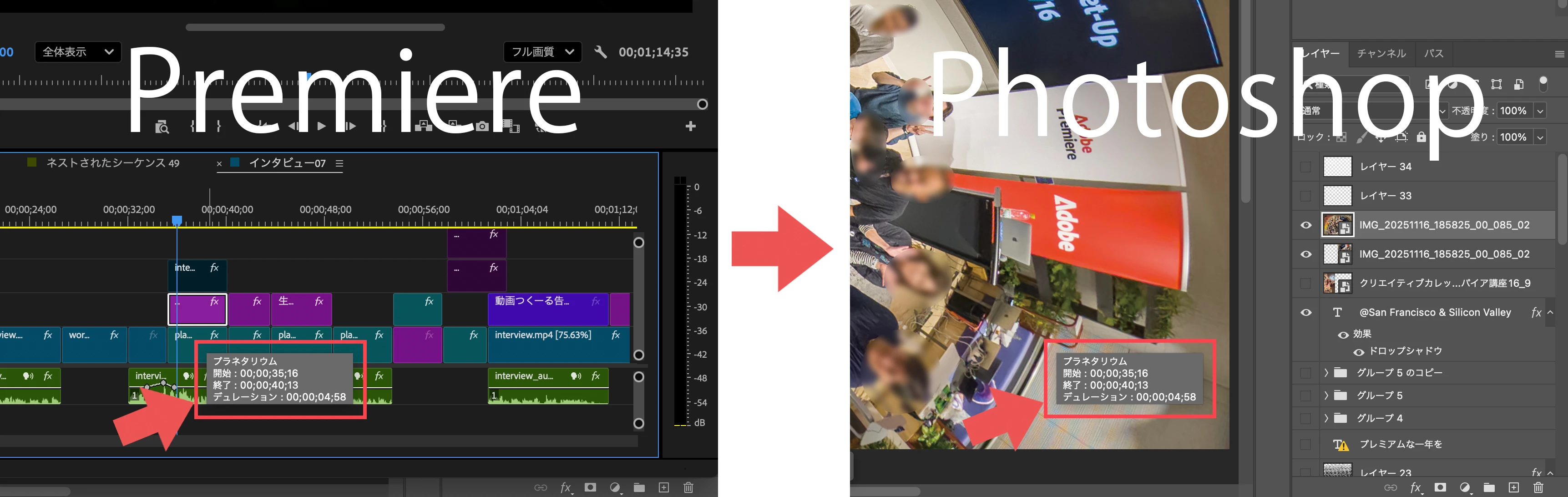
クリップの情報表示が、別のアプリケーションに切り替えた時にも表示されたままになってしまう。
When you hover over a clip in the timeline, that clip's information appears.
However, when you switch from Premiere to another app, such as Photoshop, the information remains on the screen.
→ This seems to have been an issue for some time, but it hasn't been fixed even now in version 26.0.1.
Creative Cloud app integration is a major advantage of Adobe apps. This issue, which significantly undermines this advantage, needs to be resolved.
タイムライン上のクリップにマウスオーバーした時、そのクリップの情報が表示される。
しかし、PremiereからPhotoshopなど別のアプリに切り替えた時、その情報表示が画面上消えないままのこってしまう。
→以前からある症状のようだが、ver26.0.1の今でも改善されていない
Creative Cloudアプリの連携は、Adobeアプリの大きな優位性だ。この優位性を大きく損なうこの問題を解決すべきだ。
 AdChoices