



johnrellis
Genius
August 31, 2022
Open for Voting

Allow HEIC attachments

  • August 31, 2022
  • 6 replies
  • 591 views

[This post contains formatting and embedded images that don't appear in email. View the post in your Web browser.]


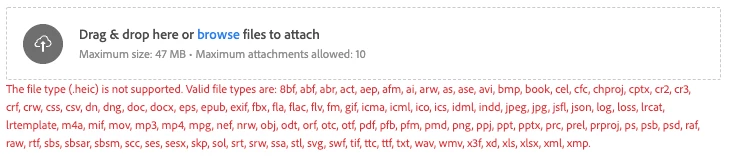
The forums should allow HEIC attachments -- it's the most common file format used with iOS devices.  A gazillion other file types are allowed:


    6 replies

    jane-e
    Community Expert
    Community Expert
    September 1, 2022


    @johnrellis wrote:

    "Hmm, the original post was made in Using The Community, not the Photoshop forum"


    That's interesting, John Rellis. We're supposed to make a note when we move a post, but that appears to have not happened. You were correct to post this to Using the Community.


    Good question @John Waller!


    Jane


    John Waller
    Community Expert
    Community Expert
    September 1, 2022

    @jane-e 

    This was originally posted in Using The Community. That's where I posted my replies to this post.


    Did someone move it to the Photoshop forum in the meantime?

    johnrellis
    Genius
    September 1, 2022

    "Since your question is not about how to use Photoshop,"


    Hmm, the original post was made in Using The Community, not the Photoshop forum:

    From: Adobe Support Community Mailer <noreply@mail.community.adobe.com> 
    Sent: Wednesday, August 31, 2022 11:54 AM
    To: John Ellis <...>
    Subject: [Using the Community] Allow HEIC attachments
    
        Adobe Support Community 
    
     
    Hi johnrellis, 
     
    johnrellis just posted in a community you follow. 
     
    ________________________________________
     
    Aug 31, 2022 11:53 AM in Using the Community Discussions 
    Allow HEIC attachments 
     
    [This post contains formatting and embedded images that don't appear in email. View the post in your Web browser.]
     
    The forums should allow HEIC attachments -- it's the most common file...


    jane-e
    Community Expert
    Community Expert
    September 1, 2022

    @johnrellis 

    Since your question is not about how to use Photoshop, I have moved it to Using the Community > Ideas. This forum is for issues with the forums in general, instead of a specific application.


    Jane


    John Waller
    Community Expert
    Community Expert
    August 31, 2022

    Agreed.


    Since proprietary Raw file formats (CR2, NEF etc) from major camera makers are permitted, seems that Apple HEIC (proprietary although not Raw) should also be permitted.

    Nancy OShea
    Community Expert
    Community Expert
    August 31, 2022

    Perhaps if we understood why you need this support from the community forums?


    Nancy O'Shea— Product User & Community Expert
    John Waller
    Community Expert
    Community Expert
    August 31, 2022

    People shooting in HEIC on iPhones and uploading to the forums from their phones want to upload their HEIC files.

    Nancy OShea
    Community Expert
    Community Expert
    August 31, 2022

    Apple's proprietary HEIC image format is unique to iOS11 or higher devices.  HEIC is not compatible with other apps or devices.  This web forum supports standard web file formats  -- jpg, png or gif. 


    If you're grabbing screenshots with your iPhone camera,

    1. Go to Settings.
    2. Tap Camera > Formats.
    3. Select Most Compatible.


    Hope that helps.


    Nancy O'Shea— Product User & Community Expert
    johnrellis
    Genius
    September 1, 2022

    HEIC is an industry standard supported by Mac OS, iOS, Android, and Windows:

    https://en.wikipedia.org/wiki/High_Efficiency_Image_File_Format 


    (Apple was the first major vendor to support the standard but it's not proprietary.)


    Anyone reading these forums on Mac or Windows would be able to view a .heic attachment (Linux too by downloading a supporting viewer).


    When helping users troubleshoot image- and metadata-compatibility problems in Lightroom Classic, it's extremely important to see the original image unconverted or modified in any way.  For years, we've had to tell users to upload the image to Dropbox, Google Drive, or similar and post the sharing link, but that's a significant impediment to users who are non-technical.   Earlier today, I started helping an iPhone user whose iPhone 8 photos are importing into LR without GPS metadata.  The easiest way to troubleshoot is by examining a sample photo.


    It's ironic that we can attach all these lesser-used truly proprietary raw formats (e.g. ARW, CR2, NEF) but not the most popular industry-standard format for iOS and Android devices.

    John Waller
    Community Expert
    Community Expert
    September 1, 2022
    quote

    It's ironic that we can attach all these lesser-used truly proprietary raw formats (e.g. ARW, CR2, NEF) but not the most popular industry-standard format for iOS and Android devices.


    Agreed.