
Evangelist ittsui
Community Expert
Community Expert
June 18, 2024
Open for Voting

The slider for adjusting the position on the program monitor screen should be brought back

  • June 18, 2024
  • 10 replies
  • 1567 views
The slider for adjusting the position on the program monitor screen should be brought back

As of ver24.4.1, the slider for adjusting the position on the program monitor screen is no longer displayed

You can zoom in and out (adjust the position slightly) by using the mouse wheel, but that alone is difficult to use

The slider for adjusting the position should be usable as before!
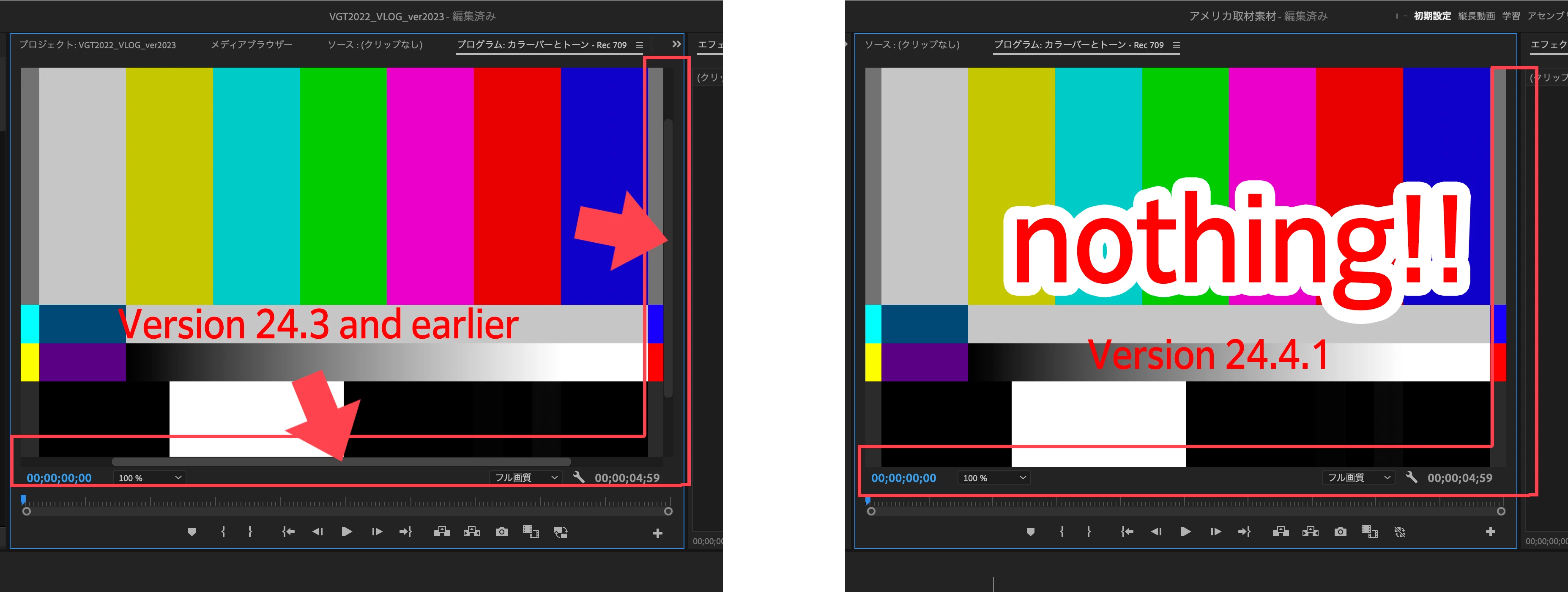
 
 
プログラムモニター画面の位置調整用スライダーを復活させるべきだ
 
ver24.4.1から、プログラムモニター画面の位置調整用スライダーが、表示されなくなった
 
マウスのホイール操作で拡大縮小(多少の位置調整)は可能だが、それだけでは使いにくい

位置調整用のスライダーを、以前と同じように使えるようにすべきだ!

10 replies

Participant
October 11, 2024

ありがとうございます。

あ、私、まちがえて26って書いていますね。

24の間違いです。

手のひらツールは、動作する時と動作しない時があります。

マウスのスクロールができない時は手のひらツールも使えなくて、

一度Premiere Proを閉じなければなりません。

バグなんだろうと思いますが、早く改善されることを願います。

いろいろと教えてくださりありがとうございました!

Kes Akalaonu
Inspiring
October 11, 2024

No problem. Enjoy the scroll bars being back and set a shortcut in keyboard shortcuts editor.

Participant
October 11, 2024

Premiere Pro2025になったら復活する感じですかね?

確認してみたところ私のは今26.6.0というバージョンでした。

私が使っているバージョンにはスクロールバーを表示するオプションはありません。

バージョンアップを待ってみます。

ありがとうございました。

(翻訳機能で読んでいるため理解が違っていたらすみません)

Kes Akalaonu
Inspiring
October 11, 2024

I can see this making it into Premiere 2025 whenever that releases but atm it is in the beta as both an option in both monitors and can be toggled by a keybind as well.

Participant
October 11, 2024

ベータ版ではスクロールバーを表示するオプションがあるということですかね?

そのうち通常盤でも復活しそうですね

早くそうなって欲しいです。

返信を下さった方ありがとうございます。

翻訳機能で読んだので理解が違っていたらすみません!

Kes Akalaonu
Inspiring
October 11, 2024

The Public Beta 25 brought back scroll bars for the Program Monitor and Source Monitor. It also gave us the best of both worlds with keybind zooming in and out and mouse zooming.

Known Participant
October 10, 2024

I thought this was a bug, but It was just explained to me that it relates to now being able to infinitely zoom using your mouse in the program monitor. You then have to use the Hand tool like the video around in the window and then the Arrow to make whatever changes you need. Maybe that's more back and forth with the keypad, but maybe not. I think it's a matter of getting used to it.

Participant
October 7, 2024

スライダーも表示されない上に、マウスのドラッグも反応しない時があり、その場合は一度Premiere Proを閉じてまた開かなくてはなりません(そうするとなぜか使えるようになる)

非常に不便なので、スライダーを戻して欲しいです。

Participant
August 8, 2024

I am constantly selecting "Fit" from the zoom dropdown to fix this issue. Very frustrating.

R Neil Haugen
Legend
June 18, 2024

Oh Heck yes! Bug the daylights outta me every day ...

Everyone's mileage always varies ...