
AlanGilbertson
Community Expert
Community Expert
May 14, 2026

Cross-Product Creative Challenge #13: Beauty Magazine Ad
  • May 14, 2026
  • 23 replies
  • 592 views

Welcome to a new Cross-Product Creative Challenge! Thanks to everyone who participated in the movie poster challenge with such great creations. This time we’re switching from action movies to fashion.

(Note: This is not a prompt challenge. There are other challenges for that.)


The Challenge:


Design a high-fashion magazine ad for wealthy, non-alien animals—any creature will do, so long as it lives on Earth. Start in Firefly, Boards, Express, or Photoshop, but DO NOT stop at a prompt. There are quality details (lighting, contrast, composition) and content details you will have to get right.

Guidelines:


A prompt is not enough. Layer your assets and refine your composition. Treat Firefly and partner models as collaborators. Use prompts to generate assets you can put together in an ad. Think like an art director. What’s the story here? Who is the audience and what is the marketing message?

It’s a Cross-Product Challenge! Use Photoshop, Illustrator, Substance, Adobe Express, Fresco—whatever tools will help you build the scene.

Share your process:


Tell us how you created it. What tools did you use? How did you refine your idea? What choices did you make?

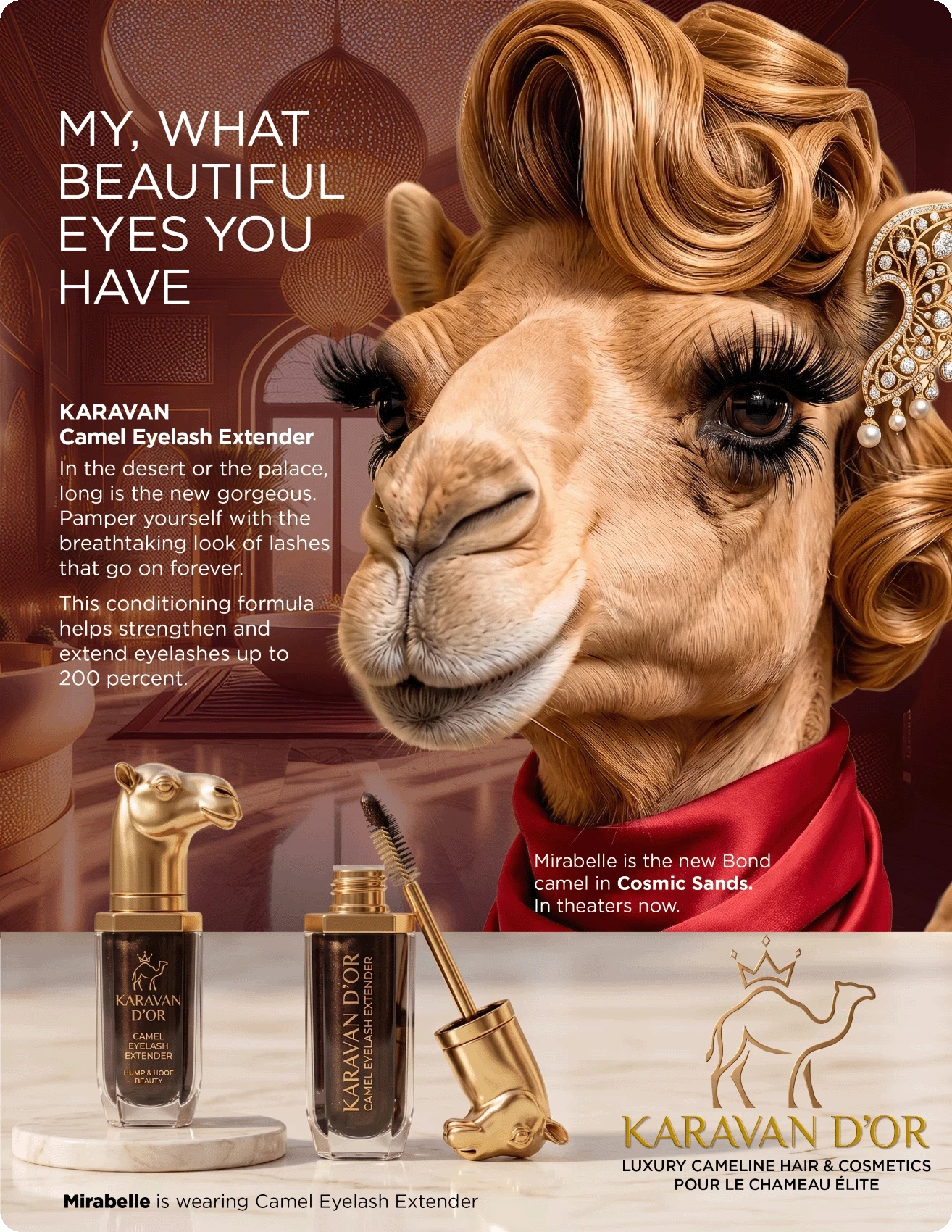
This one started life as an idea: What would it be like if camels had a beauty industry, fashion magazines, cosmetic brands? The starting point was to ask Nano Banana Pro, “Create a name and logo for a luxury hair and cosmetic brand for ultra-rich camels.” It came up with the brand name, a starting point for a logo, and some ideas for specific cosmetics. Mirabelle started as a Firefly 5 prompt: “A high-end magazine glamor photograph of an anthropomorphized young female camel with immaculately groomed hair and cosmetics, long eyelashes, in a luxurious beauty salon for camels.”

The ad copy and overall look are modeled on old cosmetic ads featuring different movie stars, particularly a Revlon mascara ad with Emma Stone. 

Mirabelle went through several iterations to get the look, the hair, and (for this ad) the eyelashes right. The eyelash extender is one of several cosmetic items I made in collaboration with Nano Banana that will get their own ads.

In Photoshop, I made an image large enough for a magazine page at 300 ppi and generated an exotic “Arabian palace” spa for a background. “Select Subject” pulled Mirabelle out of her original image on Firefly Boards. Photoshop is also where the product image and the logo were refined.

Final assembly and layout is in InDesign, where the background image gets a color tint eyedroppered from the silk scarf, and the product is layered by using “Object Layer Options” on two instances of the product Photoshop file.

I’m encouraging everyone to approach this like you would a real client project. Composition, colors, copy, image quality should be appropriate for a high-end publication. Even if you don’t do this kind of work for a living, or very often, it’s great practice in getting the different tools to work together. Above all, have fun with it!


    23 replies

    JR Boulay
    Community Expert
    Community Expert
    June 1, 2026

    J’adore l’or


    Acrobate du PDF, InDesigner et Photoshopographe
    JR Boulay
    Community Expert
    Community Expert
    June 1, 2026

    J'adore l'or = I love gold


    Making off:
    - Find the original "Dior j'adore" posters online.
    - Ask Firefly several times to generate a side view of a giraffe with its head in a three-quarter profile. Assemble the results in Photoshop to keep only the best parts.
    - Ask Gemini 3 and 3.1 several times to place Dior’s famous "femme-girafe" necklace around the giraffe’s neck (the most laborious part). Assemble the results in Photoshop to achieve a coherent result.
    - Copy and paste "J’adore Dior" into Illustrator to modify the word "Dior" and the font.
    - Give up after about fifteen minutes, unable to achieve true colour consistency in gradients.
    - Ask Gemini to replace the word "Dior" with "l'or" (actually, it’s so much simpler that I should have started there).
    - Remove Charlize from the poster using the Remove tool.
    - Assemble everything in Photoshop using "Adjust layer" and a few adjustment layers.


    Acrobate du PDF, InDesigner et Photoshopographe
    AlanGilbertson
    Community Expert
    Community Expert
    June 2, 2026

    Love it, JR. Love them both, actually. I’m not sure which I like better, but the brief was for an animal, not an alien, so… 😁

    didiermazier
    Community Expert
    Community Expert
    June 1, 2026

    Sorry guys… Only Photoshop


    JR Boulay
    Community Expert
    Community Expert
    June 1, 2026

    Les grands esprits se rencontrent ! 😉

    (Mais je ne vois pas l’animal)

    Acrobate du PDF, InDesigner et Photoshopographe
    Kathrin Federer
    Community Expert
    Community Expert
    June 1, 2026

    Prompt: 

    Create a premium advertising poster for a fictional luxury men’s fragrance campaign based on a deer-themed perfume ad called STAGGER.

    Use the uploaded images as style inspiration only. The references show humorous animal-based fake luxury posters with bold editorial layouts, punchy headlines, premium product photography, and absurd high-fashion comedy. Do not copy any one poster directly. Instead, create one original poster that feels equally polished, witty, and visually striking.

    Main idea:
    A majestic male deer / stag is the hero of the campaign. He should look elegant, overconfident, slightly dramatic, and absurdly desirable. Make him the main subject, posed like a luxury fragrance model in a moody dark forest-meets-editorial setting. He can be slightly anthropomorphic in attitude and styling, but should still clearly read as a stag. Give him a suave, high-end fashion presence — for example a dark tailored coat, subtle velvet texture, or refined luxury styling. His antlers should look powerful and beautiful.

    Scene and composition:
    Premium fashion-poster layout, visually balanced, sleek, and magazine-worthy. Dark cinematic background with a misty forest or shadowy editorial environment, subtle light beams, rich deep greens, charcoal, black, and warm amber highlights. The stag dominates the upper/middle section. In the lower right, place a realistic luxurious perfume bottle as the product hero. The bottle should be original and elegant, with a premium glass design, amber-brown fragrance liquid, a metallic cap, and a refined label reading “STAGGER” and “EAU DE PARFUM”. Add a small antler emblem or crest on the bottle for brand identity.

    Typography and copy:
    Include clean, readable ad typography integrated beautifully into the poster. Make the text stylish and intentional, mixing bold headline and refined supporting copy.

    Use the following English copy:

    Main headline, large and prominent:
    “OH DEER.”

    Secondary headline:
    “HE’S NOT TOXIC. HE’S JUST MUSKY.”

    Supporting line:
    “A scent so irresistible, the forest files a complaint.”

    Product name block:
    “STAGGER”

    Subline near the bottle:
    “Rich woods. Smoked amber. A hint of poor decisions.”

    Bottom tagline:
    “Leave them weak in the knees and lost in the trees.”

    Optional small descriptor:
    “Luxury Eau de Parfum”

    Tone:
    Ultra funny through dry wordplay, but presented with total seriousness like a real high-end perfume campaign. The humor should come from the contrast between the regal seductive stag and the absurdly polished ad language.

    Visual quality:
    Hyper-detailed, highly polished, premium lighting, realistic fur and glass, elegant shadows, magazine-level finish, luxury campaign aesthetic, sharp text rendering, and a cohesive sophisticated composition. Make it feel like a believable luxury ad poster that also makes people laugh.

    Format: Vertical 4:5 

    -------------

    I tweaked it then a bit in my home base Photoshop.


    Let's connect: kathrinfederer.ch/links
    AlanGilbertson
    Community Expert
    Community Expert
    June 2, 2026

    That’s an extraordinary bit of fun, Kathrin! I have to admit I would just make/generate the elements and assemble the lot in a layout app rather than agonize my way through such an elaborate and detailed prompt. Final result looks fantastic, though!

    Monika Gause
    Community Expert
    Community Expert
    May 30, 2026

    Sorry, embedding images doesn’t work for me.


    Let Firefly design an aggressively looking perfume

    And got a nice bloke in a night scene.

    But I had to flip the bloke and enlarge the scene, put some copy into it

    Put the perfume bottle into it and of course change the typography on the bottle

    AlanGilbertson
    Community Expert
    Community Expert
    May 30, 2026

    OMG, Monika, that’s delicious! Until mom calls for dinner, anyway. The bloke’s expression immediately reminded me of the Judoon, because I’m a big Doctor Who fan.


    Monika Gause
    Community Expert
    Community Expert
    May 31, 2026

    Thank you, Alan!

    I absolutely had to break the levels of testosterone ...

    @mj
    Community Expert
    Community Expert
    May 30, 2026

    Thnx as always ​@AlanGilbertson!

    1. Husky and perfume bottle created in FF
    2. Curves adjustment in Ps
    3. Compositing and reflection in Ps
    4. Final comp and copy in Id
    5. Kick back in my chair and say yeah!
    AlanGilbertson
    Community Expert
    Community Expert
    May 30, 2026

    Love that, Mo. Nobody would miss the message of that skull on the bottle! Thanks as always.

    bebarth
    Community Expert
    Community Expert
    May 29, 2026

    Here is my proposal, ready for printing…

    The main image as been generated with Firefly.

    Then modified with Photoshop.

    The logo has been created with Illustrator.

    The layout with InDesign.

    And the lighting of the title still with Photoshop.

    And all that for a Fast Sloth!!!

    AlanGilbertson
    Community Expert
    Community Expert
    May 30, 2026

    I love a great parody, and this is just awesome. Fantastic use of the tools to get a great final product, press-ready indeed!

    Community Expert
    June 1, 2026

    Super cool use of tools! Awesome!

    Anna Natter
    Participating Frequently
    May 29, 2026

    I created this little ad for the Queen Bee who comes back with a new product line after a break. The branding was created in Illustrator, the character and the products were made with AI, using a few different models. The cover was assembled in Photoshop at the end. 


    3D Designer / Multidisciplinary Creative / Creative Technologist
    AlanGilbertson
    Community Expert
    Community Expert
    May 30, 2026

    Wow, Anna. That is really, really superb. I love the magazine name, and the typography is fantastic., but the whole composition is amazing. Thank you!

    Anna Natter
    Participating Frequently
    May 30, 2026

    Thank you sooo much!!!

    3D Designer / Multidisciplinary Creative / Creative Technologist
    b.otlowski
    Community Expert
    Community Expert
    May 24, 2026

    I started by generating a beauty-style portrait of a panda in Adobe Firefly, posing with its paw touching its face, along with a separate mascara product image. In Photoshop, I refined and cut out the panda, adjusted the lighting and color grading, and composited elements from the mascara image into the final layout. Through typography, composition, and contrast adjustments, I aimed to create the polished look and atmosphere of a high-fashion beauty campaign.

    AlanGilbertson
    Community Expert
    Community Expert
    May 24, 2026

    And you succeeded! It looks terrific. Thank you for sharing your process. The slogan is perfect!

    Christelle RD
    Community Expert
    Community Expert
    May 23, 2026

    Story

    Keith, songwriter and guitarist of the band The Dancing Trees, has become the face of “The Sea,” the new fragrance by Jean Paul CHALTIER.
    The fragrance, made with shrimp and salmon oil on a catnip base, is a delightful way to feel at peace even when you're far from home.

    Inspiration

    LE MALE by Jean Paul Gaultier

    Process

    • Asset creation (Firefly): I first generated a sailor on his sailboat, then asked Gemini to replace the human with an anthropomorphic cat as a rocker. I kept both the image with the human and the image with the human/cat.
      I then generated the bottle, first as a standard perfume bottle shaped like a male bust, then I dressed it in a sailor shirt and generated a cat-head cap.
      All of those results had to go back-and-forth between Firefly and Photoshop. For example, I share the process of the perfume bottle design.
    • Final image (Photoshop): Using the two images of the sailor rocker, I was able to create the final image and adjusted the perfume bottle and its cap to ensure the correct proportions. I laid out the background in Photoshop, knowing where I wanted to place the text, and generative upscale.
    • Logo design and font selection (Illustrator)
    • Final layout (Photoshop):  including color harmonization, colorimetry, etc. 
      “The Sea” by Jean Paul CHALTIER


    Process of the perfume bottle design

    -

    Christelle RD
    Community Expert
    Community Expert
    May 23, 2026

    I’m sharing this one too, even though it’s off-topic. It’s obviously an ad in a fashion magazine, but it’s not from the beauty industry... Ah, if only I’d read the instructions more carefully before starting! (Same process as for the first ad)


    -

    AlanGilbertson
    Community Expert
    Community Expert
    May 24, 2026

    This one is too delicious to leave out. I’m delighted you decided to post it anyway. It’s a perfect parody, and I love a good parody! And I think it fits the “high-end fashion magazine ad” brief just fine.

    Community Expert
    May 22, 2026

    Just simple Adobe Firefly Image Generation. I saw a lot of people already played around with the Lion so I thought of using Horses since its the year of the horse :D

    AlanGilbertson
    Community Expert
    Community Expert
    May 24, 2026

    That’s a little more than “simple image generation,” my friend. That’s a great bit of work and a great way to share the process! The ghosted text is a beautiful touch.