


Participant
August 14, 2024
Question

Premiere Pro 24.5 Fehler: "bad index offset array" mit RTX A1000

  • August 14, 2024
  • 3 replies
  • 2213 views

Hallo zusammen,


ich arbeite als ITler in einer Firma und ein Mitarbeiter von uns mit dem exakt selben Notebook wie ich, hat Probleme beim Starten von Adobe Premiere Pro 24.5.

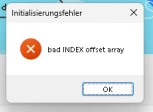
Es taucht ein Fenster auf mit "Initialisierungsfehler: bad INDEX offset array", wo man nur OK klicken kann.

Weiteres folgt gleich ...


1. Adobe Premiere Pro 24.5.

2. Windows 11 23H2 (Version 10.0.22631.3880)

3. Creative Cloud öffnen, dort PP öffnen und sofort taucht das Problem auf

4. Normales Starten der PP-Anwendung
 

Genaue Beschreibung:

Die Dame (Mitarbeiterin) und ich haben beide das Notebook: DELL Precision 5570.
Spezifikationen: I7-12800H + Intel Iris Xe GPU, 32GB-DDR5-4800, 512GB-NVME-M.2 und als dedizierte GPU RTX A1000 4GB.
Ich habe Adobe CC nach ihrer Bekanntmachung des Problems auch mal bei mir installiert, testweise lizensiert und dort mal Premiere Pro 24.5 installiert.
Bei mir funktioniert es tadellos, ich kann alles Problemlos anklicken und rendern.

Bei ihr startet nicht mal die Anwendung, man bekommt sofort ein Crash-Report.
Wenn man dort auf Senden drückt, taucht ein Fenster auf, wo Adobe Diagnostics macht.
Nach Beendigung sieht man folgendes:
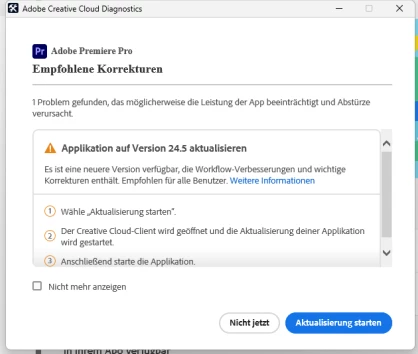
Angeblich soll Adobe PP aktualisiert werden.
Wenn ich das mache, dann passiert nichts.... weil... Adobe PP bereits auf 24.5 ist...


Folgendes habe ich alles an ihrem Notebook erfolgslos versucht:

1. Adobe PP deinstalliert und erneut installiert

2. Adobe PP mit "ALT"-Drücken gestartet, alles angehakt und versucht zu starten

3. Notebook neugestartet

4. 3x Verschiedene NVIDIA RTX A1000 Treiber benutzt (Bei der Installation der Treibe habe ich immer "Saubere Neuinstallation" ausgewählt)

- Einmal der von Dell Command Update zu Verfügung gestellt wird

- Dann der neueste von NVIDIA für Customer (Production Branch)

- Zuletzt der neueste von NVIDIA mit der Feature Rich Branch

5. Alles Adobe Produkte deinstalliert, dann Adobe CC deinstalliert und dann alles wieder installiert

6. Wieder alles deinstalliert und danach den AdobeCleanerTool benutzt und alles runter gehauen, was er noch gefunden hat

7. Batterieoptionen gewechselt

8. Zuletzt noch ein von Adobe Kompatibilitätstool (Beta) benutzt und der sagte, dass das Notebook von der Hardware her alles erfüllt

9. Adobe PP 24.3 installiert (Dort funktioniert es tatsächlich!)
10. Zurück zu 24.5 wieder dasselbe Problem


Die RTX A1000 soll wohl laut aktueller und offizieller Systemanforderung von Adobe unterstützt werden.

https://helpx.adobe.com/de/premiere-pro/system-requirements.html
Es gibt hier eine 2023 Backupversion der Website, die die RTX A1000 nicht auflistet, aber diese ist halt logischerweise veraltet:
Premiere Pro 23.x system requirements (adobe.com)


Weiß einer von euch weiter? Uns gehen die Ideen aus...
Das Problem kam plötzlich, vorher ging ja alles super.

3 replies

Kevin-Monahan
Community Manager
Community Manager
August 19, 2024

Thanks for the reply, @daniel_3872.

Yes, you can file bug reports here. If you need immediate assistance with an addressable issue, go here: https://helpx.adobe.com/contact.html. Once there, see the chat pod at the lower right. After connecting with an agent, request to speak to the "video queue." Then, you will reach the pro video support techs, who are people on my team. They are available 7 am to 7 pm M-F, Pacific Standard Time.


I apologize for the lack of response from our developers. In the meantime, please contact our techs. If you have trouble connecting with our techs or their solutions are not helpful, ask for a callback from Tier 2 support. They will call you back within 72 hours.


I hope that our agents will address this issue. Let us know how it goes with them.


Thanks,
Kevin

Kevin Monahan - Sr. Community & Engagement Strategist – Pro Video and Audio
Participant
April 3, 2025

Hi,


I had the same problem. Deleting the content of the folder %appdata%\Adobe\Creative Cloud Libraries\LIBS helped.


Best


Sven


MattVA
Participating Frequently
June 28, 2025

Perfect, thank you for this answer!

Participant
August 16, 2024

Hello @Kevin-Monahan,


thank you for your answer.


As a IT-Specialist, I can see her softwareinventory and she doesn't have "Blackmagic" Software installed and don't uses its hardware.

But she has some NVIDIA Software:

NVIDIA Grafiktreiber 555.99	555.99	NVIDIA Corporation				C:\Program Files\NVIDIA Corporation\Installer2\Display.Driver.{EED8337C-F5A5-4B17-8833-624774C32526}

NVIDIA Install Application	2.1002.418.0	NVIDIA Corporation				C:\Program Files\NVIDIA Corporation\Installer2\InstallerCore

NVIDIA Platform Controllers and Framework	555.46	NVIDIA Corporation				C:\Program Files\NVIDIA Corporation\Installer2\NVPCF.{88E50CE4-0C42-4841-9C30-1B86D4CF27D4}

And some Intel iGPU Software:

ISS_Drivers_x64	3.10.100.4572	Intel Corporation
Intel® Integrated Sensor Solution (x86)	3.10.100.4572	Intel Corporation
Intel® Software Installer (x86)	23.20.1.1	Intel Corporation

We also have the latest DisplayLink drivers installed for the Dell-Dockingstations.
But I have it too and Adobe PP doesn't crash.


I'm planning to uninstall all NVIDIA drivers except the display driver and updating the Intel iGPU driver.


I already tried out the "Adobe Creative Cloud Diagnostics (Beta)"-Tool as mentioned above. It just teels me, everthing is perfect with the hardware!


Just to clarification:

The Adobe PP splashscreen pops up, loads something and then this pops up:


Is this the right way for business to contact Adobe?

Or is there a Adobe techsupport for businiess?

Participant
April 1, 2025

Moin Daniel,


bin etwas spät zu dieser Party, aber hast du eine Lösung gefunden? Wir haben hier aktuell das gleiche Problem. Wäre dir sehr dankbar für eine Antwort. 


Danke!

Kevin-Monahan
Community Manager
Community Manager
August 15, 2024

Hello @daniel_3872,

I'm Kevin from support, one of the moderators here. Thanks for filing your bug report.

You might check these articles to see if they help you find a solution:


I hope a team member, an Adobe Expert, or a community member will assist you shortly. Sorry for the frustration.


Thanks,
Kevin

Kevin Monahan - Sr. Community & Engagement Strategist – Pro Video and Audio