Hi Amal,
Thanks for the advice, I tried that but then got a different error message, see below
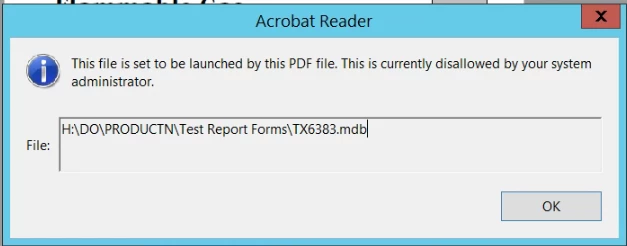
I then had a look online for this message and came across Solved: This file is set to be launched by the PDF File. T... - Page 2 - Adobe Support Community - 3026735 and found the post below
jmkolb wrote:
A Fix that worked for me: Hopefully you to!
If you go into the registry (regedit) and look under hkey_LOCAL_MACHINE - Software - Policies - Adobe - Acrobat (which ever version you have) - (version Number) - FeatureLockDown and then in cDefaultLaunchAttachmentPerms you will see the registry key tBuiltInPermList. You can edit the data in that field to open which ever type of file extension you may have a link for.
For Example: I had someone who coudlent open a .txt file. So i went in and added |.txt:2 to the list (the | is the shift \). i am not sure what the 2 really means but it then gave me the are you sure you want to open the file and i clicked okay and it went through fine. I tried putting a 3 instead of a 2 but that didnt allow for it to open.
I hope this helps everyone who has been having this issue. i found many pages saying there was a registry fix for this but untill i went through myself i have yet to see them. Let me know if this works for you also"
I followed this I then changed the value within Computer\HKEY_LOCAL_MACHINE\SOFTWARE\Policies\Adobe\Adobe Acrobat\DC\FeatureLockDown\cDefaultLaunchAttachmentPerms from |.mdb3 to |.mdb2 and this is now letting me open the file again.
Thanks alot for your assistance on this!
Lewis



 AdChoices