Johan_Massyn
Participant
March 9, 2026
Answered

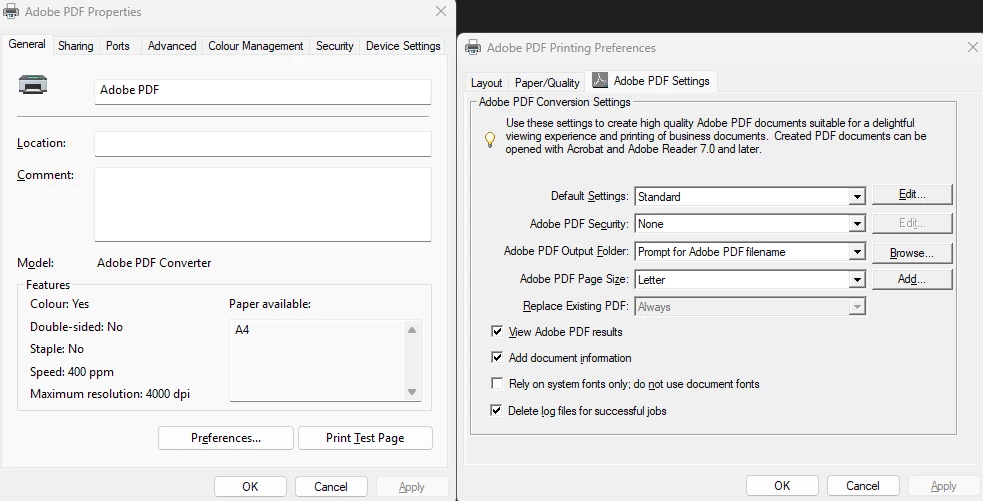
Adobe Printer's default setting changes back to "letter" instead of staying A4

  • March 9, 2026
  • 32 replies
  • 1348 views

I use Adobe Printer as my default PDF printer, but as soon as I print a document the Adobe Printer’s default paper size settings revert back to “letter” in stead of staying on A4 after it was saved.


    Correct answer Meenakshi0101

     Hi Scotty_Oz,

    Thank you for reaching out, and sorry for the trouble caused.

    Please confirm if the document prints in letter size. If you have not tried printing, please try to confirm. We are just trying to confirm if it is an issue only with the size visible in the print window after making the changes.

    Try changing the paper size in the Page Setup option in the Print window of Acrobat. Here are the steps to follow:

    • Open the PDF in Acrobat.

    • Click on the Print icon.

    • In the Print window, locate the Page Setup option at the bottom left.

    • In the Page Setup window, select “A3” from the Paper size drop-down menu.

    • Click on the OK button to save your changes.

    • Adjust any other settings as needed, and then try printing again.


    Let us know how it goes.

    Thanks,

    Meenakshi

    32 replies

    Participant
    July 22, 2026

    Hi Meenakshi0101, thanks for getting back to me. I tried to print as you requested to our wide format Ricoh printer, but it doesn’t print at all. I also tried to select A1 in the Adobe Page Setup, but once selected the first pop up still didn't change - it’s still stuck on Letter? 


    Using Page Setup


    Changing it to A1 here doesn't alter the first pop up. Still stuck on Letter.


    cheers

    Meenakshi0101
    Community Manager
    Community Manager
    July 23, 2026

    Hi Scotty_Oz,


    Thank you for the information.


    Could you please confirm the following details to further investigate this behaviour:

    • The current version number of Acrobat.

    • The make and model of the printer you are using. 

    • The operating system on your machine.

    • Are you trying to print PDFs from a specific source? Please create a test file on your local machine to see if you experience the same issue. 

    • Have you tried switching to a different printer? 

    • Are you receiving any error messages when attempting to print the file?


    Additionally, please follow the troubleshooting steps suggested here: Troubleshoot printing issues in Acrobat.


    Let us know how it goes.


    Thanks,

    Meenakshi

    Participant
    July 29, 2026

    Hi there, Still not working. We have the latest Acrobat installed; the printer is a wide format Ricoh MP2200, laptop is running Windows 11 Enterprise (up to date). PDF’s are created in CAD, ESRI or Indesign and we print from Acrobat. I have printed to our Ricoh laser printer and it prints fine. I can print a JPG from Photoshop to the wide format Ricoh MP2200 and it works. It seems to be Acrobat that doesn’t allow me to print to the PDFs.There are no error messages - Acrobat isn't recognising the Printer Settings of the Ricoh? Acrobat is stuck on Letter dimensions. Thanks Scotty

    Participant
    July 22, 2026

    Help Adobe please! We are also having serious issues with Acrobat. We have set our paper size to A1 as mentioned above, also turned off the enhanced security, but still, when we go to print - the Adobe pop up is stuck on Letter page size and doesn't recognize the A1 paper size we have previously set on the Ricoh printer. It is stuck at Letter and won't change! 

    (Above) Settings changed to A1 in the Richo print properties. 


    (Above) Doesn't change in the Adobe pop up. Stuck on Letter! Adobe doesn't recognise the change from the Printer properties.

    This wasn't has become an issue at our office in the past month or so - prior to this there was no issue. Ricoh says its not a problem with the printer, IT says its not the Ricoh driver - it does look like a problem with Acrobat?

    Cheers

    Scotty

    Meenakshi0101
    Community Manager
    Meenakshi0101Community ManagerCorrect answer
    Community Manager
    July 22, 2026

     Hi Scotty_Oz,

    Thank you for reaching out, and sorry for the trouble caused.

    Please confirm if the document prints in letter size. If you have not tried printing, please try to confirm. We are just trying to confirm if it is an issue only with the size visible in the print window after making the changes.

    Try changing the paper size in the Page Setup option in the Print window of Acrobat. Here are the steps to follow:

    • Open the PDF in Acrobat.

    • Click on the Print icon.

    • In the Print window, locate the Page Setup option at the bottom left.

    • In the Page Setup window, select “A3” from the Paper size drop-down menu.

    • Click on the OK button to save your changes.

    • Adjust any other settings as needed, and then try printing again.


    Let us know how it goes.

    Thanks,

    Meenakshi

    cartergray23456
    Participating Frequently
    July 18, 2026

    Try saving the A4 setting as a print preset. If it still resets to Letter, check the Adobe PDF printer's default preferences in Windows.

    Participant
    July 15, 2026

    I have exactly the same issue and it is annoying. Did the same thing, printer preference set to Standard Classic and A4 size but awhile later, it will reset to Standard and Letter format. Kindly advise.


    Participant
    July 14, 2026

    Looks like this is due to Adobe recreating the PDF Printer after every update based on this other answer:

    On update: The Adobe PDF printer (driver "Adobe PDF Converter") is recreated during updates, and its configuration isn't preserved, so your output folder, View results, font, and custom paper size all revert together because they all live on that printer object.


    It would explain why it’s happening so often since Acrobat seems to update itself all the time.

    Pretty sure this is a relatively recent change, I’ve been using the PDF printer for years and have not had this issue.  So it’s possible it’s a bug from a recent change and has a chance of getting fixed.  Also possible there’s a feature they added recently that only works if they rebuild after every update and we’re stuck with it.

    Known Participant
    July 14, 2026

     I’ve been using the PDF printer for years, too, and never have had such a problem.
    I think you’re right about Acrobat constantly updating itself and PDF printer.
    Though I don’t understand the reason.
    I would understand a printer reset after Acrobat version update but not at every program start.

    Known Participant
    June 8, 2026

    ..same, these steps work temporarily but it soon defaults back to Letter, this never used to be a problem. is the Adobe Print Driver now somehow localised and we just have the wrong one?


    Known Participant
    June 5, 2026

    Hi Anand, thanks for the reply, the preferences for Default A4 are retained for a while, sometimes even after a reboot, but it periodically default back to Letter, usually with a couple of hours. I’m on a Windows 11 Enterprise device, Version- 10.0.22631 Build 2263, I’m using Acrobat Pro, Version 2026.001.21563 64 Bit and there are no updates available.


    Anand Sri Bhattacharya
    Community Manager
    Community Manager
    June 5, 2026

    Thanks for sharing the details ​@djbats 


    Is it an IT-managed device, or a personal computer? For testing purposes, please create a test user profile with full admin rights and test the workflow.

    Also, turn off the enhanced security from the Menu > Preferences > Security (Enhanced) > uncheck > protected mode at start-up, and enhanced security > click ok, restart the app, and check.


    Let us know how it goes.

    Regards,

    Anand Sri.

    Known Participant
    June 6, 2026

    I have a personal computer and I recently switched my Microsoft-account to a local one with full admin rights.
    I changed Acrobat security settings according to your advice. Let’s see if the Adobe PDF printer settings will reset again :-)

    Known Participant
    June 5, 2026

    Has anyone found a working solution for this? I have the same problem, Acrobat defaulting to Letter size.

    Anand Sri Bhattacharya
    Community Manager
    Community Manager
    June 5, 2026

    Hello ​@djbats 


    I hope you are doing well, and thanks for reaching out. We’re sorry for the trouble you had.


    Have you tried the suggestions shared in the thread? What happens when you try those steps? Do you get any error message?

    Are you on a Windows or Mac machine, and what is the version? What is the version of Adobe Acrobat installed? 

    Please ensure you have the latest version of Acrobat installed on the machine: Version: 26.001.21563. Planned update, May 18, 2026. Check for any pending updates by navigating to Menu > Help> Check for Updates. Install the updates, restart the app and the machine, and try again.


    We’re here to help, just need more info.

    Regards,

    Anand Sri.

    Known Participant
    June 6, 2026

    This is my Acrobat version.

    creative explorer
    Community Expert
    Community Expert
    May 12, 2026

    @Michael_Rosenstein  May I suggest you ‘save’ your settings as a ‘print setting’ so it becomes one your ‘Presets’?

    I have a few on my end…


    m
    Known Participant
    May 12, 2026


    Known Participant
    May 12, 2026

    I always use one of the predefined Acrobat settings (Smallest file size).
    It doesn’t matter if I create my own setting, it will anyway reset to default “Standard”.
    The paper size I choose will reset to “Letter”, too.

    AndrewTheScot
    Participant
    April 25, 2026

    I have exactly the same problem with Adobe Acrobat Reader (64-bit) defaulting to US letter size rather than A4. My printer is set to use A4 paper as I am in the UK and all setting reflect this.

    The instructions to change the Printing Preferences of “Adobe PDF” under Printers & Scanners fails because “Adobe PDF” is not an available option.

    Clearly Adobe Acrobat Reader (64-bit) has a default of US letter size built in to it. Where exactly is it and how do you change it?