Johan_Massyn
Participant
March 9, 2026
Answered

Adobe Printer's default setting changes back to "letter" instead of staying A4

  • March 9, 2026
  • 32 replies
  • 1347 views

I use Adobe Printer as my default PDF printer, but as soon as I print a document the Adobe Printer’s default paper size settings revert back to “letter” in stead of staying on A4 after it was saved.


    Correct answer Meenakshi0101

     Hi Scotty_Oz,

    Thank you for reaching out, and sorry for the trouble caused.

    Please confirm if the document prints in letter size. If you have not tried printing, please try to confirm. We are just trying to confirm if it is an issue only with the size visible in the print window after making the changes.

    Try changing the paper size in the Page Setup option in the Print window of Acrobat. Here are the steps to follow:

    • Open the PDF in Acrobat.

    • Click on the Print icon.

    • In the Print window, locate the Page Setup option at the bottom left.

    • In the Page Setup window, select “A3” from the Paper size drop-down menu.

    • Click on the OK button to save your changes.

    • Adjust any other settings as needed, and then try printing again.


    Let us know how it goes.

    Thanks,

    Meenakshi

    32 replies

    creative explorer
    Community Expert
    Community Expert
    March 14, 2026

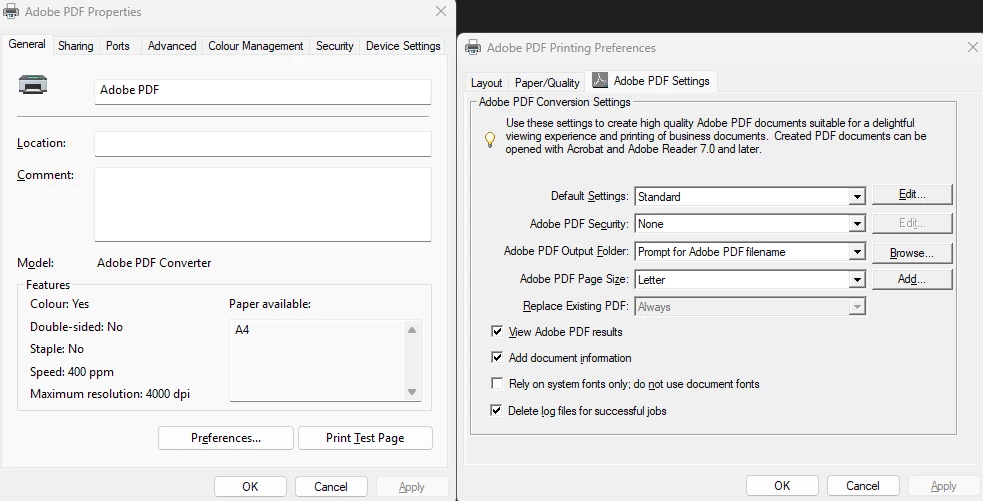
    @Johan_Massyn To make A4 the permanent and go-to-default-size, you have to change it at the "system" level, not the "app" level. Here is the move:
     

    1: Printing Preferences (Search Menu > Printers & Scanners > Adobe PDF > Printing Preferences > Adobe PDF Settings Tab). Change "Adobe PDF Page Size" to A4.

    2: Advanced Settings Inside that same Preferences window, click the Advanced button. Under "Paper/Output," ensure the "Paper Size" is also set to A4.

    For more details, https://helpx.adobe.com/acrobat/desktop/print-documents/set-up-and-print-pdfs/pdf-printer-settings.html and https://helpx.adobe.com/acrobat/desktop/print-documents/set-up-and-print-pdfs/page-size.html

    m
    Allan223255622mtk
    Participant
    April 16, 2026

    Hi

    I have done the above changes, but my PC keeps on changing back to size letter. :-(

    I have been in contact with Adobe support 4 times, but they take over the screen, and just reinstall the program. And when this don’t work, tell me that it’s a Windows issue??

    Known Participant
    May 12, 2026

    I have the same issue. Adobe PDF printer settings always reset to default, not only paper size.
    Cusiously, some time /Acrobat versions ago it wasn’t the case.