Participant
Jan 11, 2024 4:29 PM UTC
Question

Adobe reader crashes when clicking on fillable field

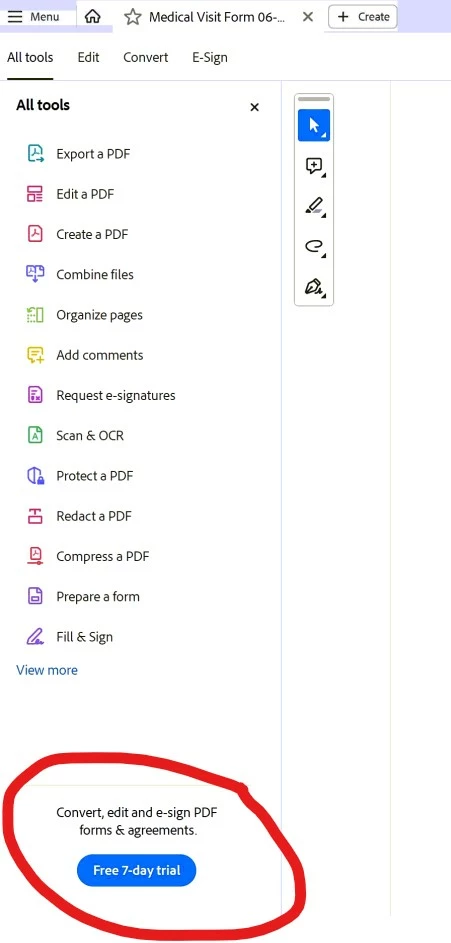
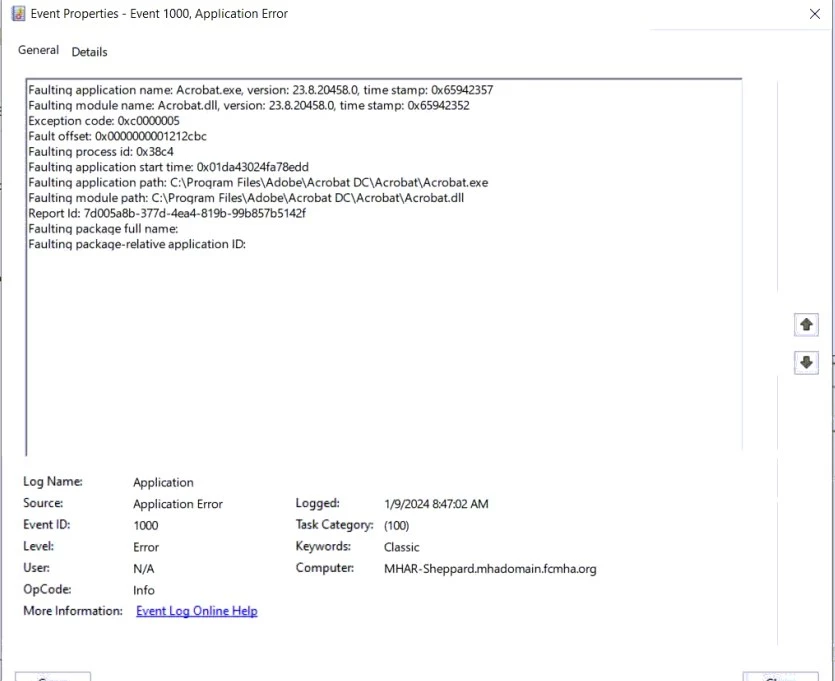
When opening a PDF file that has empty fields that need to be filled out it will crash and close the program completely when you click on an empty field. See picture from Windows error logs. Have figured out that if you click on a field immediately upon opening the file it will crash, but if you wait a little until the "Convert, edit and e-sign PDF forms & agreements. Free 7-day trial", see picture below, on the bottom left of the screen it will work fine. Have tried uninstalling, deleting all Adobe folders from PC then reinstalling. I have tried turning off protected view, and security. This is now happening on 3 different user machines.
20 replies

Participant
Apr 19, 2024 10:47 AM UTC

Replied to a guy a second ago with this, but the most effective work around so far I've found is just by opening the "Menu" top left of the screen then clicking off it back onto the pdf, works fine after that. Only takes 1-2 seconds to do as well.

Translate
Participant
Mar 27, 2024 6:53 PM UTC

Thank you for figuring this out! 

I tried several things to no avail. The last thing I tried was downloading a fillable form from the IRS. That also crashed. I can't believe the IRS is happy with that. Maybe someone there has some clout.

Translate
Participating Frequently
Mar 27, 2024 1:18 AM UTC

I am having the same problem with many workstations on a rather sizeable network.  Kind of disappointing that this was reported in January and is still an issue.  Guess displaying their ad is REALLY important to them.  I can't expect my end users (police and fire personnel) to all go through these workarounds.  C'mon Adobe, get this fixed.

Translate
Participant
Mar 27, 2024 1:51 PM UTC

I don't know if you read my post, but what I have found that works for me is that I open up the file, minimize it,  just give it a second, and then bring it up again and then it works.  If you start to fill it in right away it crashes.

Translate
Participant
Apr 19, 2024 10:46 AM UTC

A bit of an easier work around - if you open "Menu" in the top left and then click back into the pdf/doc, it works fine. No waiting required and only takes 1-2 seconds

Translate
Participant
Mar 26, 2024 9:38 AM UTC

For me, these solutions work but are not "clean", I hope that a future update of Adobe Reader will solve the problem:
- Wait a few seconds to 1 minute depending on the slowness of the PC.
- Click on a non-editable text field before clicking on the text field to fill.

Translate
Participant
Mar 25, 2024 2:13 PM UTC

What worked for me is to pull up the fillable file and then go do something else.  After letting it sit for a minute it works!

Translate
Participant
Mar 12, 2024 4:14 PM UTC

Hi,

We have struggled with the same problem. Adding these registry keys seems to have fixed the problem for us:

REG ADD "HKLM\SOFTWARE\Policies\Adobe\Acrobat Reader\DC\FeatureLockDown" /v bAcroSuppressUpsell /t REG_DWORD /d 1 /f
REG ADD "HKLM\SOFTWARE\Policies\Adobe\Acrobat Reader\DC\FeatureLockDown\cServices" /v bUpdater /t REG_DWORD /d 0 /f

Translate
Participant
Feb 28, 2024 1:00 PM UTC

Thank you for finding a solution to this problem. This has been driving me crazy.

The only other thing that works is to reinstall the app. And then it only works ONE time

I don't know how widespread this is. If it was, Adobe would have fixed it by now

Translate
Participant
Feb 27, 2024 5:56 PM UTC

@Amal. Do you think your crew could take a look at this? We prefer not to have to change our users from Modern view to the old view. Our experience is the same as those listed here. I have a form I'd be happy to send to you for testing. Thank you!


Translate
Participant
Feb 5, 2024 3:43 PM UTC

Hey guys, got it fixed by switching to the old view. Hope this could help you as well.

Translate
nikndawn
Participant
Feb 6, 2024 5:45 PM UTC

Thanks for the fix.  This worked for me.  I hope Adobe gets a fix in place for this.

Translate
Participant
Feb 13, 2024 4:30 PM UTC

Many of our users are also having the same issue.  Kindly request Adobe developers to patch this issue quickly.

Translate
Participant
Feb 3, 2024 12:25 AM UTC

I have been having this same issue, and have discovered the same workaround, if you click on any non-editable text in the pdf prior to clicking a fillable field, or if you resize the the adobe window, or move it to a different monitor; basically interact with the document in any form other than clicking on a fillable field first, the document will behave normally and you can edit fillable fields and save/print the edited document as normal.  It is a very simple workaround but a very irritating issue.  Following this thread, waiting for an answer from Adobe.

Translate