
Participant
April 12, 2022
Question

Adobe reader pdf files open very slow or go crashed with an error message

  • April 12, 2022
  • 1 reply
  • 2280 views

While opening pdf files either from locally saved or from SharePoint, it takes lot of time to open (up to 5 minutes) or it doesn’t open at all and goes crashed as mentioned below.
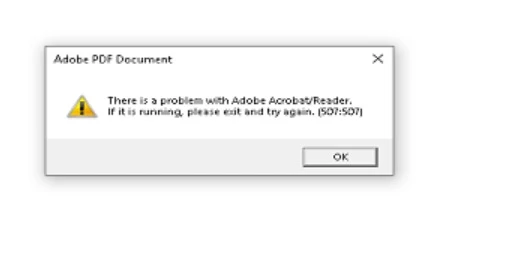
As a troubleshooting we have tried with adobe reader DC upgrade from v21.011.20039 to 22.001.20085(latest version), tried with uninstalling the recently installed windows patches. Even then the issue is still existing.

This topic has been closed for replies.

1 reply

Amal.
Community Manager
Community Manager
April 14, 2022

Hi Stefan


Hope you are doing well and sorry for the trouble. As described you are getting the error 507:507


This error means that Another Adobe Reader is running in the background. Please close the application and reboot the computer once and then try to open the PDF file and check.


You may also try to turn off the protected mode at startup (Windows Only) Go to Edit > Preferences > Uncheck 'Enable protected mode at startup' > Click OK and reboot the computer once.


You may also look at the similar discussion https://community.adobe.com/t5/acrobat-reader/what-to-do-about-error-message-507-507/m-p/7483788/thr...


Regards

Amal

Participant
April 25, 2022

Hi Amal,


Is there any alternative we can try without disabling this security feature? (disabling it consistently resolves the problem, but we have a lot of  users who don't have the problem)

Is there anything we can do to understand what the real cause of the problem is?

is this behaviour happening because there's always already an instance open?  (we don't always get that popup, sometimes it just takes a few minutes and then opens)


kind regards

Amal.
Community Manager
Community Manager
April 27, 2022

Hi there


We are sorry to hear that. As the issue gets resolved by disabling the protected mode, please go through the help page https://helpx.adobe.com/acrobat/kb/protected-mode-troubleshooting-reader.html


Also update the application to the recent version 22.1.20117 (Win), 22.1.20112 (Mac) Go to Help > Check for updates and reboot the computer once.


Regards

Amal