
Participating Frequently
May 12, 2022
Question

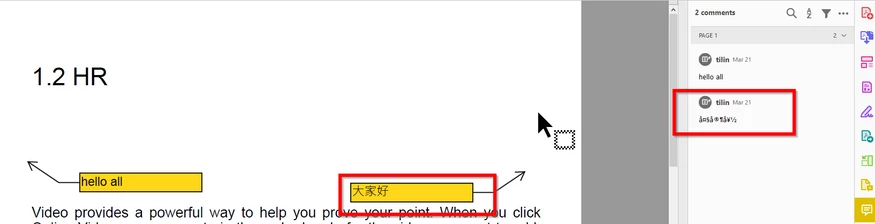
Chinse character always garbled in the comment section

  • May 12, 2022
  • 1 reply
  • 764 views

Our firm always with some docs handled by Nitro Pro. When people have ever added Chinese comments in the call out of Nitro Pro, it will display as garbled in Acrobat Reader. Hope this can be solved?


Attached is a sample for troubleshooting. If you look at it carefully. What is shown on the page itself is not the same as that in the comment section. Obviously, the comment section is garbled. I would say Abode should do something. If it can display the text correctly in one place, it should be able to do it in another.
This topic has been closed for replies.

1 reply

Harsh Vardhan Pareek
Participating Frequently
May 18, 2022

Hi @Tik Hin23679207allc 


Hope you are doing well and sorry to hear that.


Is this an issue with a particular PDF file or with all the PDFs? Please try with a different PDF file and check. If the file is stored on a shared network/drive please download it to your computer locally and then try again.


Would you mind sharing the version of the Acrobat Pro DC and the OS you are using? To check the version go to Help > About Acrobat and make sure you the most recent version installed. Go to help > Check for updates and reboot the computer once.


Also try to repair the installation from the help menu (Win Only) and check.


Please try to reset the Acrobat preferences as described here https://community.adobe.com/t5/acrobat-discussions/how-to-reset-acrobat-preference-settings-to-defau...


Also, try to create a new test user profile with full admin rights in Win or enable the root account in MAC and try using the application there and check.


Regards

Harsh

Participating Frequently
May 19, 2022

Hi Harsh,

Thank you for your reply.

Can you simply open my PDF and see the issue? If so, I wish your team could just go through all of your suggestions and see if they would help?  Because I have so many operation limitations for doing most of them in my firm.


If you open my PDF and can't see the issue, I am happy to assist. 

Below is something I can provide now:

  • It happens in all PDFs no matter in a local or network drive.
  • My version is 20.22.001.20117 and OS is window10. But it happens in the (latest) free version as well.
  • Check for update -> no update
  • Repair the installation -> no luck