
Participant
Dec 27, 2023 2:52 AM UTC
Question

Combine image error "No PDF File was Created ......"
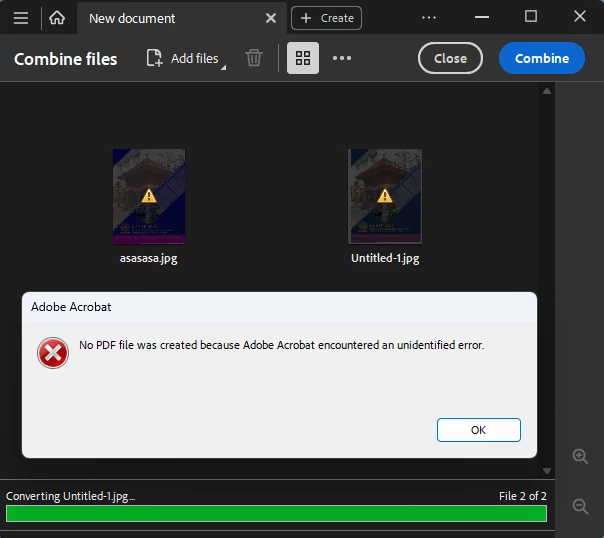
Anyone can help me, my Adobe Acrobat DC  cannot combine or convert image file to PDF, but other support format is work fine like docx file.
OS Win11 23H2 Build OS 22631.2861

Adobe Acrobat DC 23.006

This topic is closed to new replies. Start a new post to keep the conversation going.

3 replies

Amal.
Legend
Dec 27, 2023 5:53 PM UTC

Hi @Pelawa 


Hope you are doing well and thanks for reaching out.


Is this an issue with a particular set of image files or with all the images in general? please try with a different set of image files and see if that works.


Also, try to update the application to the new version 23.08.2042X from the help menu > Check for updates and reboot the computer once.


Also try to repair the installation from the help menu (Win Only) and see if that works.

Please try to reset the Acrobat preferences as described here https://community.adobe.com/t5/acrobat-discussions/how-to-reset-acrobat-preference-settings-to-default/td-p/4792082

You may also try to create a new test user profile with full admin rights in Win and try using the application there and check.


~Amal

Translate
PelawaAuthor
Participant
Dec 28, 2023 6:25 AM UTC

This problem occurs with all image files, and when I try to combine the same image files on another computer there is no problem. Additionally, image files are stored on local drives not on the network.

Translate
Amal.
Legend
Dec 28, 2023 10:01 AM UTC

Hi there


As the application is working fine on another computer with the same set of images, it seems to be some issue with the user profile on the computer. Please try to repair the affected user profile and see if that works.


~Amal

Translate