
Merlingg
Participating Frequently
August 15, 2021
Answered

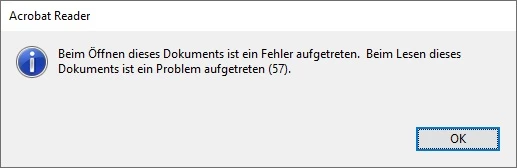
Error 57 again and again for opening a document

  • August 15, 2021
  • 2 replies
  • 3273 views

A lot of posts for this error but still no resolution!

Latest, on June 23, 2021 AnandSri and MeenakshiNegi posted that there was an update released for Acrobat and Reader DC (version 21.005.20054) that addresses this issue [Solved: Adobe Reader Error 10:10 (IE 11) - Adobe Support Community - 12104919]

I now have vesion 21.005.20060 and still the same issue. The files are perfectly accessible with other tools like Microsoft Edge browser or iOS Acrobat Reader on iPhone (here only "Liquid Mode" has a problem).

Sorry, if I missed some newer updates for this problem... Would be very happy for help!
This topic has been closed for replies.
Correct answer rachel25141376eupk

Try this method to fix this error-

If you need to open the file, there are a couple of easy methods that you can use:

1-If you have google chrome-Email the file to yourself as an attachment. Once you open the email, you can click on the file icon, and it will open it in the browser. If you download the attachment you will have the same problem, and it can not be opened. This method is only good if you want to read what is inside the file quickly.

2-This the best and permanent solution- Use other available programs. Right-click on the file - select:

Open with-Search the Microsoft store- There are several programs; some are paid, some are free, some may work, and some may not work. Select PDF X: FREE PDF EDITOR & PDF READER and install it. By using this program, your problem will be solved. This program can be upgraded to the full version, which has other capabilities, but you have to pay for the full version.


This may help you,

Rachel Gomez

2 replies

Participant
April 26, 2024

Adobe error 57, problem opening file - I've had this too, frustrating.

In file manager, I selected "Open with" and selected "Chrome". Then I printed the document to "PDF" with a different name.

Now I can open or print the problem files without the error.

Participant
August 3, 2022
rachel25141376eupkCorrect answer
Inspiring
August 4, 2022

Try this method to fix this error-

If you need to open the file, there are a couple of easy methods that you can use:

1-If you have google chrome-Email the file to yourself as an attachment. Once you open the email, you can click on the file icon, and it will open it in the browser. If you download the attachment you will have the same problem, and it can not be opened. This method is only good if you want to read what is inside the file quickly.

2-This the best and permanent solution- Use other available programs. Right-click on the file - select:

Open with-Search the Microsoft store- There are several programs; some are paid, some are free, some may work, and some may not work. Select PDF X: FREE PDF EDITOR & PDF READER and install it. By using this program, your problem will be solved. This program can be upgraded to the full version, which has other capabilities, but you have to pay for the full version.


This may help you,

Rachel Gomez

Merlingg
MerlinggAuthor
Participating Frequently
September 5, 2022

Both methods work - thank you!

Congrats to Tracker Software and shame on Adobe! Shame for this error and shame for not even trying to help!