


Participant
July 17, 2021
Question

how to change fill & sign to default font.

  • July 17, 2021
  • 1 reply
  • 578 views

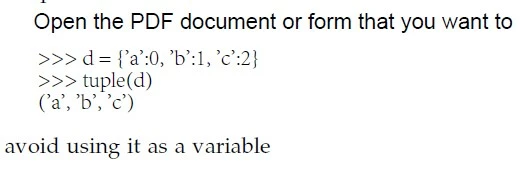
the fill & sign font somehow changes to extra blak, just as the line "Open the PDF..." shows. But it is used to be light black, just as the lines below "Open the PDF...". I don't know why. how to change it to the light black one.
This topic is closed to new replies. Start a new post to keep the conversation going.

1 reply

Amal.
Legend
July 20, 2021

Hi Samuel


Hope you are doing well and sorry for the trouble.


Would you mind sharing the version of the Adobe Acrobat DC you are using? To check the version go to Help > About Acrobat and make sure you have the version 21.05.20058 go to Help > Check for updates and reboot the computer once.


If it doesn't work, please try to reset the Acrobat preferences to default as described in the help page https://community.adobe.com/t5/acrobat/how-to-reset-acrobat-preference-settings-to-default/td-p/4792082


You may also try to create a new test user profile with full admin rights in Windows or enable the root account in Mac and try using the application there and check


Regards

Amal