


Participant
October 7, 2020
Answered

how to stop the tool bar from popping up at the bottom?

  • October 7, 2020
  • 1 reply
  • 872 views

how to stop the tool bar from popping up at the bottom?

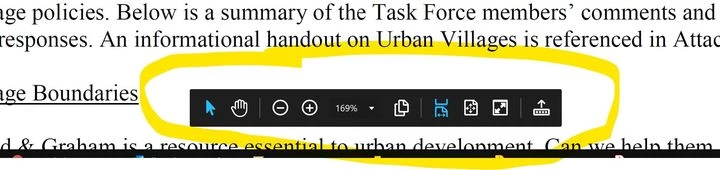
How do I stop the tool bar from popping up at the bottom of the screen (see photo)? Also, how can I make the Selection Tool the default instead of having to manually select it every time I open Acrobat. (I know the Hand Tool can be configured to select text and images, but the hand is big and blobby and gets in the way of reading text.)

 

This topic has been closed for replies.
Correct answer AnandSri

Hi.


I hope you are doing well!


Thanks for sharing the screenshot. The toolbar displayed in the screenshot shared above has an arrow at first from the right which is indicating in an upward direction. Click on that and it will bring the toolbar to its original position. Here is a screenshot: 


For making select tool as default, read a similar discussion here: https://community.adobe.com/t5/acrobat-reader/making-the-selection-tool-default-in-adobe-reader-dc/td-p/8395380?page=1


Let us know if that helps.


Thanks,

Anand Sri.

1 reply

AnandSri
Community Manager
AnandSriCommunity ManagerCorrect answer
Community Manager
October 7, 2020

Hi.


I hope you are doing well!


Thanks for sharing the screenshot. The toolbar displayed in the screenshot shared above has an arrow at first from the right which is indicating in an upward direction. Click on that and it will bring the toolbar to its original position. Here is a screenshot: 


For making select tool as default, read a similar discussion here: https://community.adobe.com/t5/acrobat-reader/making-the-selection-tool-default-in-adobe-reader-dc/td-p/8395380?page=1


Let us know if that helps.


Thanks,

Anand Sri.
