

alaind1554232
Participant
January 17, 2019
解決済み

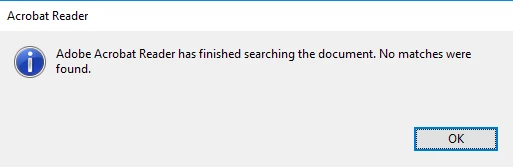
Is there a way to make the "no search results pop-up" appear on the same screen reader is oppened?

  • January 17, 2019
  • 返信数 1.
  • 469 ビュー

I need to do multiple searches in a row in PDFs every day. It would be nice if the "no search results notification" would appear in "Find" tab, just below "Previous" and "Next". That way I would not have to search on all my screens where the notification appeared just to click "OK" to enable my next search. 
このトピックへの返信は締め切られました。
解決に役立った回答 Adorobat

Hi alaind,

As per the issue description mentioned above, you want search pop-up notification to appear under the Find" tabbelow  "Previous" and "Next", is that correct?

Could you confirm if the below given pop-up you are referring to? If yes, this functionality is not available. You may share your feedback to the product team using this link:  Feature Request/Bug Report Form

Let us know if you have a further query.

Shivam

返信数 1

Adorobat
Adorobat解決!
Participating Frequently
January 17, 2019

Hi alaind,

As per the issue description mentioned above, you want search pop-up notification to appear under the Find" tabbelow  "Previous" and "Next", is that correct?

Could you confirm if the below given pop-up you are referring to? If yes, this functionality is not available. You may share your feedback to the product team using this link:  Feature Request/Bug Report Form

Let us know if you have a further query.

Shivam