
Participant
July 25, 2023
Question

Lost 'Properties' box.....

  • July 25, 2023
  • 1 reply
  • 492 views

I have upgraded from a Windows laptop at work to an 'older' iMac from home. 
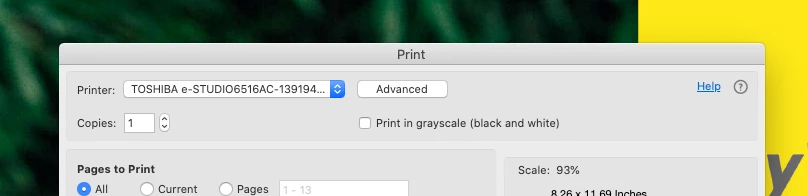
 

There 'was' a properties box next to 'Advanced' where I could set paper size / feed / location etc, but it has gone. Would appreciate a fix please, or where I need to look next. 

Please and thank you. 

This topic has been closed for replies.

1 reply

Amal.
Legend
July 25, 2023

Hi @Mark31276444y0ly 


Hope you are doing well and thanks for reaching out


What is the version of the Acrobat DC you are using? To check the version go to Help > About Acrobat and make sure you have the recent version 23.03.20244 installed. Go to Help > Check for updates and reboot the computer once.

Please try to reset the Acrobat preferences as described here https://community.adobe.com/t5/acrobat-discussions/how-to-reset-acrobat-preference-settings-to-default/td-p/4792082 and see if that works.

Also, check for any missing/pending updates for printer driver and firmware and try updating it and check. https://helpx.adobe.com/acrobat/kb/troubleshoot-pdf-printing-acrobat-reader.html


For more information about Advanced printing settings  please check the help page https://helpx.adobe.com/acrobat/using/advanced-pdf-print-settings.html


Regards

Amal