
Participating Frequently
May 9, 2024
Answered

No longer able to change scale ratio on Acrobat Reader

  • May 9, 2024
  • 14 replies
  • 37698 views

In the past, when I have wanted to change the scale ratio in Acrobat Reader, I would select the measuring tool and then right-click on my document to get a menu from which I would select "change scale ratio."

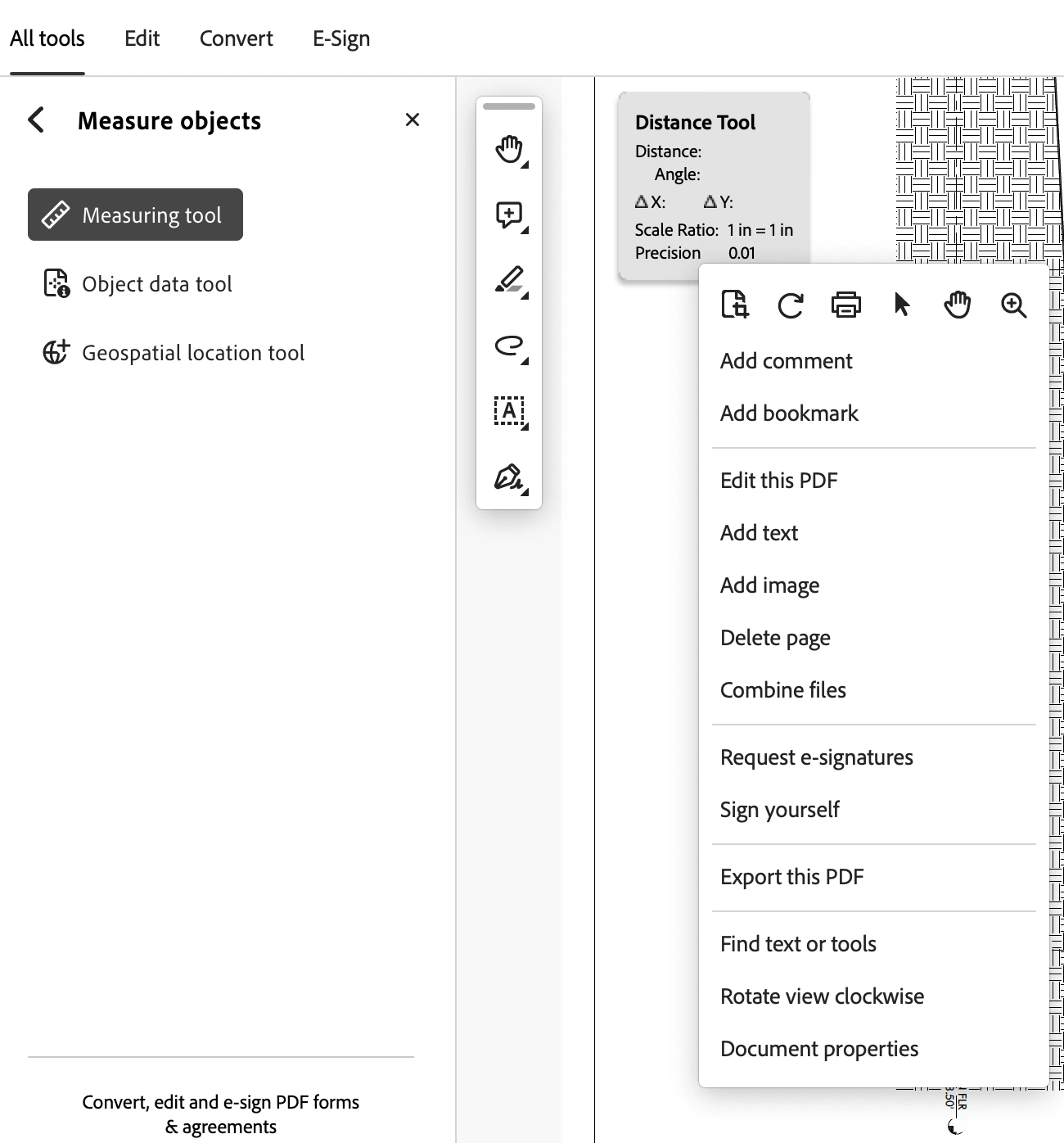
Starting this week, the "change scale ratio" option disappeared from the right-click menu. Screenshot below of the menu I get when I right-click.

Is anyone else running into this problem? MacOS Sonoma 14.4.1, Acrobat Reader v2024.002.20736.
Correct answer dylan_6790

turn off "Use Scale and Units from Document (when present) under Preferences - Measuring (2D)


Worked for me 

14 replies

dylan_6790Correct answer
Participant
April 24, 2025

turn off "Use Scale and Units from Document (when present) under Preferences - Measuring (2D)


Worked for me 

Participant
January 30, 2025

Hello all, I have been having the same problem, I have been through all the replies to this thread and have not found a resolve, if anyone can offer some help it would be grealty appreciated..


Adobe Employee
February 1, 2025

Hi @rick_0520 


The issue has been resolved in the latest update of Adobe Reader. Please update to the latest version and try.


To update to the latest version : Launch Reader->Go to Help->Check for Updates


Regards

Ravi

Participating Frequently
September 9, 2025

But, this issue perisists in Acrobat Pro 2025.001.20643 on Windows 11. 
(Reverting to the old UI resolved the measuring tool scale issue for me.)

Participant
January 14, 2025

None of the proposed solutions worked for me,not disabling the new adobe or the workaround by Jason38816712in5k (although these seemed to work for a lot of people). What did help me:


Measuring tool > Make and lock a measurement > Select the measurement so there's a blue box > Right click outside the box > Selecting "Snap to page content" from the dropdown menu.

Then, remake and lock a new measurement > Select the measurement so there's a blue box > Right click outside the box > Magically, the "Change Scale Ratio and Precision" appears. 


Idk why it worked, but it did. Now I don't have to rage throw my laptop into a wall. Happy new year!

Participant
December 16, 2024

for non mac users, what's the solution to this problem?

Participant
December 14, 2024

Go to left menu and choose view more

go to Measure objects and click left key twice

then change scale ratio

Participant
December 14, 2024

Once I got to Measure Objects, I left clicked Measuring tool ... and then I could right click anywhere on the PDF and the Change Ratio Scale and Precision option appears

Participant
July 25, 2024

Hopefully this doesnt trigger a fix from adobe, but ill share what worked for me. I'm on a macbook pro (sonoma 14.5) with an external trackpad and docking station. And using adobe reader.

Open a normal pdf file in reader. Go to left, and select the Measure Objects option.

When you do that, a floating toolbar (for me anyway) opens up and says Snap Types and Measurement Types at the top (right for me, maybe different for you). In that box, I click on the distance measuring length tool (also perimeter tool works). ANd I made a measurement using three clicks (one to start, one to end, and third to anchor the line that shows the length of the measurement). Hover your mouse over that measurement until your mouse goes from a cross to an arrow, indicating you are about to click on that line and change its settings. Right click on that line and you get a dropdown that starts with 'Reply', and the line will then be surrounded by a box. Dont click any of those options (and keep that option window open), but move the mouse off of that measurement and outside of that box that is highlighted, surrounding that newly measured line that you made. then right click anywhere on that PDF that is NOT on that box. Once you right click, you should see the familiar dropdown box that starts with: Change Scale Ratio and Precision. Good luck!!

Participant
December 10, 2024

Yes works also. Must be a bug with an update or something. 


I have found that once in the measurement tool, as long as a measurement is selected by left clicking it, move cursor off of that measurement and right click anywhere else on the file and the "Change Scale Ratio and Precision" option has returned. 

Participant
December 13, 2024

Yes, this fix has also worked for me. Kind of a pain and can be hit or miss in working. But at least I can get back to work. Adobe needs to fix this bug!

Participant
June 12, 2024

I found an option in the left corner settings drop box which i think was listed as" disbable the new adobe experience "  This has taken me to an old version with the tool repaired.

Participant
December 16, 2024

This worked for me - so far. Such a frustrating program. almost each time i sti down to work. i need to investigate a new way to do something. 

Participant
June 12, 2024

File -> disable new acrobat reader

Worked for me.

AnandSri
Community Manager
Community Manager
May 17, 2024

Hello All!


I hope you all are doing well, and we're sorry for your trouble.


Please try the registry settings below and let us know if they work for you. Please ensure you take a backup of the existing registry before making any changes. For more info on backing up on Windows, see this article. For Mac, see this article.


MAC :

Path: ~/Library/Preferences/com.adobe.Reader/plist

Registry:  DC/FeatureLockdown/bNewMegaverbRCMExp(boolean) = True


WIN:

Path :

  • 32 bit: Computer\HKEY_LOCAL_MACHINE\SOFTWARE\WOW6432Node\Policies\Adobe\Adobe Acrobat\DC\FeatureLockDown\
  • 64 bit: Computer\HKEY_LOCAL_MACHINE\SOFTWARE\Policies\Adobe\Adobe Acrobat\DC\FeatureLockDown\


Registry : bNewMegaverbRCMExp(REG_DWORD) = 1 (to disable)


I hope this helps.

Thanks,

Anand Sri.

Participant
June 11, 2024

AfternoonAnand


Can you explain further what the key 'bNewMegaverbRCMExp' does? 


Does it fix the original issue 'No longer able to change scale ratio on Acrobat Reader' or something else? 


Many thanks in advance.


Alan.

Participant
May 16, 2024

SOLVED!

I encountered the same issue and resolved it by following these steps:

  1. Go to File.
  2. Select Disable New Acrobat Version.
  3. The application will restart, reverting to the old version, which is more stable and less buggy.

This worked on Windows 10 with Adobe Reader 64-bit. Good luck!

Participant
May 22, 2024

Thanks Jeff.  this really saved me from many annoying calculations.  Just want to add for the less tech savvy that Disable New Acrobat Version is located in the drop down for the "hamburger" in the top left.