
Participating Frequently
May 23, 2022
Answered

Scale Ration Numbers Unable to be changed

  • May 23, 2022
  • 2 replies
  • 4354 views

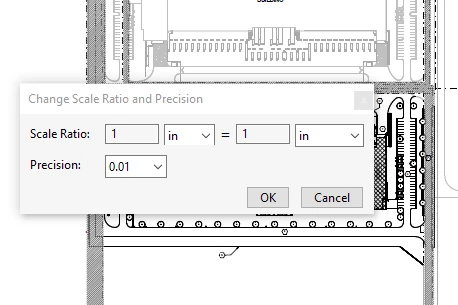
I am completely unable to change the numbers in the Change Scale ratio menu options for measuring in Adobe Reader DC Version 22.001.20117.0.


I can change units, but the 1's are defaulted and will not let me change them.
This topic has been closed for replies.
Correct answer Mark35415014tuzu

Hi there


Is this an issue with a particular PDF file or with all the PDFs? Please try with a different PDF file and check.

What is the version of the Acrobat DC you are using? To check the version go to Help > About Acrobat and make sure you have the recent version 23.06.20380 installed. Go to Help > Check for updates and reboot the computer once.

Also try to repair the installation from the help menu (Win Only) and see if that works.

Please try to reset the Acrobat preferences as described here https://community.adobe.com/t5/acrobat-discussions/how-to-reset-acrobat-preference-settings-to-default/td-p/4792082 and see if that helps.


~Amal


I was having this same trouble this morning...much to my embarrasment, I found it was only the number lock key.

I'm using the free version.

2 replies

JR Boulay
Community Expert
Community Expert
May 24, 2022

MOVED TO THE ACROBAT READER FORUM

Acrobate du PDF, InDesigner et Photoshopographe
Amal.
Community Manager
Community Manager
May 23, 2022

Hi there


Hope you are doing well and sorry to hear that.


Is this an issue with a particular PDF file or with all the PDFs? Please try with a different PDF file and check. If the file is stored on a shared network/drive please download it to your computer locally and check again.


Also try to repair the installation from the help menu (Win Only) and reboot the computer


You may also try to reset the Acrobat preferences as described here https://community.adobe.com/t5/acrobat-discussions/how-to-reset-acrobat-preference-settings-to-default/td-p/4792082


You may also try to create a new test user profile with full admin rights in Win or enable the root account in MAC and try using the application there and check.


Regards

Amal

Participating Frequently
May 23, 2022

All of these have now been attempted and the results are still the same. No ability to change the number values in the scale ratio when attempting to measure in any PDF.

Amal.
Community Manager
Community Manager
May 24, 2022

Hi there


We are sorry to hear that.


If its an issue with all the PDFs, please remove the application using the Acrobat cleaner tool https://www.adobe.com/devnet-docs/acrobatetk/tools/Labs/cleaner.html , reboot the computer once and reinstall the application using the link https://helpx.adobe.com/acrobat/kb/acrobat-dc-downloads.html


Regards

Amal