
Participant
April 19, 2022
Answered

Since the last Adobe Reader update, Fillable Forms are crashing upon opening

  • April 19, 2022
  • 1 reply
  • 703 views

We are hoping that you are able to assist with an issue our client is experiencing with the latest Adobe Reader update.  Whenever a user attempts to open a "fillable" pdf, Adobe Reader immediately crashes.  This is happening on multiple machines with the same file.  Please note the error below. Please also note that we have run an SFC, repaired Visual C++ where possible, and reinstalled Adobe.   Please let us know of anything else we may attempt to correct the issue. Thank you. 
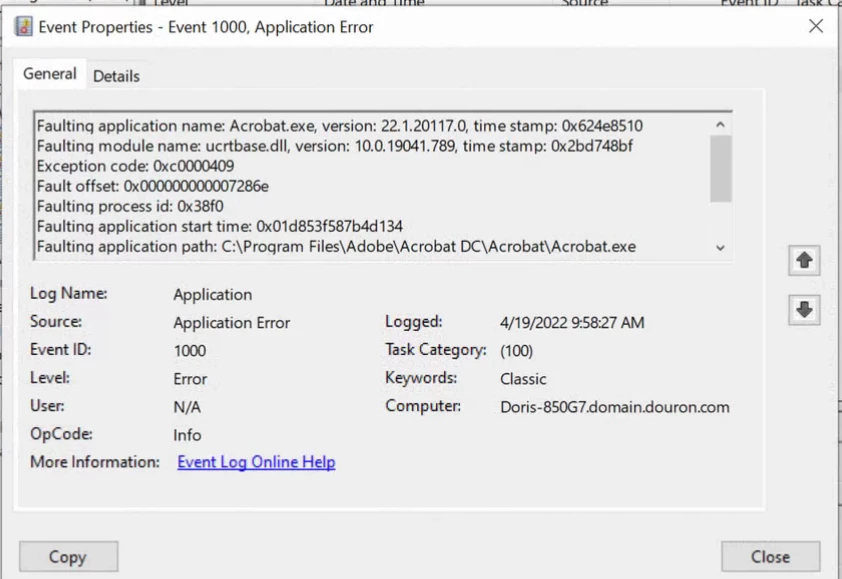


This topic has been closed for replies.
Correct answer Amal.

Hi there


Hope you are doing well and sorry for the trouble. As the application is crashing on opening the PDF file.


Is this an issue with a particular PDF file or with all the files that you try to open? Please try with a different PDF file and check. If the file is stored on a shared network/drive please save it to your computer locally and then try to open it and check. 


Also, try to turn off the protected mode, go to Edit > Preferences > Enhanced Security > Uncheck 'Enable protected mode at startup' Turn off the protected mode and uncheck 'Enhanced Security > Click OK and reboot the computer once


You may also try to repair the installation from the help menu > repair installation and check.


Also, try to reset the Acrobat preferences as described here https://community.adobe.com/t5/acrobat-discussions/how-to-reset-acrobat-preference-settings-to-default/td-p/4792082


Please try to create a new test user profile with full admin rights in Windows and try using the application there and check.


Regards

Amal

1 reply

Amal.
Amal.Correct answer
Legend
April 21, 2022

Hi there


Hope you are doing well and sorry for the trouble. As the application is crashing on opening the PDF file.


Is this an issue with a particular PDF file or with all the files that you try to open? Please try with a different PDF file and check. If the file is stored on a shared network/drive please save it to your computer locally and then try to open it and check. 


Also, try to turn off the protected mode, go to Edit > Preferences > Enhanced Security > Uncheck 'Enable protected mode at startup' Turn off the protected mode and uncheck 'Enhanced Security > Click OK and reboot the computer once


You may also try to repair the installation from the help menu > repair installation and check.


Also, try to reset the Acrobat preferences as described here https://community.adobe.com/t5/acrobat-discussions/how-to-reset-acrobat-preference-settings-to-default/td-p/4792082


Please try to create a new test user profile with full admin rights in Windows and try using the application there and check.


Regards

Amal

Participant
April 27, 2022

Amal,


Thank you so much!  The form worked in a different profile and after uninstalling Adobe, renaming all Adobe folders, and then reinstalling Adobe, all is working well. Thank you again!!