
Known Participant
June 25, 2017
Question

Text Extraction from PDF

  • June 25, 2017
  • 22 replies
  • 6735 views

I am a Windows application developer using Visual Studio.

And trying to extract texts from a pdf file.

I get complete text extraction in ENGLISH language

But, not able to extract clean text in "SANSKRIT" and "GUJARATI" Languages.

I tried with different DLL libraries and functions.

Finally I got the problem and no Solution.

Problem : While extracting text from pdf, it does not give proper UNICODE of the character sometimes. SEE THE BELOW IMAGE.

THE PDF FILE HAS :
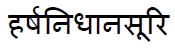
BUT THE TEXT FILE SHOWS : 

Kindly suggest the solution.

    This topic has been closed for replies.

    22 replies

    KetankobaAuthor
    Known Participant
    July 22, 2017

    This is the .indd file created with INDESIGN  :    TEST.indd - Google Drive

    This is the .pdf file created from INDESIGN (Exported as .pdf) :  TEST.pdf - Google Drive

    By copying the content of pdf and pasting it into the same file (USING ADOBE ACROBAT DC PRO) as TEXT BOX gives garbage values SHOWN IN THE SAME PDF FILE.

    Font Used : ADOBE DEVANAGARI BOLD

    Kindly provide the solution...!!!

    Legend
    July 3, 2017

    I am not going to repeat or justify my analysis, or explain in any more detail how text extraction works. You may pay someone else to repeat it if you wish, I have already spent  lot of time on this.

    My considered opinion is that this PDF contains bad information for text extraction and that nothing can fix it. You do not have to accept my opinion. You can study the PDF reference yourself. This is very interesting and has occupied me for many years.

    It it is a basic fact of PDF files: some do not have correctly extractable text. Have you considered reporting this as a bug in the PDF creator? You may link to my analysis.

    KetankobaAuthor
    Known Participant
    July 3, 2017

    I have a lot of PDF files created using INDESIGN and having no INDESIGN files (.indd).

    Kindly suggest a method to extract text from PDF except copy-pasting in NOTEPAD.

    Thank you.

    KetankobaAuthor
    Known Participant
    July 3, 2017

    Thank you for the analysis.

    The point 4 suggests by you is : "DEVANAGARI NA has the Unicode value for DEVANAGARI VOWEL SIGN I"

    Then Why does it show correct character for the first time and incorrect for the second time. And again correct for the further characters.

    Mapping is to be researched...!!!

    AND ALSO NOT ONLY FOR "DEVANAGARI NA" WHICH SHOWS INCORRECT, THERE ARE MANY CHARACTERS WHICH EXTRACT WRONG TEXT IN DEVANAGARI AND OTHER LANGUAGES AS WELL.

    SEE THE BELOW IMAGE

    https://drive.google.com/file/d/0BzT4y2YlCY9Xclo5WENLc3JNd2M/view?usp=sharing

    IN INDESIGN....TYPED TEXTS...

    https://drive.google.com/file/d/0BzT4y2YlCY9XTlNKNkY1eHNMejA/view?usp=sharing

    Participant
    June 29, 2017

    I have the same issue but went I try to convert from PDF to exel File some of numbers change in exel to letters or symbol . How I can fixed this issue. I try to convert PDF from adobe -pro to exel 2010

    Legend
    June 29, 2017

    I analysed your original file. Simply: if lots of different software extracts text wrong from the PDF, blame the PDF.

    Technical analysis.

    1. Extracting text from a PDF is a complex task, but the PDF standard gives some recommendations.

    2. One recommendation is that a PDF may contain a "ToUnicode" map, and that if it is present it should take precedence.

    3. Your sample file contains a ToUnicode map.

    4. In the ToUnicode map, the character which is visually DEVANAGARI NA has the Unicode value for DEVANAGARI VOWEL SIGN I.

    5. It seems to me that this ToUnicode map is incorrect, though Devanagari is a particularly complex part of Unicode, and I do not pretend to properly understand the rules for shaping and composing accents.

    6. Adobe and all other technologies are extracting text using correct methods

    7.Your use of multiple technologies is an empirical conformation of the points from my analysis.  If the PDF is incorrect, you need to focus your attention on the technology that creates it this way. It was not created with Adobe technology: did you try that?

    Participant
    June 29, 2017

    I have the same issue but went I try to convert from PDF to exel File some of numbers change in exel to letters or symbol . How I can fixed this issue. I try to convert PDF from adobe -pro to exel 2010

    KetankobaAuthor
    Known Participant
    June 29, 2017

    ANY SOLUTION...!!!!

    KetankobaAuthor
    Known Participant
    June 28, 2017

    NOW I AM IN ADOBE TECHNOLOGY...

    IS THERE ANY SOLUTION ???

    KetankobaAuthor
    Known Participant
    June 28, 2017

    I HAVE NOT USED THE APPLICATION. JUST COPIED FROM ADOBE ACROBAT DC......AND PASTED IN NOTEPAD AND MICROSOFT WORD.

    LET US SAY IF I AM NOT USING 3rd PARTY PRODUCTS.. BUT....

    WHAT ABOUT THE SEARCH OPTION IN ADOBE ACROBAT...!!!

    THE IMAGE SHOWING SEARCHED TEXT IN ADOBE ACROBAT DC

    TESTED IN PDF.PNG - Google Drive

    Karl Heinz  Kremer
    Community Expert
    Community Expert
    June 27, 2017

    It does not sound like you are actually using Adobe technology. You've mentioned that you've used "iTextSharp, PdfBox and PDFlib", these are all 3rd party products, and you will need to use their support systems to find out what's wrong with either your code or the PDF file you are using.