
Known Participant
June 25, 2017
Question

Text Extraction from PDF

  • June 25, 2017
  • 22 replies
  • 6735 views

I am a Windows application developer using Visual Studio.

And trying to extract texts from a pdf file.

I get complete text extraction in ENGLISH language

But, not able to extract clean text in "SANSKRIT" and "GUJARATI" Languages.

I tried with different DLL libraries and functions.

Finally I got the problem and no Solution.

Problem : While extracting text from pdf, it does not give proper UNICODE of the character sometimes. SEE THE BELOW IMAGE.

THE PDF FILE HAS :
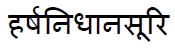
BUT THE TEXT FILE SHOWS : 

Kindly suggest the solution.

    This topic has been closed for replies.

    22 replies

    KetankobaAuthor
    Known Participant
    June 27, 2017

    We had copied Contents(TEXTS) from PDF file and Pasted in .txt as well as .docx file.

    THE RESULTS REMAINS SAME.

    Additionally, THE PDF SEARCH OPTION  SHOWS THE SAME INCORRECTED TEXT.

    THE TEXT FILE LINK:

    TEST.txt - Google Drive

    THE DOC FILE LINK :

    TEST.docx - Google Drive

    THE IMAGE SHOWING SEARCHED TEXT IN ADOBE ACROBAT DC

    TESTED IN PDF.PNG - Google Drive

    Legend
    June 27, 2017

    This is the Acrobat Reader forum. Please share the result you get when extracting text or copy/paste using Acrobat Reader.

    KetankobaAuthor
    Known Participant
    June 27, 2017

    THE PDF FILE LINK :

    TEST.pdf - Google Drive

    KetankobaAuthor
    Known Participant
    June 27, 2017

    /// PROGRAM IN C# USING "PDFBOX" LIBRARY

                 PDDocument doc = null;

                string input = textBox1.Text; // INPUT FILE PATH IS IN textBox1.Text

                doc = PDDocument.load(input);

                PDFTextStripper stripper = new PDFTextStripper();


                foreach (char c in stripper.getText(doc)) // EXTRACT EACH CHARACTER FROM TEXT

                {

                    string text1 = String.Format("Character '{0}' has Decimal code: {1} and Unicode value: U+{2}",

                                      c, ((int)c), ((int)c).ToString("X4"));

                   string unicode = "\\" + "u" + ((int)c).ToString("X4"); // TO STORE UNICODE AS "\u<unicode>", EACH CHARACTER


                   File.AppendAllText(output, unicode); // STORE UNICODE IN TEXT FILE (output)

                }

              // OPTIONAL

              //  File.WriteAllText(output, stripper.getText(doc), Encoding.UTF8); // TO STORE TEXT in TEXT FILE (output).

    Legend
    June 26, 2017

    Can you confirm how you obtained this list of Unicode points? Was it by adding code to the character extractor? Please do not read this value from the app opening the extracted data as this introduces the possibility of new errors.

    It it would be best if you could share the PDF. You must ise your own file sharing for this.

    KetankobaAuthor
    Known Participant
    June 26, 2017

    For the word in pdf

    the unicode should be: \u0939\u0930\u094D\u0937\u0928\u093F\u0927\u093E\u0928\u0938\u0942\u0930\u093F

    Text SHOWS :

    It shows unicode as : \u0939\u0930\u094D\u0937\u0928\u093F\u0927\u093E\u093F\u0938\u0942\u0930\u093F

    Legend
    June 26, 2017

    Yes, so please share the specific numbers for the two strings  in your images. In full please.

    KetankobaAuthor
    Known Participant
    June 26, 2017

    Yes Exactly.

    When the text is "XZ" in PDF; It must extract "XZ".

    I have built a .NET application in C# .

    Till now I have tried using iTextSharp, PdfBox and PDFlib. But no clear extraction.

    Legend
    June 26, 2017

    Sorry, simple error. I should have typed: "For example if you saw XY but expected XZ I would want you to reply that you saw 0058 0059 but expected 0058 005A".

    Bernd Alheit
    Community Expert
    Community Expert
    June 26, 2017

    How did you extract the text with Acrobat Reader?