



ManuFV
Inspiring
September 24, 2021
Answered

XFDF and acroread 21.007.20091 - windows install restart each time I open a XFDF file

  • September 24, 2021
  • 3 replies
  • 785 views

hi,


I'm using XFDF from decades and with the last relase of Acroread 21.007 we have a trouble to open the file from 'windows launch document'.

If I start Acrord32 and request Open a XFDF file, it works correctly.

If I start a fulle command Acrord32 'filename.xfdf', it works perfectly

but 

If I dbl-click a XFDF file from  windows explorer.exe  / desktop or if I 'start by document' , windows start a 'installation phase of Acroread DC' then 20 secondes later  acrobat open my file. 
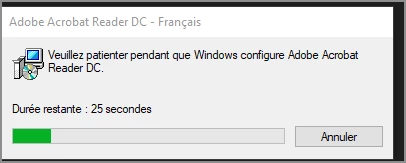


I suppose there is something to declare under windows 'extension association system' but what !! 


if someone can help

thanks by advance.

manu 

This topic has been closed for replies.
Correct answer AnandSri

Hi All!


Thanks for your time and patience.


The fix is available with the latest update of Acrobat & Reader DC Continuous track: Adobe Acrobat and Reader - 21.007.2009x Optional update


Please install the latest patch, and let us know if you experience any issues. 


See this article for detailed information about this release, bug fixes and how to update the app: https://community.adobe.com/t5/acrobat-discussions/adobe-acrobat-and-reader-21-007-2009x-optional-up... 


Regards,

Anand Sri.

3 replies

AnandSri
AnandSriCorrect answer
Legend
September 29, 2021

Hi All!


Thanks for your time and patience.


The fix is available with the latest update of Acrobat & Reader DC Continuous track: Adobe Acrobat and Reader - 21.007.2009x Optional update


Please install the latest patch, and let us know if you experience any issues. 


See this article for detailed information about this release, bug fixes and how to update the app: https://community.adobe.com/t5/acrobat-discussions/adobe-acrobat-and-reader-21-007-2009x-optional-up... 


Regards,

Anand Sri.

_BhavnaNegi
Participant
September 24, 2021

Hi Manu


Thank you for reporting the issue.

The team is aware of this issue and working on the fix.

We will update you once we get any information about resolution for this issue.


We appreciate your patience.


Thanks,
Bhavna

Meenakshi_Negi
Legend
September 24, 2021

Hi Manu,


Thank you for reporting this and sorry about the trouble.


The team is aware and investigating ths issue. We will share an update with you once we get any information from the team.

We appreciate your patience.


Thanks,

Meenakshi


ManuFV
ManuFVAuthor
Inspiring
September 24, 2021

hi, thanks for the reply,


Waiting for the fix, I use a workaround and force the association like the .pdf files , at cmd.exe run as admin

C:\WINDOWS\system32>assoc .pdf
.pdf=AcroExch.Document.DC <<< start as document.DC
C:\WINDOWS\system32>assoc .xfdf
.xfdf=AcroExch.XFDFDoc <<< start as XFDFDoc ... windows launch a install ?
C:\WINDOWS\system32>assoc .xfdf=AcroExch.Document.DC <<< I force to start with Document.DC
.xfdf=AcroExch.Document.DC

and it works.....


with kind regards

manu