
Adobe Acrobat Form Rendering Issue on Android Tablet (Galaxy Tab A8)
Description: (Site Inspection Form Attached for testing if necessary)
We are experiencing a rendering issue with Adobe Acrobat Reader: Edit PDF on our Samsung Galaxy Tab A8 running Android 14 (One UI 6.1). The issue occurs when entering text into form fields.
Steps to Reproduce:
- Open a PDF form in Adobe Acrobat Reader (version 25.2.0.37438).
- Click into a form input field to start typing.
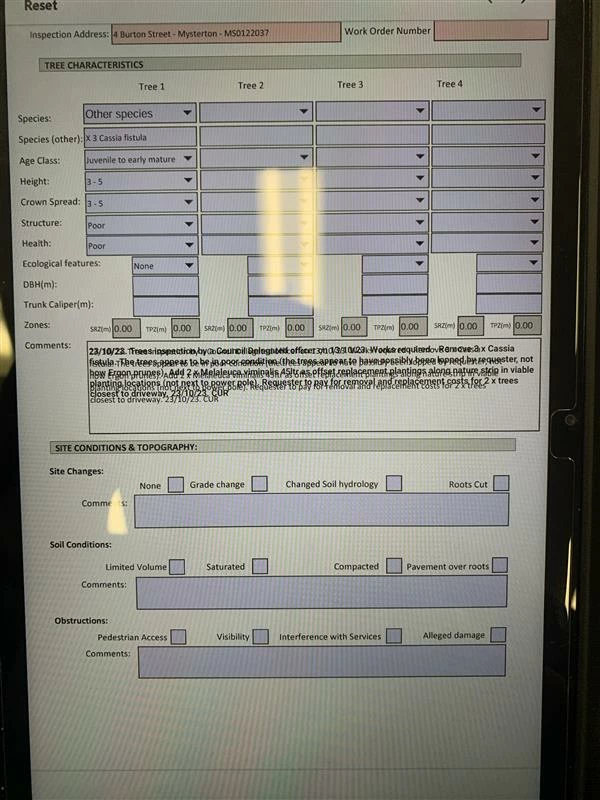
- The text overlaps while typing, making it difficult to read.
- Exiting the input field resolves the overlap, making the text display normally.
- Sometimes, when clicking the input field, the text appears vertically aligned, one character per line (e.g., "H" on one line, "e" on the next, and so on).
- In this state, scrolling vertically within the input field is oddly possible.
Troubleshooting Attempts:
- Cleared cache and data of Adobe Acrobat – issue persists.
- Reinstalled Adobe Acrobat – same error occurs.
- Tried on another Galaxy Tab A8 with the same Android version – issue still occurs.
- Issue appears to be related to how Adobe Acrobat renders text within input fields.
Workaround:
Using Microsoft 365 Copilot app (version 16.0.18526.20058) to fill out PDF forms instead of Adobe Acrobat works as expected, without any text rendering issues.
Device Details:
- Product Name: Galaxy Tab A8
- Android Version: 14 (One UI 6.1)
- Firmware Version: X205XXU5DXKA
- App Name: Adobe Acrobat Reader: Edit PDF
- App Version: 25.2.0.37438
- IMEI: 353289769253925
Request:
Could you provide guidance or confirm if this is a known issue? Any fixes or updates planned to resolve this input field rendering problem?
(Looks like this when you are not clicked into the input field > looks normal)
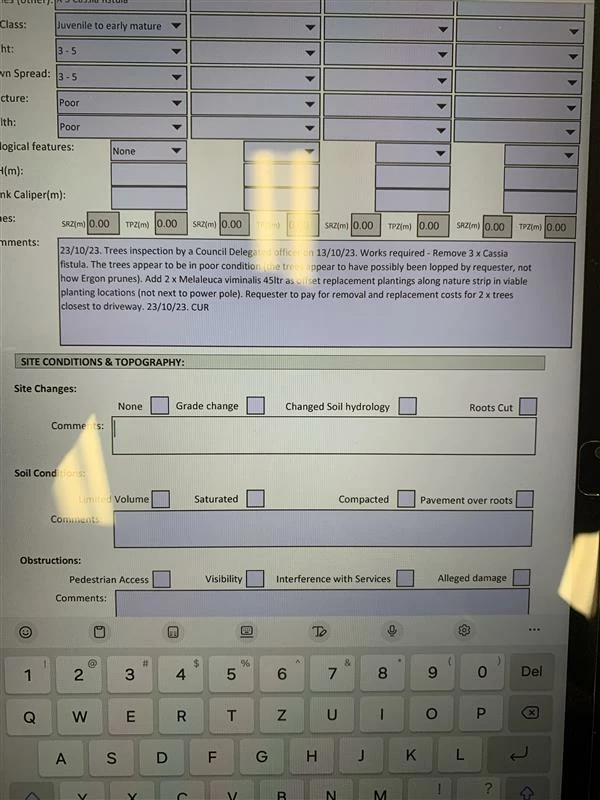
(Looks like this when you click the input field to enter or edit text > sometimes this text aligns vertically as well)
Thank you.


 AdChoices