
Participant
January 10, 2023
Answered

Adobe Acrobat Reader error saving once users signs with ipad

  • January 10, 2023
  • 2 replies
  • 1383 views

I have a time sheet that managers fill out and sign then send it off to the owner of the company to sign off on... When the managers sign it it has no issues. But once specific PDF that the owner signed I am gettiing the ffollowing error.

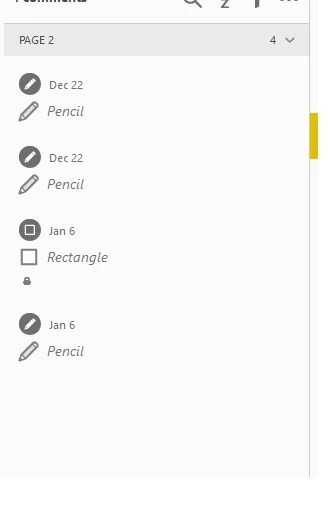
"The Doucment could not be saved. Invalid annotation object". I think I have narowed it down to the owners signature bing a "locked rectangle" in the notes section. Has anyone run into this or know why this happens when signing pdfs with an ipad? 
This topic has been closed for replies.
Correct answer Thom Parker

Have the iPad user open the PDF in the Acrobat Mobile Reader or Readdle PDF Expert for the signing. 

It is very likely that whatever the iPad Mail App is doing is destroying the PDF format. 


Can you post an example of a PDF signed on the iPad?


2 replies

Thom Parker
Community Expert
Community Expert
January 10, 2023

In which ipad application is the form signed?  

In which application is the ower signing?

Is the an Adobe Sign form?  

Thom Parker - Software Developer at PDFScriptingUse the Acrobat JavaScript Reference early and often
Participant
January 11, 2023

In which ipad application is the form signed?  Original user uses Pdf by Xodo to sign which causes no issues 

In which application is the ower signing? the Owner opens the pdf once the user signs it from inside the iOS Mail app on the iPad Pro. Then she will click the pencil icon on the top right corner of the pdf and sign it with an apple pencil. Then she attaches it to an email and shoots it off to another user. once that users opens it in Adobe Acrobat Reader DC she is unable to save it due to the "rectangle" created by the Owner signing it. 

Is the an Adobe Sign form?  They are not using Adobe Sign form.

Thom Parker
Community Expert
Thom ParkerCommunity ExpertCorrect answer
Community Expert
January 11, 2023

Have the iPad user open the PDF in the Acrobat Mobile Reader or Readdle PDF Expert for the signing. 

It is very likely that whatever the iPad Mail App is doing is destroying the PDF format. 


Can you post an example of a PDF signed on the iPad?


Thom Parker - Software Developer at PDFScriptingUse the Acrobat JavaScript Reference early and often
JR Boulay
Community Expert
Community Expert
January 10, 2023

[MOVED TO THE ACROBAT READER MOBILE DISCUSSIONS]

Acrobate du PDF, InDesigner et Photoshopographe