Participant
July 3, 2025
Answered

AI Assistant - iphone

  • July 3, 2025
  • 1 reply
  • 257 views

Hi team,


I’ve purchased the Adobe Acrobat AI Assistant and I’m using the iOS system, primarily on my iPhone. However, I can’t find the AI icon anywhere and I’m unable to use it.


Could you please assist me with how to access or enable it on my iPhone?


Thank you very much.

Correct answer Amal.

[Edited response]

Hi @marko_4822 


We hope you are doing well. Thanks for reaching out. We are sorry for the trouble you are experiencing.


++ Adding to the discussion 


As described by @creative explorer The AI Assistant isn't a standalone app. It's an integrated feature within the Acrobat Reader Mobile app (or the paid Acrobat desktop app). 

To use the Acrobat AI assistant on iPhone mobile device, you need to download the Acrobat Reader mobile app (Freeware) from the App Store and install it on your iPhone. Once done, open any PDF file using the Acrobat Reader mobile app, and then select AI Assistant
Alternatively, you can also access AI Assistant from the contextual menu. Select the text for AI Assistant. The contextual menu opens, then select Ask AI Assistant

Also, make sure the Generative AI is enabled from the Acrobat Mobile app preferences. Tap on the profile > Preferences > Enable 'Generative AI features in Acrobat'
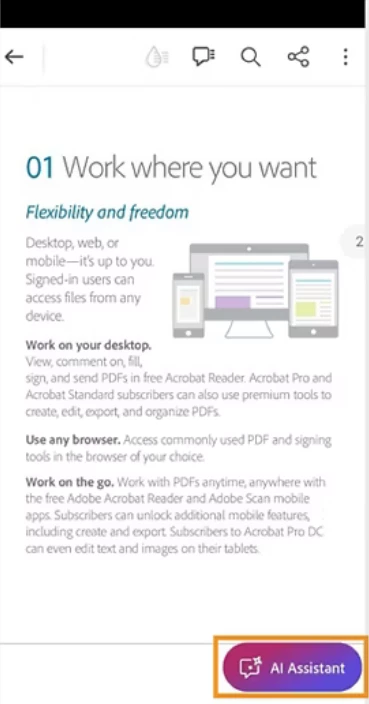
To know more about using generative AI features in Acrobat Mobile, please check the steps shared in the help page https://helpx.adobe.com/acrobat/using/generative-ai-features-in-acrobat-mobile.html 


Let us know if you still experience any trouble and need more help.



1 reply

creative explorer
Community Expert
Community Expert
July 5, 2025

@marko_4822 even if you've purchased the Adobe Acrobat AI Assistant, you still need to have the Adobe Acrobat Reader app (or the full Adobe Acrobat app if you have a Standard or Pro subscription) installed on your iOS device to access and use the AI Assistant features. The AI Assistant isn't a standalone app. It's an integrated feature within the Acrobat Reader app (or the paid Acrobat app) that enhances its capabilities.

m
Amal.
Community Manager
Amal.Community ManagerCorrect answer
Community Manager
July 7, 2025

[Edited response]

Hi @marko_4822 


We hope you are doing well. Thanks for reaching out. We are sorry for the trouble you are experiencing.


++ Adding to the discussion 


As described by @creative explorer The AI Assistant isn't a standalone app. It's an integrated feature within the Acrobat Reader Mobile app (or the paid Acrobat desktop app). 

To use the Acrobat AI assistant on iPhone mobile device, you need to download the Acrobat Reader mobile app (Freeware) from the App Store and install it on your iPhone. Once done, open any PDF file using the Acrobat Reader mobile app, and then select AI Assistant
Alternatively, you can also access AI Assistant from the contextual menu. Select the text for AI Assistant. The contextual menu opens, then select Ask AI Assistant

Also, make sure the Generative AI is enabled from the Acrobat Mobile app preferences. Tap on the profile > Preferences > Enable 'Generative AI features in Acrobat'

To know more about using generative AI features in Acrobat Mobile, please check the steps shared in the help page https://helpx.adobe.com/acrobat/using/generative-ai-features-in-acrobat-mobile.html 


Let us know if you still experience any trouble and need more help.