


Android tablet – Color palette is cut off in landscape mode when highlighting text
I would like to report a display/UI issue affecting Adobe Acrobat Reader on Android tablets.
The problem started with the app version released on August 30, 2026 and is still present after the September 2, 2026 update.
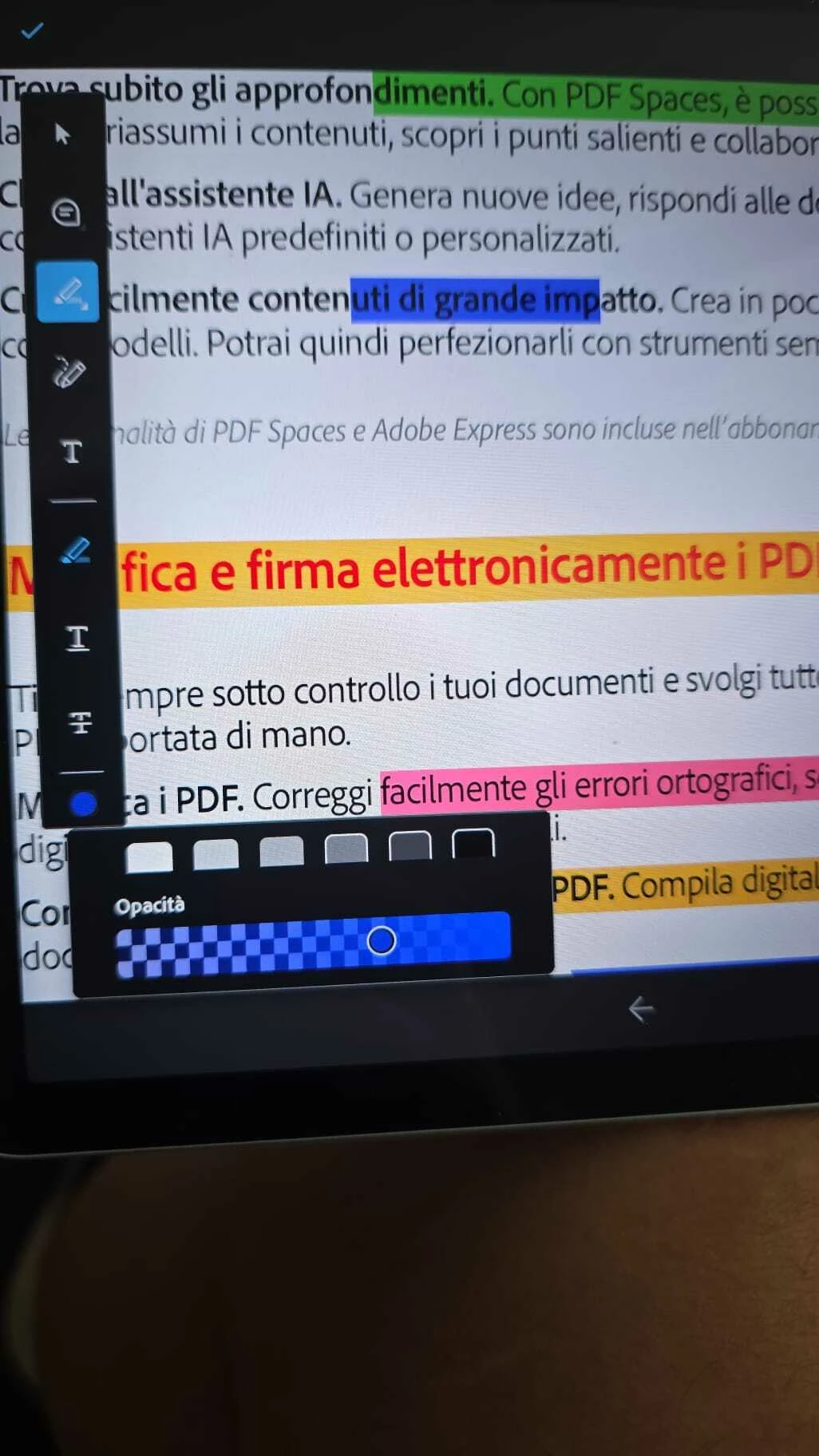
On Android tablets, when the device is used in landscape orientation and I highlight some text, the color palette is not displayed correctly. As a result, I am unable to select or change the highlight color.
The same issue also affects other color palettes/tools: in landscape mode, the palette appears cut off, incomplete or partially outside the visible area of the screen.
If I rotate the tablet to portrait orientation, the palette is displayed correctly and all colors can be selected normally.
I have reproduced the issue on different Android tablets, including:
- Samsung tablet
- Lenovo tablet
The problem does not occur on Android smartphones, where the color palette works correctly in both portrait and landscape mode.
Steps to reproduce:
- Open a PDF in Adobe Acrobat Reader on an Android tablet.
- Rotate the tablet to landscape orientation.
- Select some text.
- Choose the Highlight tool.
- Open the highlight color palette.
- The palette is cut off and it is not possible to properly select/change the color.
Expected behavior:
The entire color palette should remain visible and accessible in landscape mode, as it does in portrait mode.
Actual behavior:
The palette is partially hidden/cut off in landscape orientation, preventing access to some or all color options.
I have attached a photo showing the issue.
This appears to be a regression introduced with the August 30 update.
Could you please confirm whether this is a known issue and if a fix is planned for an upcoming Android release?
Thank you.
 AdChoices