Participant
May 15, 2023
Answered

Can't Download Languages For Read Aloud (Androi

  • May 15, 2023
  • 5 replies
  • 21386 views

I'm getting the following error whenever I try to download languages for the "Read aloud" function.
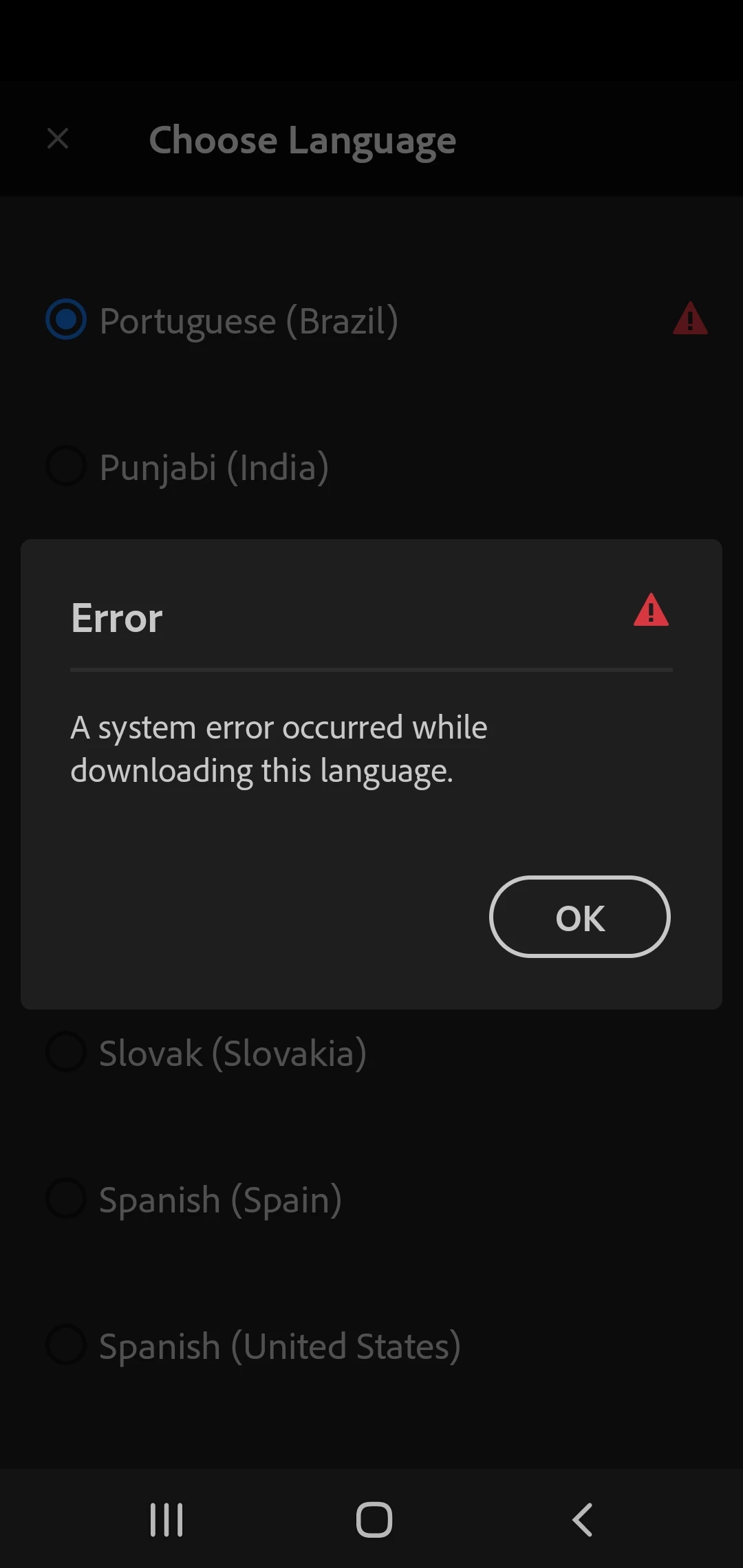


I haven't found anything about this issue in these forums or elsewhere.


Please, advise.

Correct answer ls_rbls

Hi @Bernadeth ,


I was able to download the Indonesian language pack using an Android device with version 14, kernel updated on 12 April 2024.


I also used a 5G network to perform the download. Since I've noticed from your screenshots that you were possibly perforimng the download over a 4G cellular data network, would it make any difference if you perform the download using a Wi-Fi network?


Anyhow, if you are able to download and install the desired Lnaguage Pack on your Android, you also need to go to the Android's "General Management" menu ==> tap on "Language ==> tap on the "+ Add Language" to actually make that language available for your apps.


However, if you naviagte to the Android's "General Management" menu ==> "App languages", note in that menu screen the message "Only apps that support language selection are shown here"


Mostly the main Google apps will appear listed here and maybe a few third-party apps. Yet, the Acrobat Mobile app doesn't appear listed here, indicating that the Acrobat app doesn't support that particular language selection.

5 replies

Amal.
Community Manager
Community Manager
August 22, 2024

Hi @André G Heindrickson @Bernadeth @broadway73 


I hope you're doing well. I wanted to follow up and check if you're still encountering the issue with the latest build version 24.08.00. If the problem persists, please let us know, and we'll promptly investigate it further.


~Amal

A3user
Inspiring
September 27, 2024

Hi Amal. I'm having the same issue trying to download the Spanish language (to read aloud) with the app installed in my Galaxy s21Fe. 

Participant
November 10, 2024

I'm having the same problem, even though I used Spanish (United States) the previous day, today it stoped working. I've downloaded and reinstalled the language pack for Spanish US on my Android 15 and still get the message ". I'm using an google pixel 9

Participant
April 30, 2024

I just got the same problem today. When I tried to switch the language into Indonesian, it said downloading, but then the error message popped up. 


I read from the replt that it has something to do with google. Do I suppose to wait until the next update? Just confirming. Thank you.


ls_rbls
Community Expert
ls_rblsCommunity ExpertCorrect answer
Community Expert
May 2, 2024

Hi @Bernadeth ,


I was able to download the Indonesian language pack using an Android device with version 14, kernel updated on 12 April 2024.


I also used a 5G network to perform the download. Since I've noticed from your screenshots that you were possibly perforimng the download over a 4G cellular data network, would it make any difference if you perform the download using a Wi-Fi network?


Anyhow, if you are able to download and install the desired Lnaguage Pack on your Android, you also need to go to the Android's "General Management" menu ==> tap on "Language ==> tap on the "+ Add Language" to actually make that language available for your apps.


However, if you naviagte to the Android's "General Management" menu ==> "App languages", note in that menu screen the message "Only apps that support language selection are shown here"


Mostly the main Google apps will appear listed here and maybe a few third-party apps. Yet, the Acrobat Mobile app doesn't appear listed here, indicating that the Acrobat app doesn't support that particular language selection.

Participant
July 4, 2024

Thank you so much. It helps a lot

Participant
May 19, 2023

Getting the same error, any news on solving it?

ls_rbls
Community Expert
Community Expert
May 19, 2023

@Cpintov1 ,


As mentioned, is working on my Android mobile device.


I updated the Acrobat Mobile app to its latest beta version, shown in the screenshot below:


Alternatively, if you already updated to its latest version, see if clearing the cache and restarting the mobile device do any difference:


S_S
Community Manager
Community Manager
May 21, 2023

Hi @André G Heindrickson @Cpintov1,


Hope you are doing well. Sorry for your experience with Acrobat Reader's read-aloud feature.


Acrobat Reader Mobile uses stock Android text-to-speech features to allow you to listen to the text within the document.


Have you tried downloading the language pack from your device's settings app? Also, Samsung uses its own Text-to-speech engine. Can you confirm if the application is installed on your device?


If not, you can do so from your Galaxy Store and then install the desired language pack on your device (depending on the availability in the list). Once downloaded, you can also use the same language on Acrobat Reader Mobile.


Let us know if the issue persists after following the above steps, and we will investigate further.


Look forward to hearing from you.


-Souvik


maxwithdax
Community Expert
Community Expert
May 15, 2023

Read Aloud uses the language installed in your Phone. Android uses TalkBack.


Participant
May 15, 2023

Hello, 


Thank you for your reply. My phone has Samsung text-to-speech engine and Speech Services by Google, and either option makes no difference.


Furthermore, why would Acrobat show me the option to download languages if they are not supposed to exist? Seems mighty arbitrary to me.


Kind regards,


AGH

ls_rbls
Community Expert
Community Expert
May 15, 2023

Hi @André G Heindrickson ,


If I am not mistaken, if you're trying to download languages for Adobe Acrobat and they are meant to be used with a full desktop operating system, they will not install.


Try using the recommended Text to Speach from Google:


You may also need to download and install third-party PDF reading apps from the Google Play store.

Participant
May 15, 2023

Hello,


Thank you for your reply. Doesn't it seem a bit preposterous that Acrobat would show me the option to download these languages in Android if they were only meant for Windows?

Also, Google Text-to-Speech is already enabled on my phone settings, and it makes no difference.


Finally, sure, I could download a different app for this purpose, which is a "solution"that fits mostly every problem. However, I'm looking for a solution for Acrobat, my main reader, which is why I posted in this forum.

Kind regards,

AGH

ls_rbls
Community Expert
Community Expert
May 15, 2023

I am sorry, but unless my Acrobat Mobile App is different than yours, I don't see where in that app you have an option to download Read Aloud languages for Acrobat.


Read Aloud and Accessibility features are handled by the device's operating system not by the app itself.


 But maybe I am preposterously wrong and you may be able to clarify what exactly am I missing.