
Participant
January 31, 2025
Answered

changing underline color

  • January 31, 2025
  • 4 replies
  • 1235 views

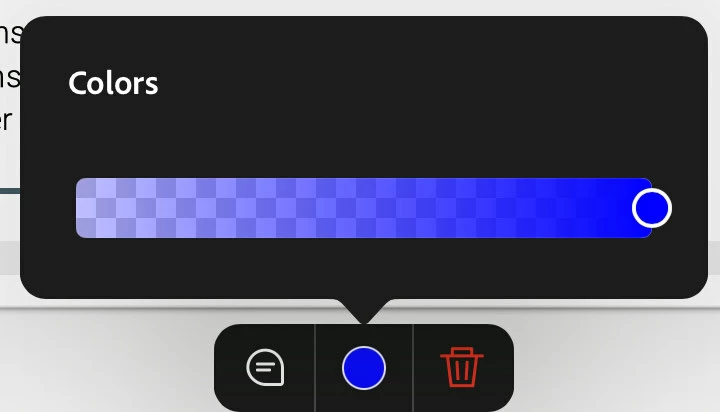
I was able to change underline colors about a week ago, but now I don’t even have the option to choose a color palette. The only option available is adjusting the gradient of the color. Is there a setting I can change to fix this? What am I missing? Also, I'm using my iPad 10 to edit PDF files.
Correct answer Amal.

Hi there


Hope you are doing well and thanks for reaching out. We are sorry for the late reply.


This issue has been fixed with our March release, please update the app to the latest version available on App/Play Store and reboot the device once and check.


Let us know if you still experience this issue and need more help.


4 replies

Participant
February 7, 2025

Exactly ! What a stupid new behavior of adobe. So idiot. 

Amal.
Community Manager
Amal.Community ManagerCorrect answer
Community Manager
May 21, 2025

Hi there


Hope you are doing well and thanks for reaching out. We are sorry for the late reply.


This issue has been fixed with our March release, please update the app to the latest version available on App/Play Store and reboot the device once and check.


Let us know if you still experience this issue and need more help.


Participating Frequently
February 2, 2025

Yes!

This seems to be a new behavior -- iPad gersion of Reader.

I want my color palette back -- not this opacity slider !!


-lagouyn

Participating Frequently
February 2, 2025

gersion -> version

try67
Community Expert
Community Expert
February 2, 2025

[Question moved to the Reader for Mobile forum]

Community Expert
February 1, 2025

To clarify, you have text that you wnat to underline and choose the colour?
I'm on Windows with Acrobat Pro and the process is:
1. Choose Edit.
2. Select your text.

3. Change the colour in the Font color box and choose a color (as below).
4. Click on the Underline icon (as below).


Is the above not working for you? If not, what are the steps you're going through?

Participant
February 1, 2025

Yes I'm trying to change the color of underlined text while editing my textbook for note-taking in Adobe on my iPad. However, the option to change the underline color seems to be missing. I’m not sure if this is due to a recent update or something