
amitm59583440
Participant
July 30, 2018
Answered

Content Not Display in PDF for Adobe Acrobat on Android Devices

  • July 30, 2018
  • 4 replies
  • 9955 views

Hi Team,

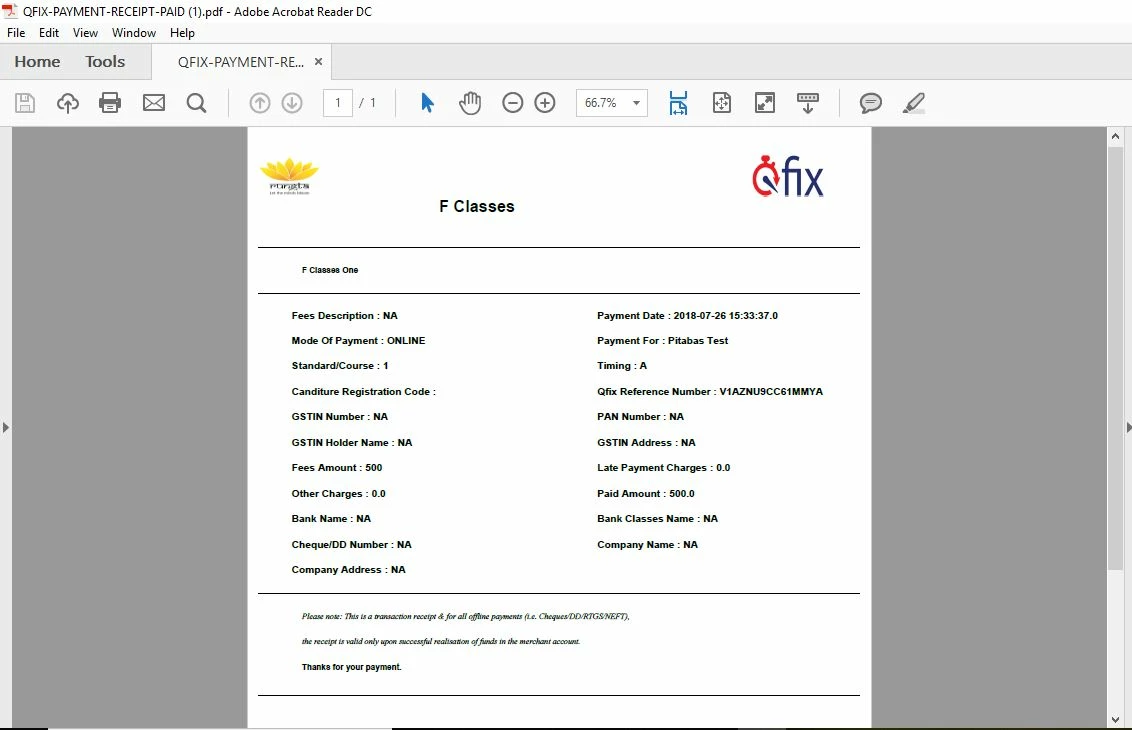
We have one pdf file that is downloading from server through our mobile app. When we open this pdf file in Adobe Acrobat for mobile on any Android devices, files does not display whole content. While same pdf file when we open through Adobe Acrobat Reader DC on Desktop then all content display successfully.

This pdf file display whole content on Android devices, when we open it through other non-adobe products like WPS office, Drive Pdf viewer etc.

We debug from our side and we are not getting any error.

Kindly check it and let us know as soon as possible. Please let us know in case of any query.

For reference attaching the pdf file, and also attaching the screenshot of pdf that how this pdf is looking  into mobile devices, how this pdf  is looking into desktop devices for Adobe Acrobat.

As I see there is not any option to attach the pdf files, please let me know how I can send pdf files for inquiry. Is there any email id of support team in Adobe Acorbat then please let us know.

Mobile Snanpshot of Pdf -

Desktop Snanpshot of Pdf -
Thanks

Qfix Team

This topic has been closed for replies.
Correct answer Dov Isaacs

That is helpful information. Thanks. May take a bit to get back to you on this. As you are probably aware, this PDF file wasn't generated by any Adobe tools and thus, it may take some significant work to figure out what's wrong.

          - Dov


OK. The Director of our Mobile PDF Reader development team found the problem. In fact the PDF file is defective although some renderers ignore the error.

There is a DecodeParams array that is empty. We fixed the file by removing that array. See attached file. It should work. Bottom line is that whatever is creating this file (it is not Adobe) is not following the PDF specification closely enough.

          - Dov

4 replies

Participant
April 24, 2023

Even I have the same problem please help me with this pdf it is very important for me thank you

S_S
Community Manager
Community Manager
April 29, 2023

Hi @Murtaza Khuzema Hakimi,


Thank you for sharing the file.


Our team is aware of the issue, and will be fixed in the upcoming update. 


While I understand how frustrating this might be, I request your kind understanding and patience while we get this fixed.


-Souvik

Participant
April 29, 2023
Thanks you can you optimise my pdf till that it is fixed I need it urgently
to work
amitm59583440
Participant
July 31, 2018

Hi Dov, Can you please let me know how I can send pdf files to you

Dov Isaacs
Legend
July 31, 2018

Use the Send and Track feature of Acrobat and send me the URL via a private message on these forums.

          - Dov

- Dov Isaacs, former Adobe Principal Scientist (April 30, 1990 - May 30, 2021)
amitm59583440
Participant
August 1, 2018

Hi Dov, Please find the pdf file in below link : https://files.acrobat.com/a/preview/74fc799b-36b6-4bd7-896e-29dfc6b92ccd

Dov Isaacs
Legend
July 30, 2018

If you could please post a sample PDF file exhibiting this issue, we might be able to examine it and advise you as to what the issue actually is. Without such a file, there is nothing we can do other than provide perhaps meaningless speculation.

          - Dov

- Dov Isaacs, former Adobe Principal Scientist (April 30, 1990 - May 30, 2021)
Dov Isaacs
Legend
July 30, 2018

No it isn't. It is screen shots, not the PDF file itself!! We can't analyze screen shots to determine the contents of a PDF file.

          - Dov

- Dov Isaacs, former Adobe Principal Scientist (April 30, 1990 - May 30, 2021)
felipepaz
Participant
July 30, 2018

Same issue here. Also noticed that hapens with Adobe app on UWP windows devices.

Legend
July 30, 2018

You are posting replies to a PUBLIC FORUM. Do not upload files containing personal data.

felipepaz
Participant
July 30, 2018

Thanks Dave. Dont worry about that. This file does not provide classified information. It's just my weight and can be public used to help solving this problem.