alexandre_atheniense
Participant
May 13, 2017
Answered

Convert e-mail to pdf on iPad version

  • May 13, 2017
  • 1 reply
  • 815 views

Hi,

how can I convert an e-mail on outlok inbox to PDF using an IPad version of Adobe ?

This topic has been closed for replies.
Correct answer AkanchhaS8194121

Hi Alexandre.atheniense,

You may follow the steps suggested below-

  • In Mail, view a message.
  • Tap the Share button.
  • Select Print.
  • In the Printer Options screen, you’ll see a preview. You can either Pinch and Expand it or Poke it (the harder 3D Touch).

      A PDF preview window opens. As shown in picture-
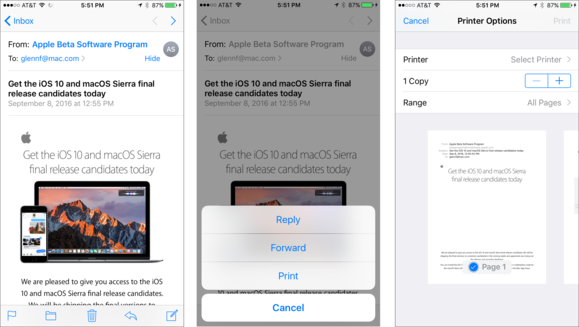
mac911 print pdf from email

  • Tap the Share button at the bottom (For 5s) or top Right (For 6 or 7S) of that window.

IMG_3694

  • You can choose any Share option, "Copy to Acrobat"  including Copy to, switch to an app that supports PDFs into which you can paste, share it Dropbox, add it to iCloud Drive, and the like. (similar to the image below)

IMG_3695

  • Once it’s shared, tap the back arrow (upper left), and then tap Cancel.

Regards,

Akanchha

1 reply

AkanchhaS8194121
AkanchhaS8194121Correct answer
Legend
May 18, 2017

Hi Alexandre.atheniense,

You may follow the steps suggested below-

  • In Mail, view a message.
  • Tap the Share button.
  • Select Print.
  • In the Printer Options screen, you’ll see a preview. You can either Pinch and Expand it or Poke it (the harder 3D Touch).

      A PDF preview window opens. As shown in picture-

mac911 print pdf from email

  • Tap the Share button at the bottom (For 5s) or top Right (For 6 or 7S) of that window.

IMG_3694

  • You can choose any Share option, "Copy to Acrobat"  including Copy to, switch to an app that supports PDFs into which you can paste, share it Dropbox, add it to iCloud Drive, and the like. (similar to the image below)

IMG_3695

  • Once it’s shared, tap the back arrow (upper left), and then tap Cancel.

Regards,

Akanchha