Correct answer HarshVardhan Pareek

Hi @MarcelodelaFuente,


Hope you're doing well.


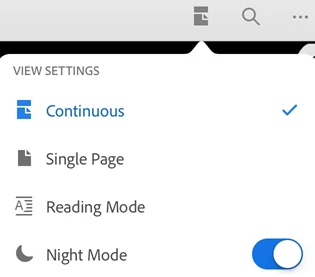
As you have mentioned that you have changed the application to dark mode now you want to change it back to normal. To turn off the dark/night mode you can follow the steps below:

  1. Open a document.
  2. Tap the view mode icon (varies depending on the current mode).
  3. Enable Night Mode.


Also, here is a help article you can refer to:

IOS- https://www.adobe.com/devnet-docs/acrobat/ios/en/accessibility.html?highlight=dark%20mode#night-mode

Android- https://www.adobe.com/devnet-docs/acrobat/android/en/settings.html?highlight=night%20mode#dark-night-mode


Let us know it that helps.


Thanks,

Harsh

3 replies

Participant
February 3, 2025

Hi, I cannot find the settings button on my adobe acrobat to switch back from dark mode to light mode.


Can you please tell me where to find it?


Thanks.

Monica


Amal.
Community Manager
Community Manager
February 10, 2025

Hi there,

I hope you're doing well! Thanks for reaching out.

If you want to switch back to Light Mode, follow these steps:

  1. Open the PDF file in the Acrobat app
  2. Tap on the three dots in the top right corner.
  3. Tap on view settings > Scroll at the bottom to turn off 'Night Mode'


Additional source: For future reference and self help you may also check the  help page https://helpx.adobe.com/acrobat/mobile-app-faq.html


Participant
March 10, 2023

Hi I'm trying to change to light mode on my Samsung but everywhere I look is just for iPhone. Can you help? 

S_S
Community Manager
Community Manager
March 10, 2023

Hi @Phillipa28807073lze5,


Sorry to hear about your experience.


Would you mind going through the steps here: Accessibility — Acrobat for Android Help


Let me know if this helps.


-Souvik

HarshVardhan PareekCorrect answer
Participating Frequently
August 16, 2021

Hi @MarcelodelaFuente,


Hope you're doing well.


As you have mentioned that you have changed the application to dark mode now you want to change it back to normal. To turn off the dark/night mode you can follow the steps below:

  1. Open a document.
  2. Tap the view mode icon (varies depending on the current mode).
  3. Enable Night Mode.


Also, here is a help article you can refer to:

IOS- https://www.adobe.com/devnet-docs/acrobat/ios/en/accessibility.html?highlight=dark%20mode#night-mode

Android- https://www.adobe.com/devnet-docs/acrobat/android/en/settings.html?highlight=night%20mode#dark-night-mode


Let us know it that helps.


Thanks,

Harsh

Participant
August 16, 2021

Harsh, I did exactly what you indicated and it worked, thank you very much

Participating Frequently
August 17, 2021

Glad to know that your issue is resolved now.
Let us know if you need any help.


Regards,
Harsh