Participant
April 19, 2025
Answered

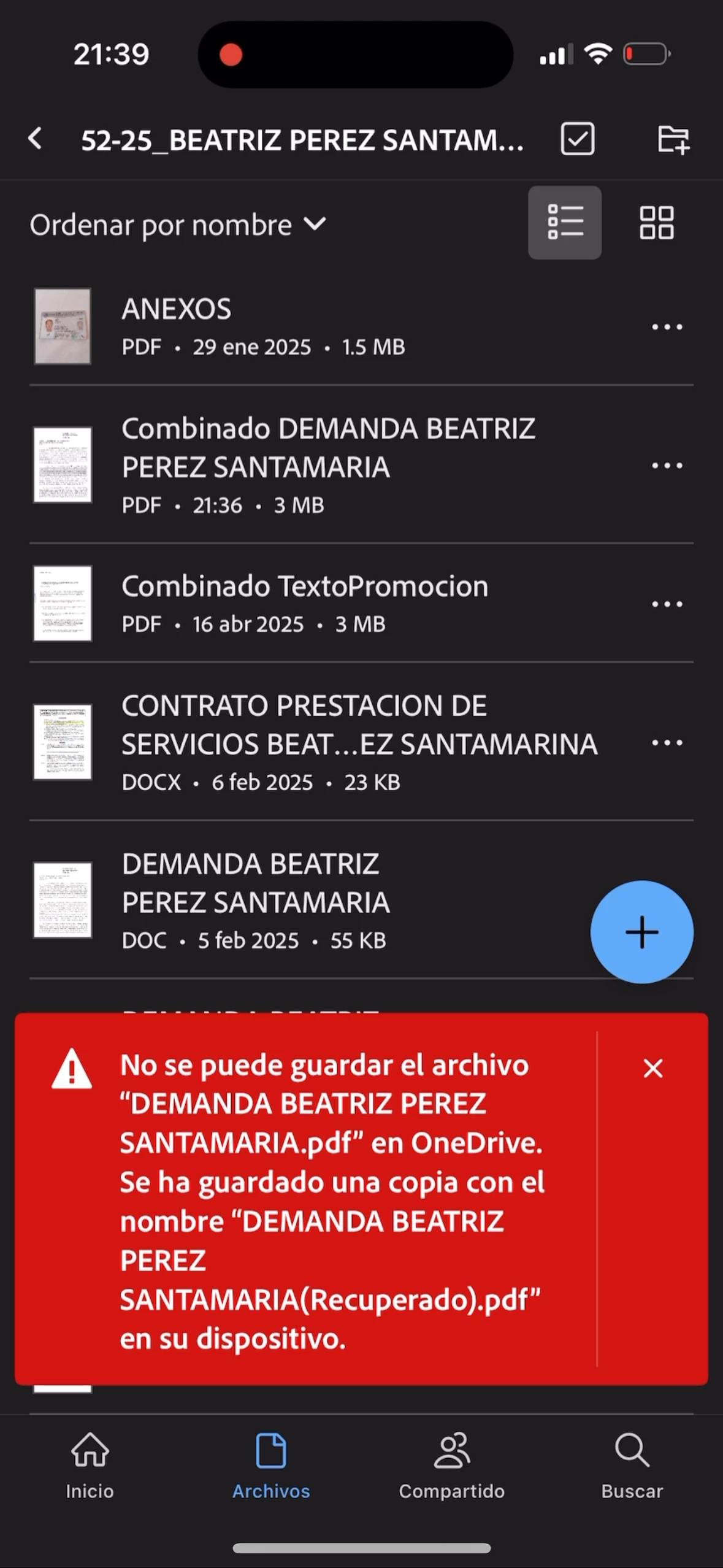
Error combinar archivos
  • April 19, 2025
  • 2 replies
  • 577 views

Estoy presentando este problema al utilizar Adobe Acrobat Reader. a la hora de querer fusionar archivos o páginas en un archivo contenido En OneDrive. 

Correct answer Amal.

Hi there


Hope you are doing well, and sorry for the trouble you had while merging and saving the file on OneDrive.


I have checked your Adobe account and found that you have an Acrobat Premium subscription. With a subscription to Adobe Acrobat Premium or Adobe Acrobat Pro, you can combine up to 12 files into a single PDF. You can also combine files from any integrated file location, such as Dropbox and Drive. For more information, please check the help page (https://www.adobe.com/devnet-docs/acrobat/ios/en/managefilesfolders.html?highlight=combine)


The issue you are experiencing, where the file doesn't save to OneDrive and a local copy is getting created, is a known issue to our engineering and its work under progress, we will keep you posted as soon as we get more information.


Thanks for your understanding.


2 replies

Participant
June 28, 2025

Estoy teniendo problemas para combinar unos planos de qgis en pdf. Me sale error.

Amal.
Community Manager
Community Manager
June 30, 2025

Hi there 


Hope you are doing well and thanks for reaching out. 


This page is dedicated to Acrobat Mobile app-related queries and issues. Please post your query on the Acrobat Pro community page for desktop application issues https://adobe.ly/3TMEY9l so that our community experts may also look into it and assist you better.


creative explorer
Community Expert
Community Expert
May 18, 2025

@luis_9897 I hate to be be bearing you bad news, but Adobe Acrobat Reader does not natively allow you to merge PDF files. This is a feature that is typically available in the paid versions of Adobe Acrobat (like Acrobat Pro or Standard) or through Adobe's online services, which may require a subscription. While you can view, sign, annotate, and perform other basic PDF tasks with Adobe Acrobat Reader desktop, combining multiple PDFs into one requires more advanced functionality and well, the paid versions too!


You can read more into what Standard and Pro offers you: https://www.adobe.com/acrobat/pricing.html


m
Amal.
Community Manager
Amal.Community ManagerCorrect answer
Community Manager
May 19, 2025

Hi there


Hope you are doing well, and sorry for the trouble you had while merging and saving the file on OneDrive.


I have checked your Adobe account and found that you have an Acrobat Premium subscription. With a subscription to Adobe Acrobat Premium or Adobe Acrobat Pro, you can combine up to 12 files into a single PDF. You can also combine files from any integrated file location, such as Dropbox and Drive. For more information, please check the help page (https://www.adobe.com/devnet-docs/acrobat/ios/en/managefilesfolders.html?highlight=combine)


The issue you are experiencing, where the file doesn't save to OneDrive and a local copy is getting created, is a known issue to our engineering and its work under progress, we will keep you posted as soon as we get more information.


Thanks for your understanding.