This topic has been closed for replies.
Correct answer jane-e

Hi @Charanjit5C72 

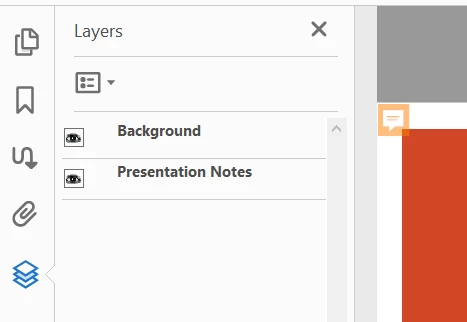
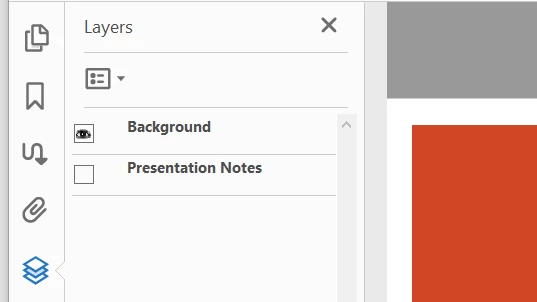
When you convert PowerPoint Notes to Acrobat Comments, Acrobat automatically creates a Layer for the Notes and puts the Layers pane in the left-hand Navigation Pane. (Or View > Show/Hide > Navigation Panes.)


Click the eyeball for the Presentation Notes layer to Hide (Show) the layer with the Comments.


~ Jane

1 reply

jane-e
Community Expert
jane-eCommunity ExpertCorrect answer
Community Expert
March 21, 2021

Hi @Charanjit5C72 

When you convert PowerPoint Notes to Acrobat Comments, Acrobat automatically creates a Layer for the Notes and puts the Layers pane in the left-hand Navigation Pane. (Or View > Show/Hide > Navigation Panes.)


Click the eyeball for the Presentation Notes layer to Hide (Show) the layer with the Comments.


~ Jane

Participant
March 21, 2021

Thank you for your reply Jane. I am aware of the layers however they are not supported on an iPAD Acrobat Reader. 


Our requirement is to remove the annotation mark but preserve the comments. We use PDF on on iPAD for presentations and having those annotation marks is distracting and we don't want the comments to pop up accidentaly during presentation.


Would appreciate guidance on how best to do it. We have the ability to use the Adobe Tools API/SDK, if there is a way to accomplish our requirement.

jane-e
Community Expert
Community Expert
March 21, 2021

Hi


I saved the PDF to the Document Cloud and opened it on my iPad. As you said, the icons reappear in the iPad version of Reader.


You did not mention Acrobat Reader for iPad in your original post, and you posted to the Acrobat forum. Since your question is about the iPad version, I'll move your post to Acrobat Reader Mobile where you are more likely to get a focused response.


~ Jane