Answered
Freehand issue
adobe reader app on iPad Pro. Cannot find anywhere to change the font from red to black. Please help

adobe reader app on iPad Pro. Cannot find anywhere to change the font from red to black. Please help
Hi,
After you add Freehand drawing to a document,
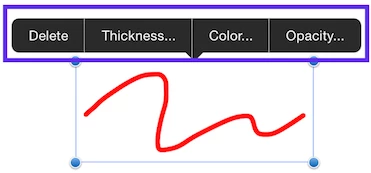
Once you change the color property, Acrobat Reader will remember the new value of the particular comment type next time.
Please let us know if it works for you.
Already have an account? Login
Enter your E-mail address. We'll send you an e-mail with instructions to reset your password.
 AdChoices