

Participant
February 23, 2021
Answered

Full Subscription scam

  • February 23, 2021
  • 4 replies
  • 4846 views

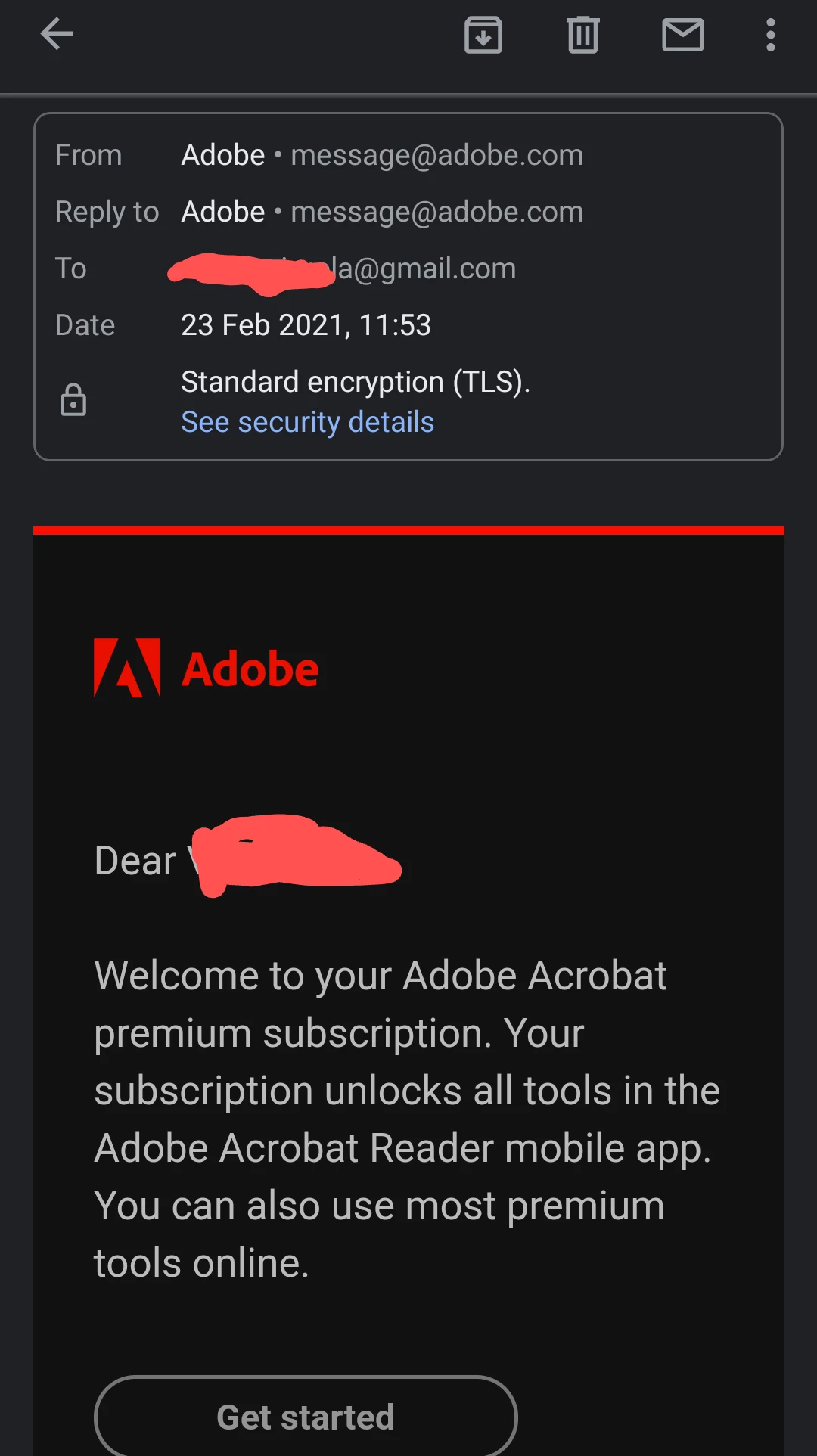
Hello I just got an email from Adobe about a full Subscription I never did and checking on my app it shows I'm a free user.......the email looks genuine so just a mistake or some scam?

    This topic has been closed for replies.
    Correct answer Tariq Ahmad

    Hi Pescebello and all,


    Sadly, the email, Pescebello, has received is a genuine Adobe email. It was a system glitch.

    We are sorry for your inconvenience. Please know that you were not charged for an Acrobat Reader mobile subscription without a purchase. We appreciate your understanding and are always here if you have any additional questions or concerns.

    Regards,
    Tariq 

    4 replies

    Tariq AhmadCommunity ManagerCorrect answer
    Community Manager
    March 4, 2021

    Hi Pescebello and all,


    Sadly, the email, Pescebello, has received is a genuine Adobe email. It was a system glitch.

    We are sorry for your inconvenience. Please know that you were not charged for an Acrobat Reader mobile subscription without a purchase. We appreciate your understanding and are always here if you have any additional questions or concerns.

    Regards,
    Tariq 

    Inspiring
    February 26, 2021

    Hi Pescebello,


    Thank you for posting your query here.


    I would like to inform you that the sender email address is a valid one and all emails regarding "Welcome email" and "Invite User" for Creative Cloud and Document cloud Subscriptions are triggered from the automated mailbox message@adobe.com. And the email is triggered only when there is any activity registered for your email address. 


    I would request you to contact Adobe Support Team once and please remain signed in with your same email address before accessing the link  https://helpx.adobe.com/contact.html,  and click chat icon on the bottom-right of the page.   


    Hope this helps. 

    Thank you.

    kglad
    Community Expert
    Community Expert
    February 26, 2021

    @Dj_Creative_enthusiast  this paragraph is misleading:


    "I would like to inform you that the sender email address is a valid one and all emails regarding "Welcome email" and "Invite User" for Creative Cloud and Document cloud Subscriptions are triggered from the automated mailbox message@adobe.com. And the email is triggered only when there is any activity registered for your email address."


    1. the email address may be valid but that doesn't mean the email came from that address nor does it mean the email itself is valid.


    2. the subject line of legitimate emails (just like the return address of legitimate emails) is irrelevant and what triggers legitimate emails is irrelevant.


    p.s. you should read, https://en.wikipedia.org/wiki/Email_spoofing

    Inspiring
    March 4, 2021

    Dear @kglad , 


    Thank you for your response. 


    I have mentioned in my response to the customer that the email address appears to be valid, however thats not the conclusion to the query and I have requested to contact Adobe Support for a confirmation on the same. 


    I feel it is imperative for the customer to get this checked as I have worked with Creative Cloud for Teams Technical Team for over 64 months and I have seen hundreds of similar queries wherein customers feel that they have been scammed, however later on Support Team help them identifies the Orders placed using the same email address, and basis my experience I have requested the customer to contact Support Team once for the confirmation on the same. 


    While I do not have much confidence about how Paypal would action against the scam email that you posted and shared with me, I am confident that Adobe has a Fraud prevention Team to take care of such misleading phishing e-mails. They can be reached out at: https://www.adobe.com/trust/fraud-prevention.html 


    Thank you. 

    John Waller
    Community Expert
    Community Expert
    February 23, 2021

    message@adobe.com smells like a spoofed email address.


    Have you tried viewing the email header to see where it really came from?

    Participant
    February 23, 2021
    I posted the picture of the email address and looks like genuine but it was
    smelling like s**t =D
    kglad
    Community Expert
    Community Expert
    February 23, 2021

    you have to examine the email headers and i'm not sure that's possible with your email program on a mobile.  anyway, don't click anything from that email, or at least, don't give any personal info.

    kglad
    Community Expert
    Community Expert
    February 23, 2021

    looks fake because reader is free and no subscription (free or otherwise) is needed.  just go to your app store and install acrobat reader on your mobile.