Participant
October 14, 2018
Answered

How do I create Folders with the new update?

  • October 14, 2018
  • 1 reply
  • 1100 views

I have looked everywhere but without luck!  How do I create Folders since the updates?

This topic has been closed for replies.
Correct answer derek lau @ adobe.com

hi Baxter123,

Would you please try following,

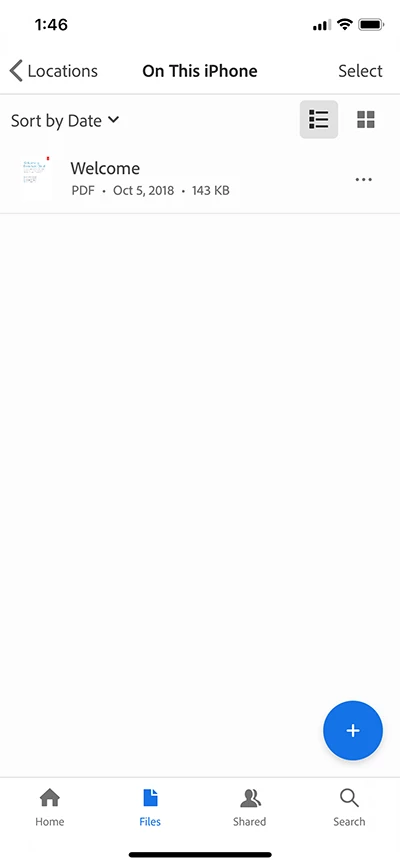
1. Tap on "Files" button at the bottom toolbar

2. Tap blue circle "+" button

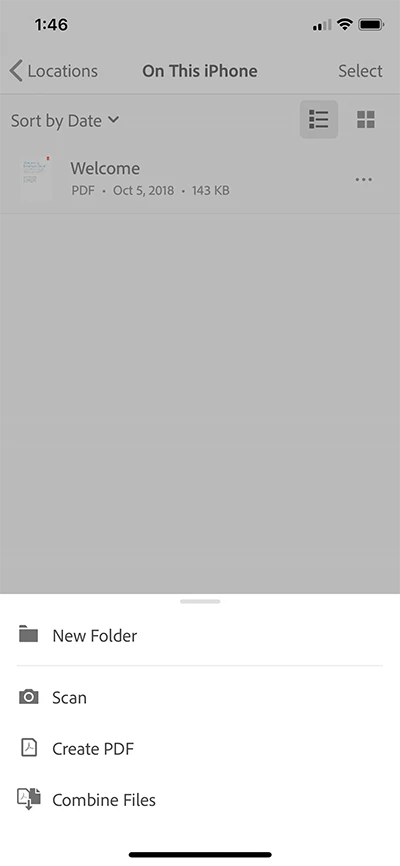
3. Context board menu should appear as below

4. Tap "New Folder" to create a folder.

Hope this help,

-derek

1 reply

derek lau @ adobe.comCorrect answer
Adobe Employee
October 14, 2018

hi Baxter123,

Would you please try following,

1. Tap on "Files" button at the bottom toolbar

2. Tap blue circle "+" button

3. Context board menu should appear as below

4. Tap "New Folder" to create a folder.

Hope this help,

-derek

Baxter123Author
Participant
October 14, 2018

Thank you, thank you!  I’m so happy, you have made my day.   Lyn

Adobe Employee
October 14, 2018

hi Baxter123,

I'm glad to hear that.

Cheers,

-derek