Participant
September 30, 2017
Answered

How do I delete files in my cloud folder?

  • September 30, 2017
  • 2 replies
  • 2971 views

How do I delete files in my cloud folder?

This topic has been closed for replies.
Correct answer derek lau @ adobe.com

hi Moosajie1,

After signed in to Document Cloud, please do the followings to delete files,

#1. Navigate inside your folder

#2. Tap "..." button (iPhone) or Checkmark button (iPad) at the upper right hand corner

#3. Tap "Select" in the popover menu (iPhone)

#4. Then select files by tapping radio button as below,
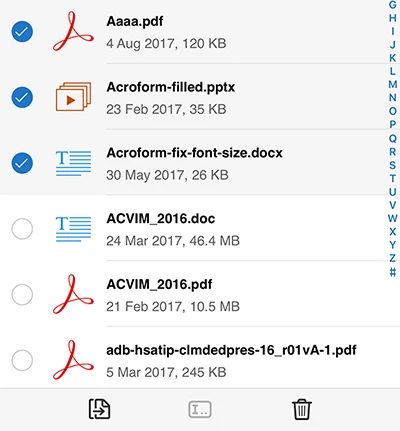
#5. Tap "Trash" button at the bottom toolbar, then tap "Delete" in popover menu to confirm to delete files

If you want to delete single file,

#1. Use Swipe-to-left gesture on the file you want to delete, and the slide-out menu should appear like below,
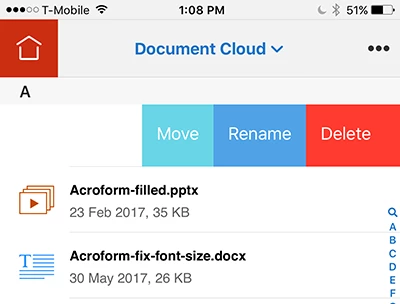
#2. Tap "Delete" on the slide-out menu, then "Delete item" dialog should appear like below,
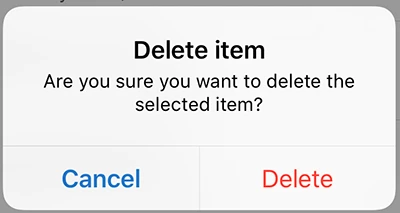
#3. Tap "Delete" in the "Delete item" dialog to confirm to delete the file

Hope this help,

2 replies

evanNow
Participating Frequently
November 14, 2021

I have a problem with the delete file routine. I've used the creative cloud file sync / backup for several years but never new that their were files accumulating in the Deleted folder. Now I have 505 gigabytes of files in Deleted, and I can only successfully delete a few at a time. There should be an easier way to do this. Adobe should give an option to permanently delete the full contents of the folder.

AkanchhaS8194121
Legend
November 25, 2021

Hi Evan,


How/where exactly you are accessing your Creative Cloud files, is it on web or through CC desktop app?

This ongoing discussion is about Acrobat Reader mobile app and files stored in Document Cloud storage. Which is different than the Creative Cloud file storage.

Please share accurate details, so that we can redirect your query to right community.


Thanks,

Akanchha 

Participant
March 19, 2022

I have the same issue. I have been trying to delete these for over a year. I just tried online chat to resolve but they told me to check the files in deleted folder and remove which of course is what I ahve been trying to do. I also have over 500gb. There a 10s of thousands of files. When I try to delete multiple files it just times out. I am at my wits end!! Trying to solve this forever!!!. Shoudl I close my account and start a new one. Seems to be the only solution. I am accessing throught the web as this is the only place to access the files in cloud storage. I no longer sync. I stopped this ages ago as it filled up and I couldn't delete. Please help me I am desperate!!


derek lau @ adobe.comCorrect answer
Adobe Employee
September 30, 2017

hi Moosajie1,

After signed in to Document Cloud, please do the followings to delete files,

#1. Navigate inside your folder

#2. Tap "..." button (iPhone) or Checkmark button (iPad) at the upper right hand corner

#3. Tap "Select" in the popover menu (iPhone)

#4. Then select files by tapping radio button as below,

#5. Tap "Trash" button at the bottom toolbar, then tap "Delete" in popover menu to confirm to delete files

If you want to delete single file,

#1. Use Swipe-to-left gesture on the file you want to delete, and the slide-out menu should appear like below,

#2. Tap "Delete" on the slide-out menu, then "Delete item" dialog should appear like below,

#3. Tap "Delete" in the "Delete item" dialog to confirm to delete the file

Hope this help,

Participant
October 1, 2017

Thank you.

Could not find the "Correct" box to tick.

Regards

Sydney

[personal information removed by moderator]

Adobe Employee
October 2, 2017

hi Sydney,

Could you please provide the screenshot to show your issue?

Thank you for your patience,