Dieses Thema wurde für Antworten geschlossen.
Beste Antwort von MobileDeveloperCK

Ideally, it would be great to add Google Drive as a storage account, much like we currently can for Box, Dropbox, OneDrive, and SharePoint Site.

FYI, there are other PDF read/annotate solutions that do this (some even offer collation features). I would prefer to use a solution from Adobe, whom I trust, but I can only do that if you actually have a decently workable solution.


Hi wsvoems​, jesse9goodman​,

Acrobat Reader for iPhone and iPad supports Google Drive via Apple's Document Picker now.

To add Google Drive as a storage option

  1. Install the Google Drive app on your iPhone/iPad.
  2. Launch the Google Drive app and sign in.
  3. Launch Acrobat Reader.
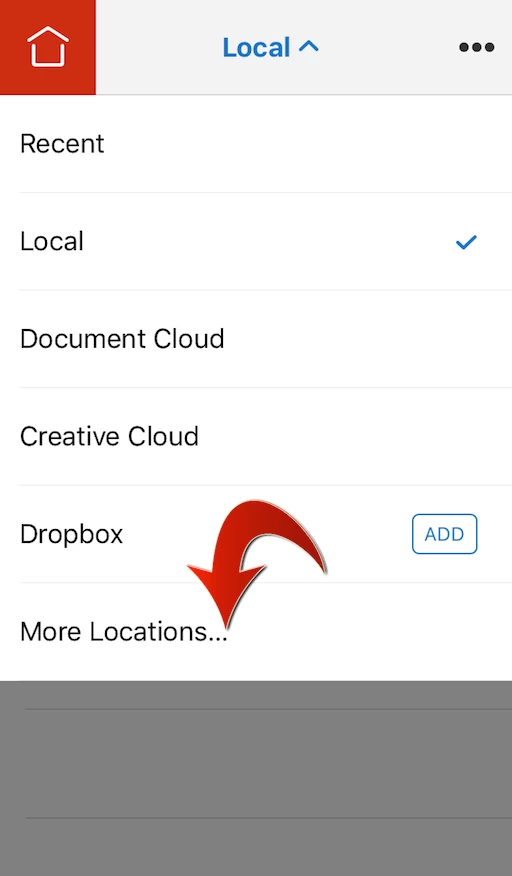
  4. Open the Location Chooser by tapping the blue text in the top bar.
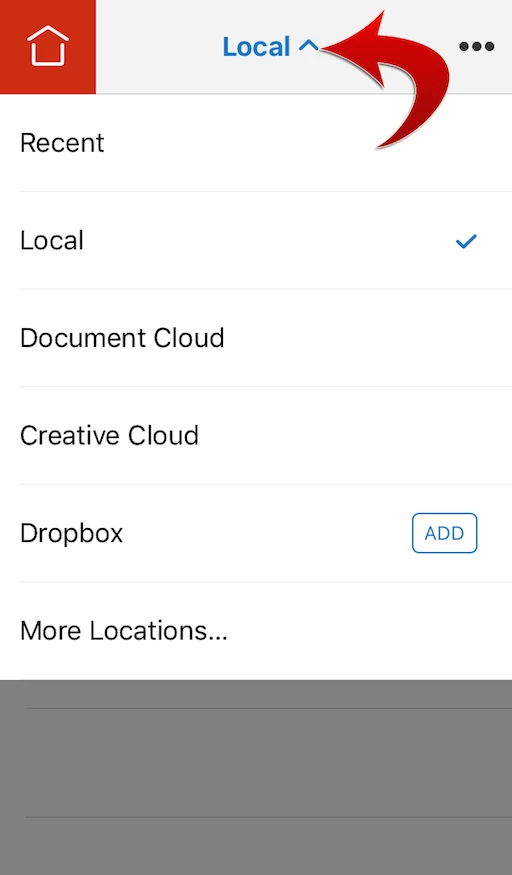
  5. Tap "More Locations..."
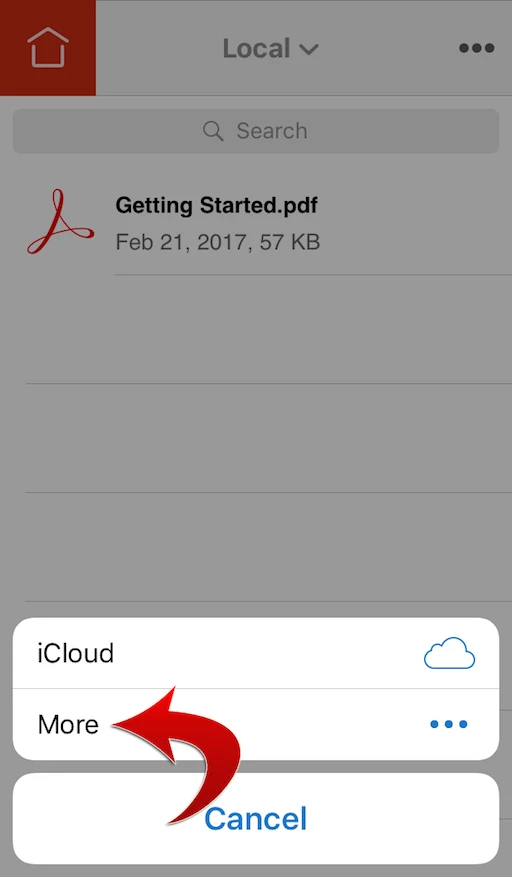
  6. Tap More.
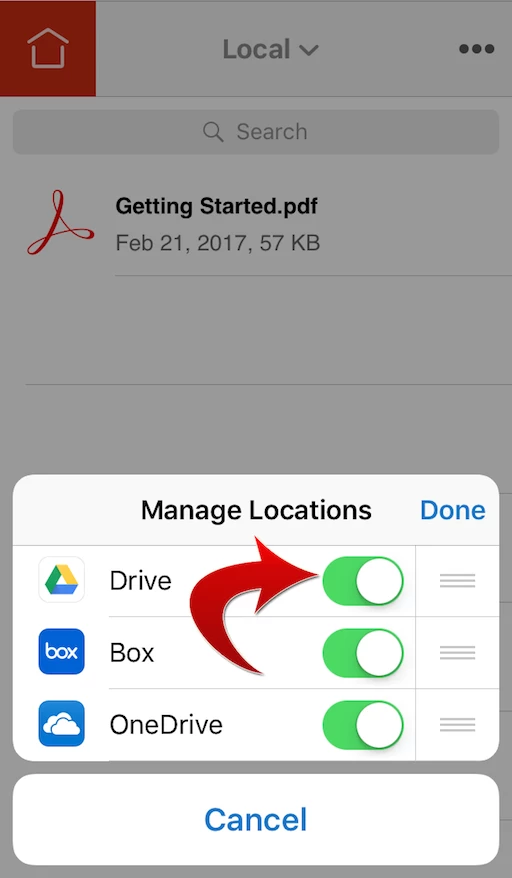
  7. Enable Google Drive.
  8. Tap Done.
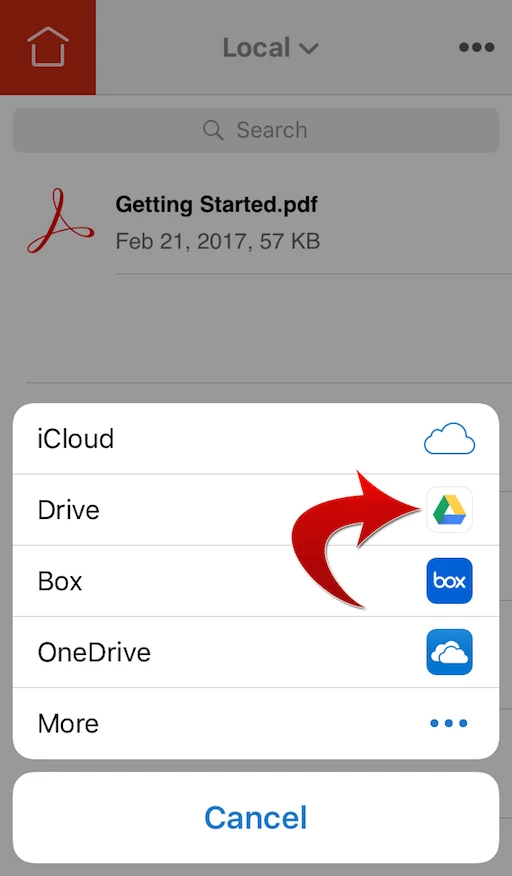
  9. Tap Google Drive.

Now you can open the documents stored on Google Drive in Acrobat Reader.

Hope this helps.

3 Antworten

Participant
December 5, 2018

It appears that Adobe has added the ability to connect your Google Drive account (in Oct 2018), however, it doesn't connect to our org's Team Drives. Adobe, please add Team Drive's access. Thanks.

leonvddool
Participant
June 7, 2017

When is it possible to open directly form Google Drive (same as Dropbox)?

Greatings    

Legend
March 18, 2016

Hi,

Google Drive for iPad/iPhone has the built-in PDF preview capability.  You can simply tap a PDF document to open and view it inside the Google Drive app.  However, please note that Google Drive's PDF preview does not fully support comments/annotations and forms fields.

To open a PDF document in Acrobat Reader for iOS (going from Google Drive to Acrobat Reader for iOS)

  1. In the Google Drive app on your iPad, tap a PDF document to open it in the previewer.
  2. Tap the Overflow menu icon in the upper-right corner.
  3. Select "Send a copy" from the menu.
  4. Tap "Open in".
  5. Tap "Copy to Adobe Acrobat".

Your PDF document will be opened in Acrobat Reader for iOS.


Does it work for you?  Please let us know if you have further questions.

Thank you.

nater8296569
Participant
February 2, 2017

This "send a copy" feature is not available on my windows PC running Google Chrome. Will Adobe build out a Google App, like DocHub has? My team uses Google Drive often and we currently have dual subscriptions with both DocHub and Adobe Acrobat Pro. Would prefer to just utilize Adobe in the capacity in which we use DocHub across my sales team so we do not need to have 2 paid PDF edit and esign platforms. Only reason we are holding onto Adobe at the moment is due to the API for contract signatures in our proprietary platform. Give us a google App before Doc Hub gives us an API please.

Mike Laursen
Participating Frequently
February 3, 2017

nater8296569 , when you say "build out a Google App", are you asking for a way to access your documents that are stored on Google Drive from Acrobat Reader for iPhone/iPad?