Participant
November 12, 2018
Answered

How to move a pdf to an existing folder (ipad)

  • November 12, 2018
  • 1 reply
  • 913 views

How can i move a pdf scan i made to an existing folder in acrobat

This topic has been closed for replies.
Correct answer derek lau @ adobe.com

hi rolandod57814904,

Would you please follow the steps below after go to the "Adobe Scan" folder,

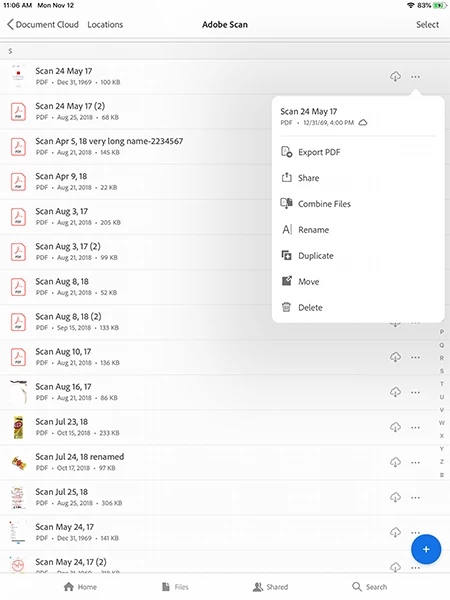
1. Tap "..." button on the right hand side of the file that you want to move

2. The "Context board" menu should appear as below,

3. In "Context board" menu, tap Move

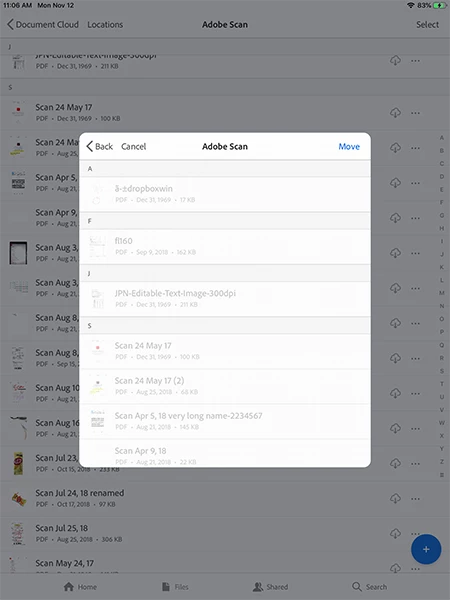
4. The "Move" dialog should appear as below,

4. Choose the desired folder to move

Hope this help,

-derek

1 reply

derek lau @ adobe.comCorrect answer
Adobe Employee
November 12, 2018

hi rolandod57814904,

Would you please follow the steps below after go to the "Adobe Scan" folder,

1. Tap "..." button on the right hand side of the file that you want to move

2. The "Context board" menu should appear as below,

3. In "Context board" menu, tap Move

4. The "Move" dialog should appear as below,

4. Choose the desired folder to move

Hope this help,

-derek