
November 6, 2017
Answered

ipad landscape view

  • November 6, 2017
  • 1 reply
  • 1739 views

I am having a problem recently about the ipad viewing in landscape mode.

I have two pages per slide showing up and I just want to view a single page per slide.

I'm sure I am just missing something simple, but overlooking it.

I am using ios 10.3.3.  (cant upgrade to ios 11) Also, using the latest version of adobe acrobat 17.10.32
This topic has been closed for replies.
Correct answer derek lau @ adobe.com

hi ericm99098147,

Please give it a try as followings,

1. Open a PDF

2. Choose "View" mode button (at the leftmost) at the bottom toolbar

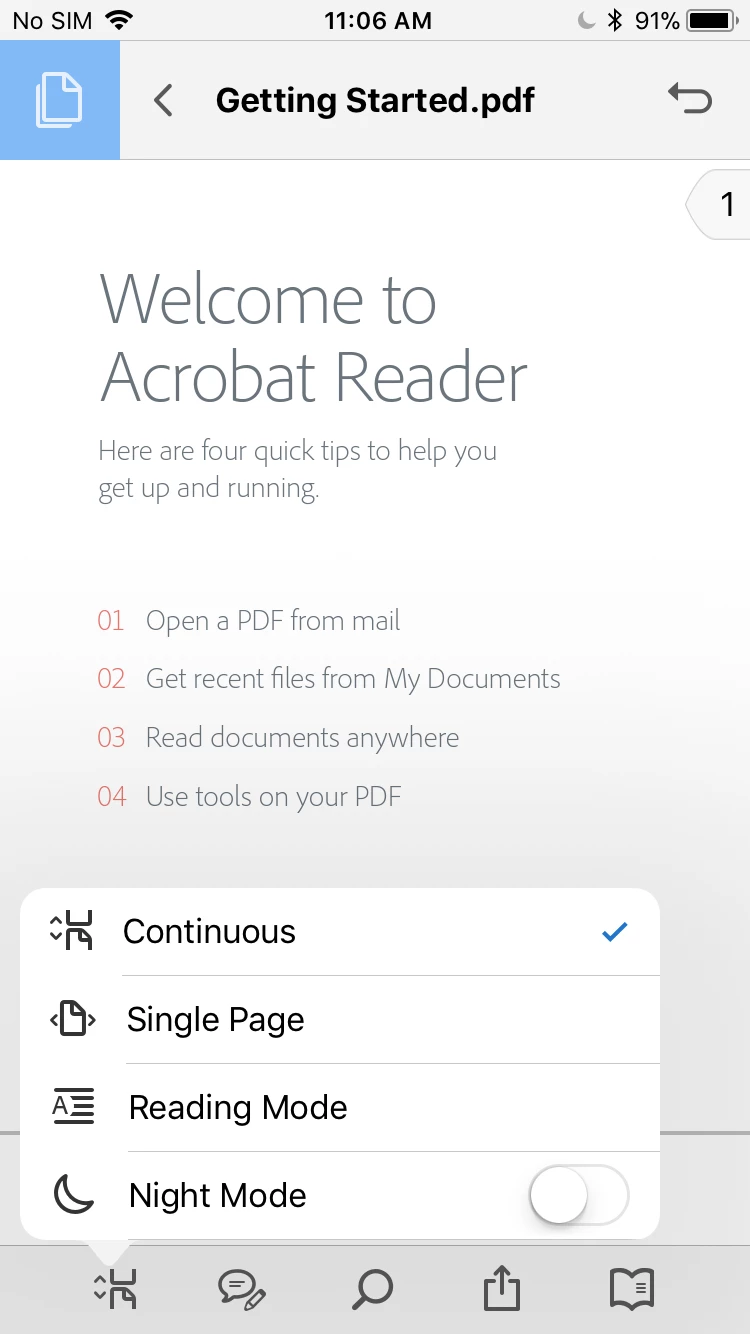
3. In the Popover menu, choose "Single Page" mode like below

Now, PDF should display one page at a time like below,

Hope this help

1 reply

derek lau @ adobe.comCorrect answer
Adobe Employee
November 7, 2017

hi ericm99098147,

Please give it a try as followings,

1. Open a PDF

2. Choose "View" mode button (at the leftmost) at the bottom toolbar

3. In the Popover menu, choose "Single Page" mode like below

Now, PDF should display one page at a time like below,

Hope this help

November 9, 2017

Hey Derek,

I tried your method, and it worked when I used it into adobe.

I looked into that and I opened up a PDF in one drive and its still doing this. So, I dug a bit deeper into this and looks like onedrive uses its own pdf reader and I think ill contact them. I was thinking it was using adobe as a default program.

Thanks for the time.