
Participant
October 20, 2021
Question

Issues printing password protected documents on iOS devices

  • October 20, 2021
  • 1 reply
  • 752 views

Ican open apassword protected pdf document. No issues with that!!
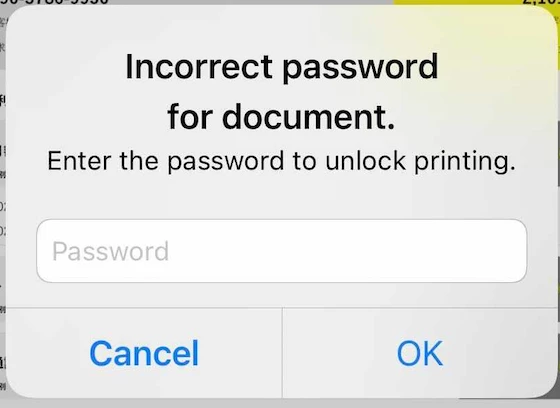
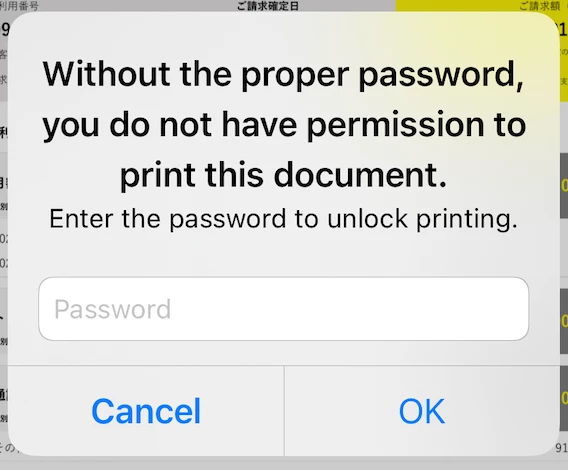
But I'm having issues printing password protected documents via iOS devices. It goes on a loop asking for password. Entering the correct password for the document doesnt work. Ive consulted the team that generated the pdf document. They have informed that the password has nothing to do with pritning, as such the the pdf document is not restricted ion any way.

Ive attached the screen shots. Any help will appreciated !!
This topic has been closed for replies.

1 reply

Harsh Vardhan Pareek
Community Manager
Community Manager
October 20, 2021

Hi @Pranav5CBE


Hope you are doing well.

As per the issue description that you are unable to print a password-protected PDF. It is because printing a password-protected PDF is not supported in Acrobat Reader mobile application.

For more details, you can refer to this help document: https://www.adobe.com/devnet-docs/acrobat/ios/en/workingwithpdf.html?#print-a-pdf


Let us know if that helps.


Thanks,

Harsh

Participant
October 20, 2021

Thank you for the prompt reply @Harsh Vardhan Pareek. I will go through the link shared by you in details. 

Ive tried printing it outside of the Acrobat Reader mobile application and have faced with the same issue. As such I downloaded password protected PDF and emailed it to myself. I was able to print it over laptop/desktop issues. But when I press on the print icon that shows up on menu when share icon is pressed on iOS devices (iPhone and iPad). I enter the "password loop". Is this a known issue and documented as well ??


Harsh Vardhan Pareek
Community Manager
Community Manager
October 21, 2021

Hi @Pranav5CBE 


As of now, the feature of print PDF from the Acrobat Reader mobile application has a limitation that it is not possible to print a password-protected PDF. Although it is possible on the Desktop version of Acrobat. If you are trying to print using some other application then we will not be able to comment on that. 

Kindly check the article above for the reference. 


Thanks,

Harsh