Hi,
The latest version (17.01.31 as of February 25, 2017) of Acrobat Reader for iPhone and iPad requires iOS 9.0 or later.
What is the iOS version on your iPhone 4?
According to the following wikipedia page, an iPhone 4 can run up to iOS 7.1.2.
List of iOS devices - Wikipedia
Unfortunately, you will not be able to install the latest version of Acrobat Reader due to the operating system requirement. However, you can still install the last compatible version of Acrobat Reader on your iPhone 4.
- Go to the App Store app on your iPhone.
- Find Acrobat Reader.
- Try downloading the latest version of Acrobat Reader.
Do you see the following dialog with two buttons (Download and Cancel)?
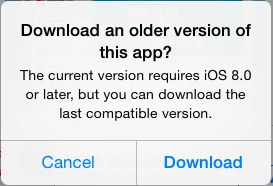
(Note: The dialog message should say 'iOS 9.0' instead of 'iOS 8.0'.)
Please tap the Download button to install the last compatible version of Acrobat Reader.
Or do you see the dialog with the OK button only (i.e. no Download button)? It means that you have never installed Acrobat Reader using the particular Apple ID before. Please let us know if that's the case. We can provide additional instructions.
Hope this helps.

 AdChoices