
Participant
June 27, 2024
Answered

Liquid mode modifies headings

  • June 27, 2024
  • 1 reply
  • 754 views

When opening this PDF in the Acrobat App and activating Liquid mode, it messes up the headings, making them unreadable. The first one, for instance, should be the Dutch word 'Introductie' but is modified to 'Introduc ientroducttie'.


These headings are simple H2 tags so I have no clue what I can do to prevent this from happening. I have also not found this problem anywhere online yet.


I sadly cannot attach the PDF itself because it contains sensitive, user specific data. Hopefully the screenshot below makes the issue clear enough.
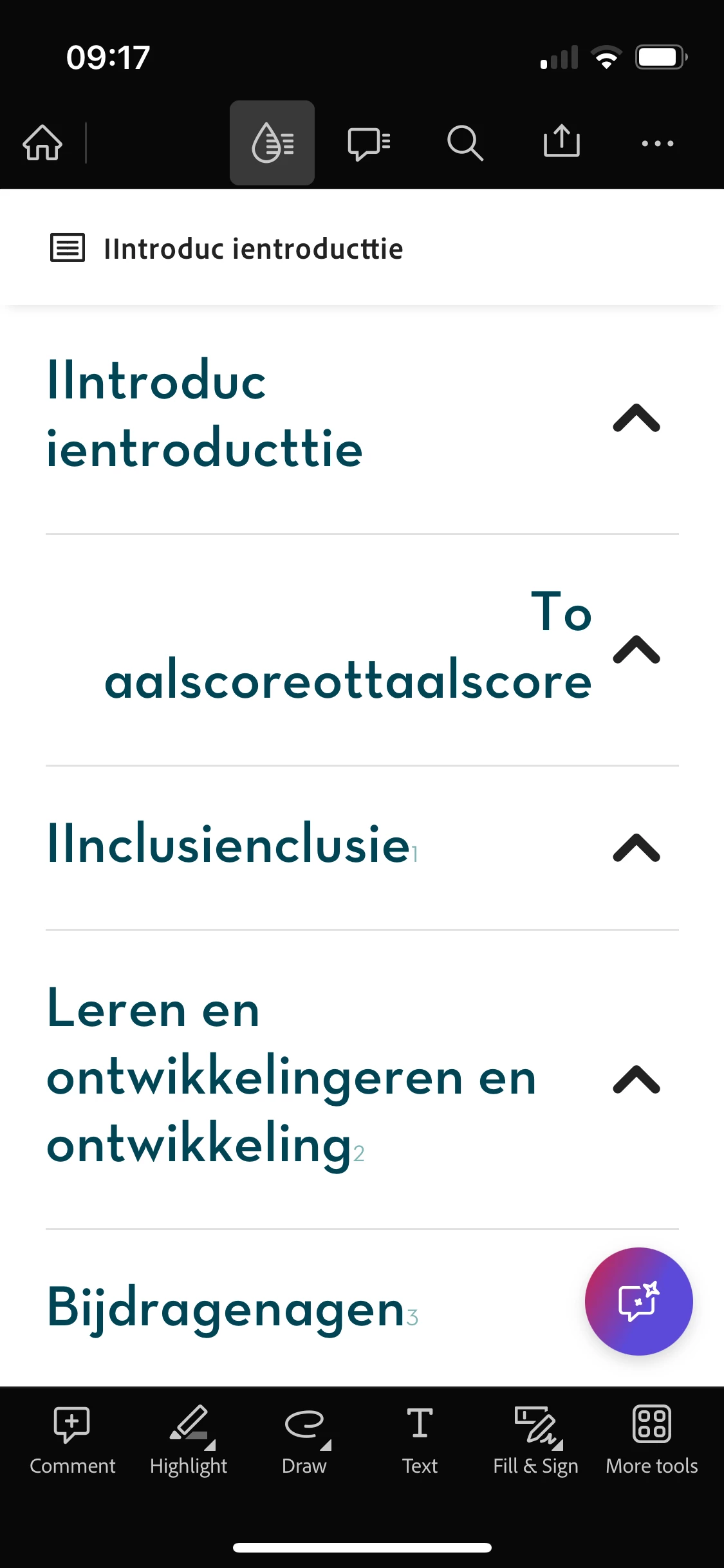


Hope someone can help!

This topic has been closed for replies.
Correct answer sprinklr-integration-user

Hi Souvik,

Hope you are well! I was just wondering whether there is any update about this issue.

Or anything I can relay back to our customer.


Thank!


Hi there


I hope you're doing well.


I wanted to update you that our engineering team is still reviewing the issue. We're actively working on a fix, and it will be included in a future update.


Thank you for your patience and understanding.


~Amal

1 reply

Karl Heinz  Kremer
Community Expert
Community Expert
June 27, 2024

Based on the screenshot, this is in the mobile app. I will move your question to a more appropriate forum. 

MathijsLAuthor
Participant
July 4, 2024

Ah yes it is indeed, thank you!

S_S
Community Manager
Community Manager
July 12, 2024

Hi @MathijsL,


Hope you are doing well. Sorry for your experience.


Do you see this with every Dutch file you try to view? 


As you mentioned this has sensitive data, would you mind sharing the file over with me on private messages? The file would be used solely for testing purpose and deleted once investigation is done.

[To send  private message, click on my profile name followed by the blue "Send message" button on the next page]


-Souvik