


Participant
October 5, 2018
Answered

Lost Files after current update

  • October 5, 2018
  • 1 reply
  • 632 views

I have a presentation this afternoon and have just discovered that all my local files are missing following the recent update. I have searched for a solution but nothing works. What can I do to get my files back?  This is very time sensitive.
This topic has been closed for replies.
Correct answer MobileDeveloperCK

Hi paulsmhk​,

If you simply update (not uninstall) Acrobat to a new version, your local files should remain intact on your iPad/iPhone.

The Home screen shows recently opened files only.

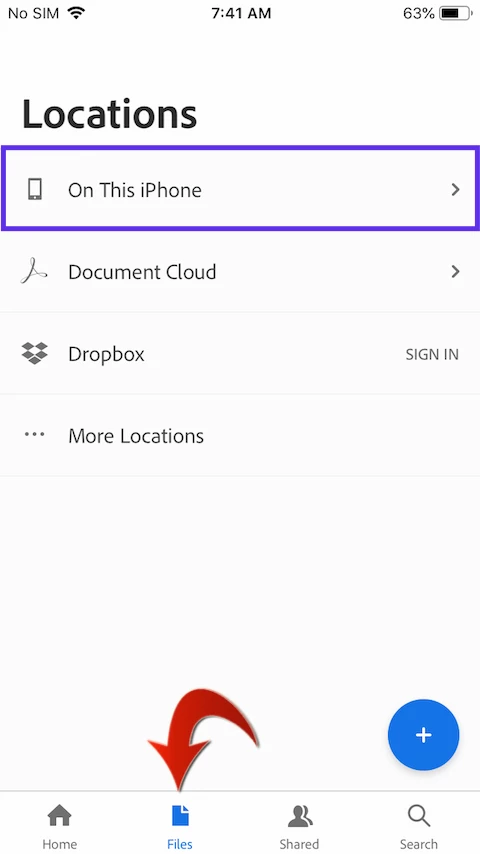
To see the files stored locally or in cloud storage

  1. Tap the < (Back) button, if a document is already open.
  2. Tap "Files" in the bottom bar.

Do you see "On This iPhone" / "On This iPad"?  That's where all of your local files appear.

Please let us know if you are able to locate your files.

Thank you.

1 reply

MobileDeveloperCKCommunity ManagerCorrect answer
Community Manager
October 5, 2018

Hi paulsmhk​,

If you simply update (not uninstall) Acrobat to a new version, your local files should remain intact on your iPad/iPhone.

The Home screen shows recently opened files only.

To see the files stored locally or in cloud storage

  1. Tap the < (Back) button, if a document is already open.
  2. Tap "Files" in the bottom bar.

Do you see "On This iPhone" / "On This iPad"?  That's where all of your local files appear.

Please let us know if you are able to locate your files.

Thank you.